7 DaVinci Resolve Color Grading Tools and Techniques That Enhance Your Workflow
Summary:
This video presents seven powerful tools and techniques within DaVinci Resolve to significantly improve your color grading process:
- Color Warper: Enables precise selective color adjustments using an intuitive 3D color matrix and eyedropper tool.
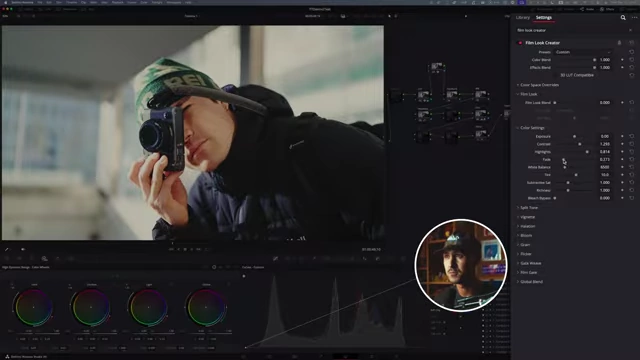
- Film Look Creator: A comprehensive tool for building filmic grades from scratch, offering control over contrast, highlight fall-off, faded blacks, richness, and halation.
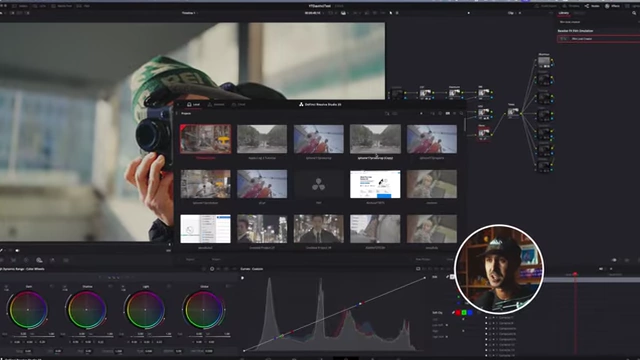
- Dynamic Switching: Allows seamless switching between and copying of color grades from different projects without complex importing/exporting.
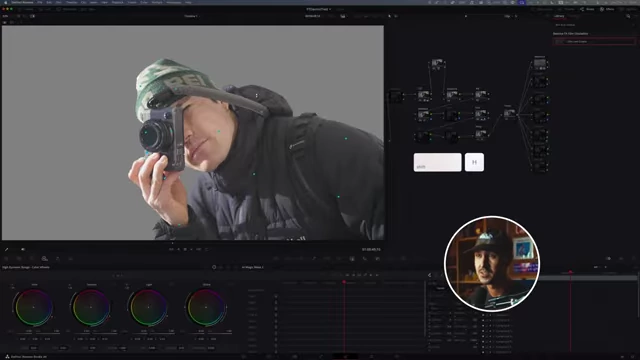
- AI Magic Mask: Utilizes enhanced AI to accurately select and track subjects or backgrounds for isolated adjustments.
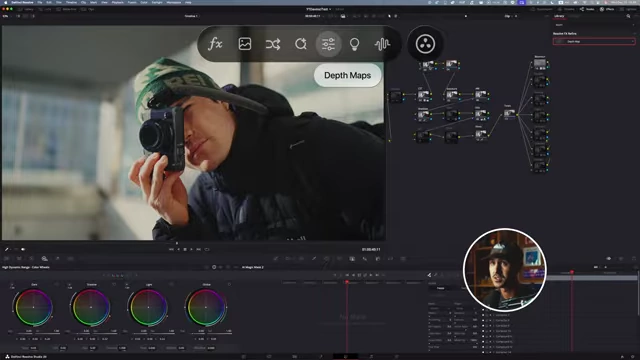
- Depth Masks: Creates masks based on depth, enabling gradual and selective effects like radial blur or exposure changes on foreground/background elements.
- Cinematic Haze: Adds realistic artificial haze and light rays that intelligently interact with light sources in your scene.
- Filmic Curves: A technique using custom curves to lift shadows for a non-crushed black look and gently roll off highlights, mimicking film's dynamic range.

The Color Warper's 3D color matrix highlighting the selected skin tone. [ 00:00:40 ]
1. Color Warper [00:00:09]

- Functionality and Interface
- The Color Warper is a new tool in DaVinci Resolve 17 and above, represented by a 3D color matrix.
- It allows for intuitive, selective adjustment of colors by clicking and dragging directly on the image with an eyedropper.
- As you hover over colors, the corresponding point on the 3D matrix highlights, showing which colors will be affected.
The Color Warper's 3D color matrix highlighting the selected skin tone. [ 00:00:40 ]
- Practical Applications
- Skin Tones Correction: Easily make skin tones more orange, magenta, blue, or green.
- Object-Specific Color Adjustment: Selectively change the hue of specific elements, such as a green beanie, to blue, yellow, or orange.
- Shadow/Highlight Correction: Quickly remove unwanted color casts (e.g., blue or magenta) from shadows by selecting the area and dragging the color point towards the center to desaturate or changing its hue.
- Benefits
- Simplifies selective color adjustments compared to traditional color slice tools.
- Provides a quick and intuitive way to fine-tune colors.
2. Film Look Creator [00:02:47]
- Initial Setup
- Drag the Film Look Creator effect onto a new serial node.
- Start by selecting "Clean Slate" to build your filmic look from scratch, overriding the default "ugly" grade.
- Creating a Filmic Contrast
- The tool offers a "Contrast" slider that adds pleasing contrast without crushing blacks or blowing out highlights.
- Highlight Recovery: After adding contrast, use the "Highlights" control to gently bring back blown-out highlights, creating a natural fall-off.
- Faded Blacks: Introduce a subtle "Fade" in the blacks to achieve a pleasing, non-digital fall-off, avoiding overly harsh black areas.
- Color and Tonal Adjustments
- Richness (HSV): Use the "Richness" slider to bring back some saturation/vibrancy, often desired after film emulation.
- Bleach Bypass/Subtractive Saturation: Experiment with "Bleach Bypass" for creative looks or use "Subtractive Saturation" (inverse of density) to subtly reduce overall saturation.
- Split Toning
- Add a "Mid Hue Angle" and a slight amount of "Split Toning" to introduce warmth in highlights and coolness in shadows, enhancing the filmic aesthetic.

Film Look Creator interface showing split toning and halation options. [ 00:05:03 ]
- Add a "Mid Hue Angle" and a slight amount of "Split Toning" to introduce warmth in highlights and coolness in shadows, enhancing the filmic aesthetic.
- Advanced Film Emulation Effects
- Halation: Instead of using "Bloom," apply "Halation" and then subtract all its saturation. This creates a bloom effect that primarily affects the contrasty edges and highlights of the image, adding glow without overall softening.
- Film Grain: Utilize the built-in "35mm Grain" which is highly pleasing and adds an authentic film texture without needing external plugins.
3. Dynamic Switching [00:06:12]
- Problem Solved
- Traditionally, copying grades between different DaVinci Resolve projects involved cumbersome exporting and re-importing of PowerGrades or LUTs.
- Solution: Dynamic Project Switching
- In the project manager, right-click on a project and ensure "Dynamic Project Switching" is toggled on.
- Double-click a project to open it; a dropdown arrow will appear next to the project title.
- This allows you to quickly switch between multiple open projects.
- Workflow Improvement
- Enables direct copy (Command C) and paste (Command V) of nodes or entire grades between different projects, streamlining workflow and grade transfer.
4. AI Magic Mask [00:07:14]
- Evolution
- The updated AI Magic Mask (version 2) in DaVinci Resolve 17+ is more intuitive and effective than previous iterations.
- Simplified Masking
- Instead of drawing complex squiggly lines, simply place a few dots on your subject.
- Press
Shift+Hto visualize the mask, adding more dots for accuracy. - Use the track forward/backward buttons to track the mask across the entire clip.
- Selective Adjustments
- Subject Isolation: Once tracked, the mask allows you to apply color grading adjustments (e.g., exposure, white balance) exclusively to the subject.
- Background Manipulation: Invert the mask to affect only the background, creating separation or depth without touching the foreground subject.
- Feathering: Adjust the mask's radius for softer transitions, avoiding harsh edges.
5. Depth Masks [00:09:30]
- Concept
- Depth Masks create masks based on the depth information within your image, providing a gradual selection from foreground to background.
- Implementation
- Add a "Depth Map" effect to a node.
- Map its alpha output to a subsequent node where you'll make adjustments.
- View the "Depth Map Preview" (
Shift+H) to adjust the "Near Limit," "Far Limit," and "Gamma" to refine the mask's spread.
- Creative Uses
- Radial Blur: Apply a radial blur to the background by inverting the depth mask, creating a cinematic, depth-based blur that gradually fades.
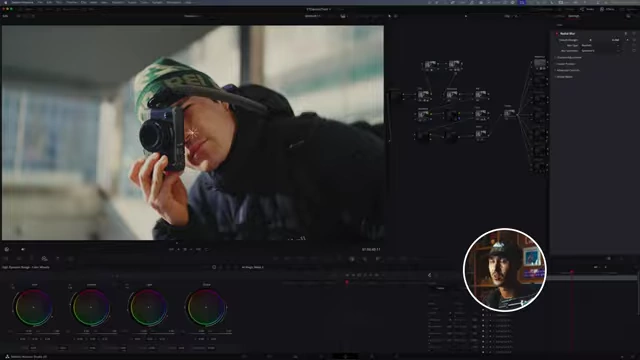
Radial blur applied to the background using a depth mask for gradual effect. [ 00:10:44 ] - Exposure Control: Decrease the background exposure using the depth mask to make the foreground subject pop, with a natural, smooth transition.
- Radial Blur: Apply a radial blur to the background by inverting the depth mask, creating a cinematic, depth-based blur that gradually fades.
- Advantages over Magic Mask
- Offers a more gradual and natural transition between masked and unmasked areas, making it suitable for subtle depth enhancements where a harsh mask might not be ideal.
6. Cinematic Haze [00:11:05]

- Purpose
- Adds a cinematic atmosphere to images, especially useful for shots with harsh light sources.
- AI-Powered Haze
- The "Cinematic Haze" effect uses AI to intelligently determine where haze and sun rays would naturally emanate from within the scene.
- Customization
- Haze Adjustment: Adjust "Far Limit" and "Near Limit" to control the spread and intensity of the haze, ensuring it only affects desired areas. Use subtly for best results.
- Light Rays: Enable and adjust "Light Rays" to simulate volumetric light.

Cinematic Haze effect with AI-generated light rays emanating from a light source. [ 00:12:23 ] - Angle: Align the light ray angle with the actual light source in the scene (e.g., a window or the sun).
- Softness & Brightness: Control the softness, brightness, and saturation of the rays to integrate them seamlessly.
- Optimal Usage
- Best applied subtly and in moderation.
- Particularly effective when there's a clear, strong light source in the scene (e.g., light coming through a window) for a more believable effect.
7. Filmic Curves [00:13:09]
- Mimicking Film's Dynamic Range
- This technique uses custom curves to achieve a "filmic" look, particularly in how shadows and highlights are handled.
- Lifted Shadows (Non-Crushed Blacks)
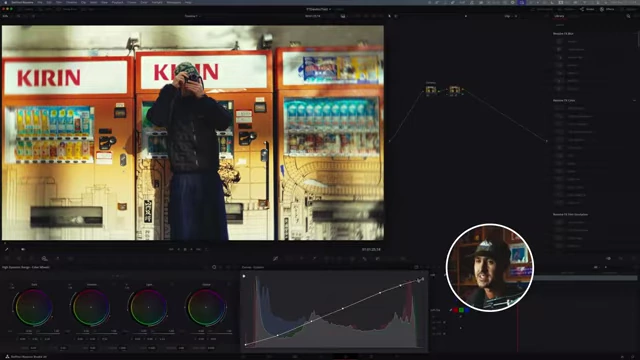
- In the custom curves, take the bottom-left point (representing blacks) and gently lift it up.
- This prevents shadows from being completely crushed to digital black, giving them a slightly desaturated, lifted appearance characteristic of film.
- Fine-tune by adding an additional point near the bottom to maintain some contrast while still lifting the darkest blacks.
- Rolled-Off Highlights
- Take the top-right point of the curve (representing highlights) and gently bring it down a little.
- This helps to preserve detail in bright areas and prevents highlights from being blown out, mimicking the softer highlight roll-off of film.

Custom curves showing both lifted shadows and rolled-off highlights to mimic filmic dynamic range. [ 00:14:21 ]
- Combined Effect
- The combination of lifted shadows and rolled-off highlights enhances the image's dynamic range and adds a subtle filmic quality, especially when paired with film grain.