Objective Color Grading: Understanding HSL Values and Using a Color Meter Tool
Summary:
This video explains why traditional color scopes are outdated for precise color grading and introduces a better, objective method using HSL (Hue, Saturation, Luminance) values and a dedicated color meter tool.
Key points include:
- Traditional 2D scopes provide a subjective view of the 3D color space, which can be misleading due to human vision's automatic white balance and exposure adjustments. ![0:53]
- HSL is a more intuitive color model than RGB for understanding and manipulating color, where Hue is an angle, Saturation is intensity, and Luminance is brightness. ![6:43]
- The presenter illustrates how to objectively match skin tones and overall scene moods between different clips by targeting specific HSL values using the external color meter tool. [![12:00] Image 23: 18:50]
- The video introduces "Chroma" as a hidden fourth term, representing the distance from the neutral axis, which is crucial for cinematic grades. [
]
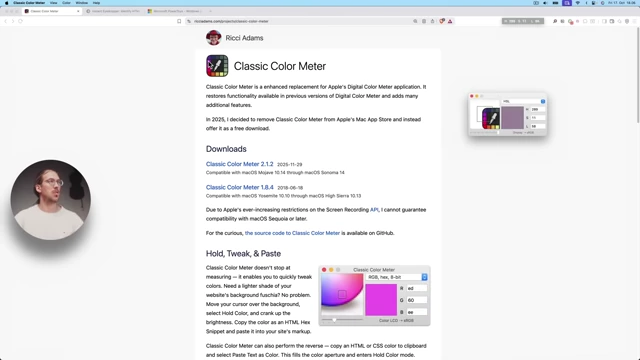
19:50 [ 00:21:49 ] - The primary tool recommended is "Ricci Adams' Classic Color Meter" for macOS, allowing users to sample colors and view their HSL, RGB, or Hex values. [
33]
24: [ 00:25:43 ] - Windows alternatives suggested are "Instant Eyedropper" and "Microsoft PowerToys Color Picker". ![26:14]


Introduction [0:00]
- Traditional color scopes are now largely considered obsolete.
- A superior tool exists for monitoring and comprehending colors in various color grading software.
- This improved understanding leads to:
- Superior color grades.
- More accurate skin tones that are easier to correct.
- Simplified and objective clip matching.
- A deeper theoretical understanding of color that many beginner and intermediate colorists lack.
Why Scopes are Outdated [0:44]
- Color grading software operates as 3D modeling environments.
- All color modifications in software are essentially warping this 3D color space.
- Different scopes (e.g., vectorscopes) offer various 2D projections of this 3D color space.
- The main flaw with traditional scopes is human vision's subjectivity.
- Human vision automatically adjusts for exposure and white balance, making it difficult to objectively perceive color shifts.
- An example is shown where a video slowly shifts to a cooler tone, which is hard for the viewer to consciously detect.
- Even scopes fail to clearly illustrate this subtle shift in a universally understandable way for all viewers.
What is HSL [6:14]
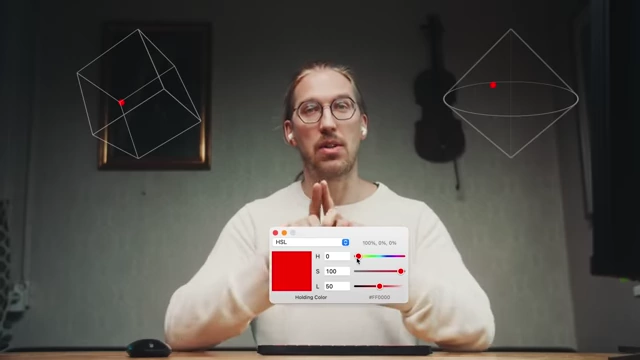
- The HSL (Hue, Saturation, Luminance) color model offers a more intuitive way to understand and manipulate colors compared to RGB. [
43]
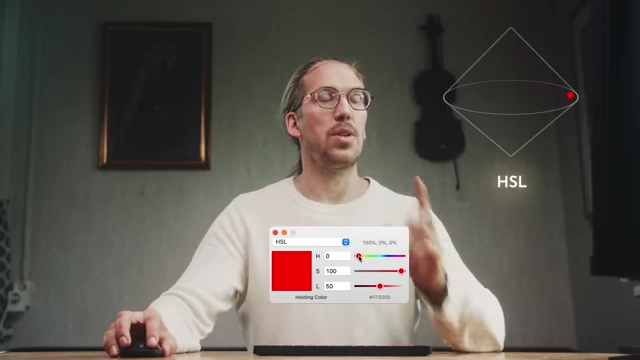
6: [ 00:07:14 ] - HSL is often represented as a bicone or double-cone shape in 3D space.
- The three main values in HSL are:
- Hue (H) [7:08]: An angle value from 0 to 360 degrees, representing the type of color (e.g., red, green, blue).
- 0° is red.
- 60° is yellow.
- 120° is green.
- 180° is cyan.
- 240° is blue.
- 300° is magenta.
- Rotating this value changes the color around the outer edge of the color circle.
- Saturation (S) [7:31]: Defines the intensity or purity of the color, ranging from 0% (grayscale) to 100% (full color).
- Moving this value moves the color closer to or further from the center of the color circle.
- Luminance (L) [7:39]: Defines the brightness or darkness of the color, ranging from 0% (black) to 100% (white).
- Moving this value moves the color up or down the central axis of the bicone.
- Hue (H) [7:08]: An angle value from 0 to 360 degrees, representing the type of color (e.g., red, green, blue).
- The "neutral axis" [7:48] of the HSL color space runs vertically through the center, where colors are desaturated (grayscale).
- Chroma [8:01]: An often "hidden" fourth term, Chroma represents the true distance from the neutral axis.
- Chromaticity (Chroma) can be highest when Luminance is 50%, providing the most space to move away from the neutral axis.
- Chroma is vital for achieving cinematic color grades where images might be highly saturated, even if their HSL saturation values don't appear exceptionally high due to their position in the color space.
In Resolve [8:15]
- DaVinci Resolve utilizes the HSL model in several tools:
- HSL Qualifier [8:19]: Allows selection and adjustment based on Hue, Saturation, and Luminance ranges.
- Hue vs. Hue / Sat / Lum Curves [8:27]: Provides precise control over how hues relate to other hues, saturation, or luminance.
- Color Warper Tool [8:38]: Features an HSL color model for complex color manipulations. ![8:38]
- Practical application: Matching skin tones [10:01]
- The presenter demonstrates using the external color meter tool to sample skin tones from a reference image.
- He notes the HSL values (e.g., Hue 19, Saturation 35, Luminance 63). ![11:47]
- He then samples the skin tone from the image to be graded, noting its HSL values (e.g., Hue 27, Saturation 33, Luminance 72).
- By adjusting global white balance and tint sliders within Resolve, he brings the image's skin tone HSL values closer to the reference. [
0]
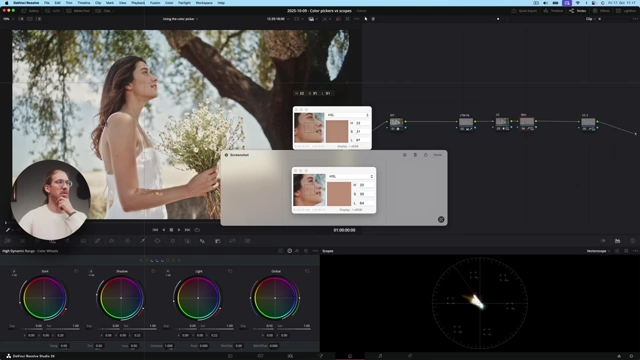
12:0 [ 00:12:32 ] - While the numbers provide objective guidance, the final visual perception remains the ultimate authority.
- Practical application: Matching overall mood/sky [14:38]
- The presenter attempts to match the sky's appearance and overall mood between two clips with very different lighting conditions. ![14:38]
- He first adjusts the exposure of the second clip to visually match the overall brightness of the first. ![15:15]
- He then uses the external tool to sample the sky's HSL values from both clips to identify differences in hue and saturation. ![17:20]
- By isolating the sky and using Resolve's color wheels, he adjusts the hue and temperature of the sky to match the reference's cooler, more cyan tones. ![16:03]
- The result shows a matched mood and sky appearance between the two clips. ![18:50]


Advanced Tricks [19:11]
- Understanding Hue values mentally:
- Knowing the primary and secondary color positions on the 360-degree hue wheel is crucial for quickly estimating and adjusting colors without constant visual reference.
- Red is 0/360, Yellow is 60, Green is 120, Cyan is 180, Blue is 240, Magenta is 300.
- This allows for mental triangulation of colors. For example, a Hue of 18 would be between red and yellow, closer to red (warm red).
- Importance of Chroma: [19:50]
- Chroma indicates the distance from the neutral axis (grayscale) in the color space. ![19:50]
- Colors with high Chroma appear more vibrant.
- Chroma is highest when Luminance is around 50%. Colors at 0% or 100% Luminance (pure black or white) have no Chroma, regardless of their saturation value.
- This understanding is vital for creating cinematic looks where colors might be highly vibrant despite having seemingly "low" HSL saturation values when their Luminance is not exactly 50%.

The TOOL [24:33]
- The "secret" tool used for objective color measurement is Ricci Adams' Classic Color Meter. ![24:33]
- Available for macOS users.
- Features include:
- Choice of color models: HSL, RGB, Hex, CMYK.
- Adjustable sampling area: From a single pixel to larger averages, reducing noise.
- "Hold Color" function: Captures and displays HSL values for comparison.
- Copy functions: Allows easy transfer of color values (e.g., Hex code) for web design or other applications.
- "Mini Window" option: Keeps the color meter discreetly on top of other applications.
- Windows Alternatives:
- Instant Eyedropper: A free tool that allows single-pixel color selection. It is less accurate due to 1-pixel sampling, which can pick up more noise.
- Microsoft PowerToys - Color Picker: Part of a utility suite, offering similar functionality to the Mac tool, including individual pixel sampling. ![26:14]
