Professional Colorist's Approach to Reading Scopes in DaVinci Resolve
This video provides a professional colorist's guide on effectively reading and utilizing color scopes within DaVinci Resolve, demonstrating what each scope is best for and its limitations.
- Waveform: Best for assessing contrast, overall exposure, and identifying specific image areas due to its visual representation of the image's luminance. It is not effective for judging color saturation.
- Parade Scope: Excellent for checking individual red, green, and blue channel levels, crucial for achieving accurate white balance and detailed contrast adjustments across channels.
- Histogram: Displays the pixel distribution for each RGB channel, ideal for quickly identifying crushed blacks or clipped whites and understanding the overall tonal spread. It does not show specific image content.
- Vectorscope: The definitive tool for measuring color saturation and hue. It is indispensable for checking skin tones and understanding color relationships for creating specific looks, such as teal-orange.
- Image Analysis: The video demonstrates applying these scopes in conjunction to diagnose and correct issues like poor contrast, strong color casts, and managing exposure in challenging scenarios like night shots, emphasizing that scopes are technical guides, but creative judgment always takes precedence.
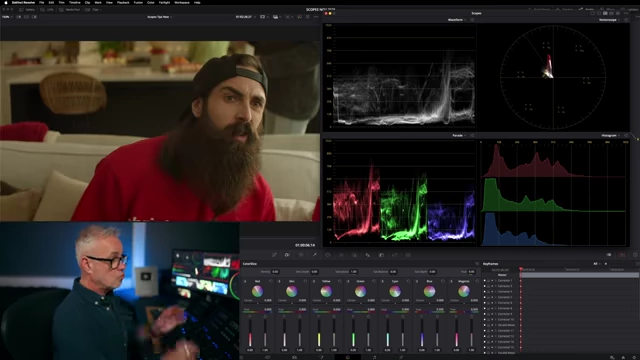
A four-up display of all four color scopes (Waveform, Vectorscope, Parade, Histogram) in DaVinci Resolve, used for comprehensive image analysis. [ 00:09:29 ]
Understanding Professional Scope Usage [00:00]
The video begins by stating its purpose: to delve into how a professional colorist truly reads and interprets scopes in DaVinci Resolve, going beyond basic definitions to explain their practical application and what information each scope provides, and what it cannot.
How to Use the Waveform in Resolve [01:03]
The Waveform scope reads luminance from left to right, directly reflecting the image's brightness distribution.
- Strengths:
- It is excellent for assessing overall contrast and exposure.
- It shows a direct visual trace of the image, allowing colorists to identify specific areas that might need adjustments, such as bright or dark spots.
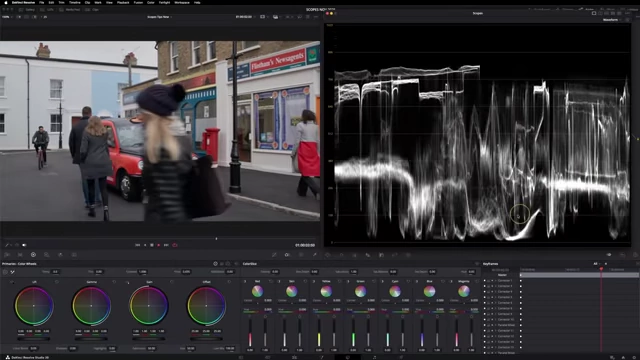
The Waveform scope showing the visual trace of characters moving through a shot, illustrating its ability to reflect image content from left to right. [ 00:01:30 ] - It helps in checking black levels (ensuring they are not crushed below zero) and white levels (avoiding clipping highlights).
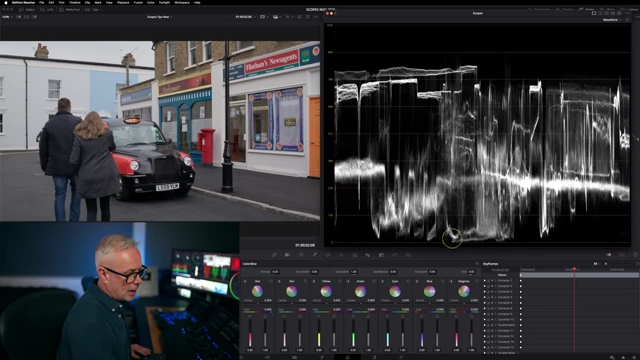
The Waveform scope indicating good black levels, ensuring no detail is crushed below zero. [ 00:01:58 ] 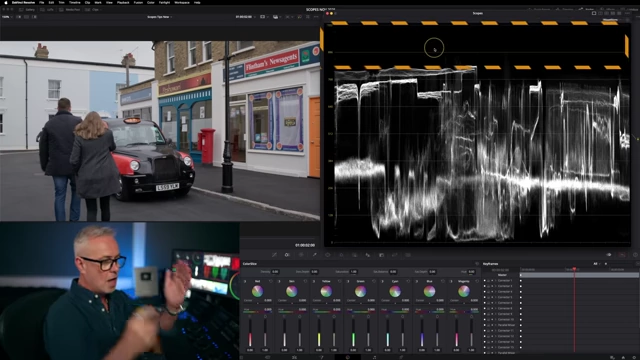
The Waveform scope showing ample headroom for highlights, avoiding clipping at the top. [ 00:02:14 ]
- Limitations:
- The Waveform is not effective for measuring color saturation or identifying color casts accurately. Even with "colorize" enabled, it doesn't clearly indicate excessive or illegal colors.
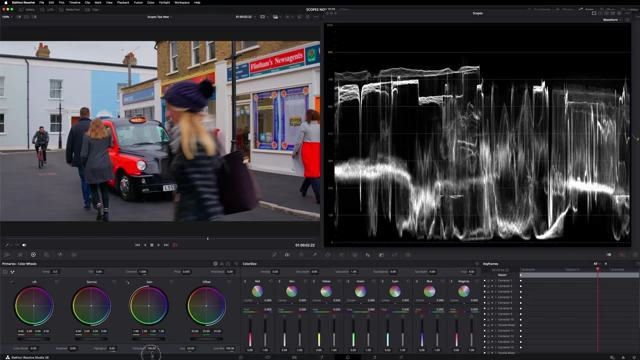
The Waveform scope demonstrating its limitation in accurately showing excessive color saturation, as the image appears balanced despite extreme saturation. [ 00:02:44 ]
- The Waveform is not effective for measuring color saturation or identifying color casts accurately. Even with "colorize" enabled, it doesn't clearly indicate excessive or illegal colors.
How to Use the Parade Scope in Resolve [03:05]
The Parade scope separates the red, green, and blue channels into individual waveforms.
- Strengths:
- It's useful for checking contrast within each color channel and across the entire image.
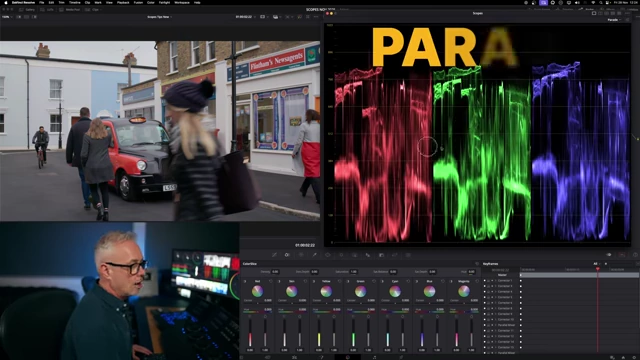
The Parade scope displaying separate red, green, and blue waveforms, useful for identifying specific image areas and color balance. [ 00:03:10 ] - Crucially, it aids in achieving accurate white balance by allowing the colorist to align the white levels of the red, green, and blue channels.
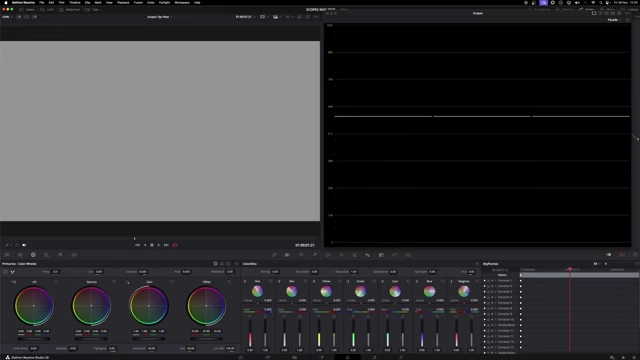
The Parade scope showing a flat line when contrast is removed, indicating zero contrast in the image. [ 00:03:42 ] 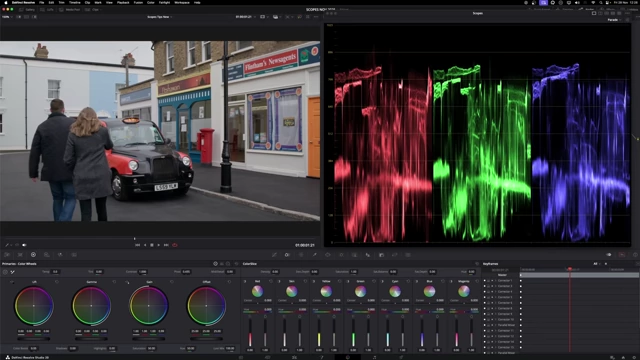
The Parade scope after adjusting the blue channel to achieve a more balanced white point, correcting a slight cold cast. [ 00:04:32 ] - It offers a more specific view of color information than the standard Waveform.
- It's useful for checking contrast within each color channel and across the entire image.
- Limitations:
- While better than the Waveform for color, it is still not the optimal tool for precise saturation measurement.
- Measuring overall exposure and brightness is less intuitive than with the Waveform.
How to Use the Histogram in Resolve [04:57]
The Histogram displays the pixel distribution across the tonal range for each red, green, and blue channel.
- Strengths:
- It provides a clear visual representation of the image's contrast and tonal spread.

The Histogram scope displaying the distribution of red, green, and blue pixels across the tonal range, showing overall contrast and tonal spread without specific image content. [ 00:05:00 ] - It is excellent for identifying if blacks are being crushed (pixels piling up at the left edge) or whites are being clipped (pixels at the right edge).
- It allows for quick adjustments to lift and gain to recover detail in shadows or highlights.
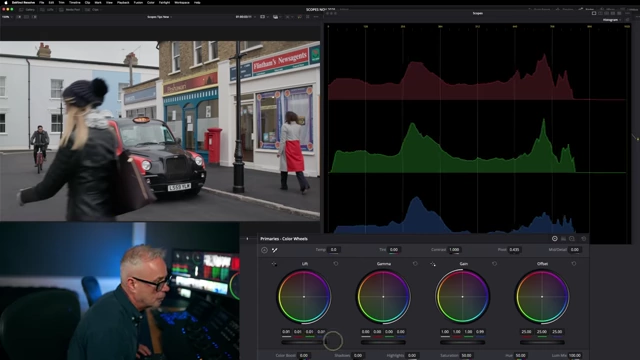
The Histogram showing pixels moving away from the black crushing point after 'lift' adjustment, recovering shadow detail. [ 00:05:53 ]
- It provides a clear visual representation of the image's contrast and tonal spread.
- Limitations:
- Unlike the Waveform or Parade, the Histogram does not show any visual trace of the image, making it impossible to identify specific objects or areas.
- It is not suitable for measuring saturation or making precise color balance adjustments.
How to Read a Vectorscope in Resolve [06:20]
The Vectorscope is a circular display used to analyze color saturation and hue.
- Strengths:
- It's the primary tool for precisely measuring color saturation; a higher trace indicates more saturation.
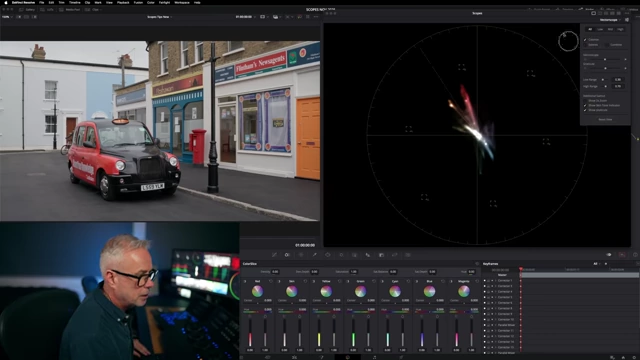
The Vectorscope with the skin tone indicator line enabled, allowing precise measurement and correction of skin tones. [ 00:06:30 ] 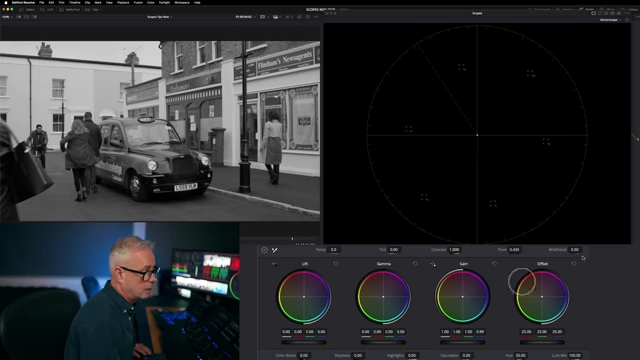
The Vectorscope showing only a central dot when saturation is completely removed from the image, indicating no color information. [ 00:07:47 ] - It includes a skin tone line, making it invaluable for checking and correcting the hue of skin tones to ensure they appear natural.
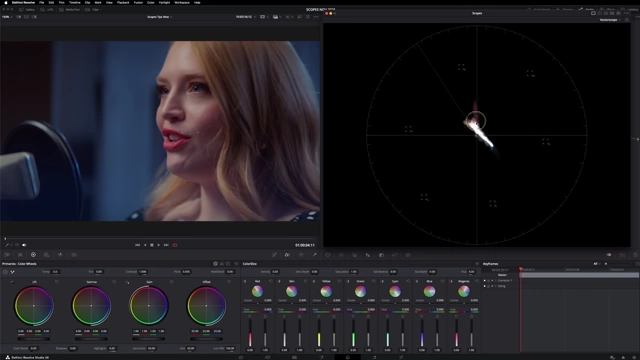
The Vectorscope illustrating how skin tones align with the designated skin tone line, ensuring natural-looking complexions. [ 00:08:04 ] - It's instrumental in achieving specific color looks, such as the "teal-orange" aesthetic, by showing complementary color relationships.
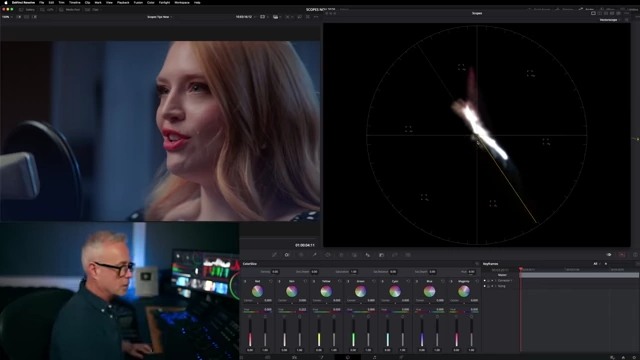
The Vectorscope showing the adjustment of blue/cyan hues to complement skin tones, achieving a teal-orange color contrast. [ 00:08:57 ]
- It's the primary tool for precisely measuring color saturation; a higher trace indicates more saturation.
- Limitations:
- It does not provide information about contrast, exposure, or luminance levels.
- It cannot show a discernible trace of the actual image content.
Analyzing Images Using the Scopes in Resolve [09:20]
The video demonstrates analyzing three different shots using a four-up display of all scopes (Waveform, Parade, Histogram, Vectorscope) to illustrate their complementary use.
- Analyzing a Warm, Low-Contrast Shot [09:28]
- Initial Assessment: Scopes indicate insufficient contrast, a low blue channel, and a dominant red/yellow hue (visible on Vectorscope). The image itself appears very warm.
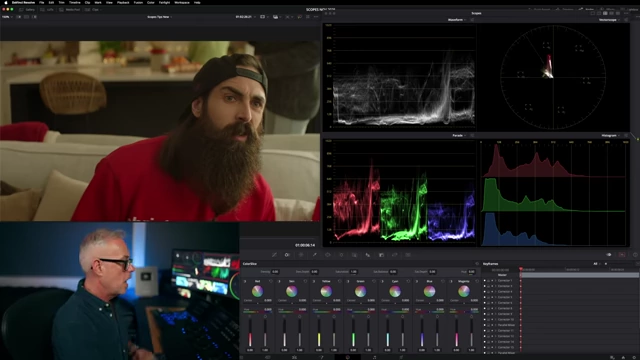
The four-up scope display for a warm, low-contrast shot, showing an unbalanced vectorscope and compressed waveform/parade data. [ 00:09:54 ] - Correction Process:
- Highlights are gently increased.
- The red channel is slightly brought down, and the blue channel is lifted to improve balance.
- Overall contrast is increased.
- The prominent red spike on the Vectorscope (from the subject's jumper) is addressed by adjusting its density and pulling a small amount of saturation, balancing the image without desaturating the main subject excessively.
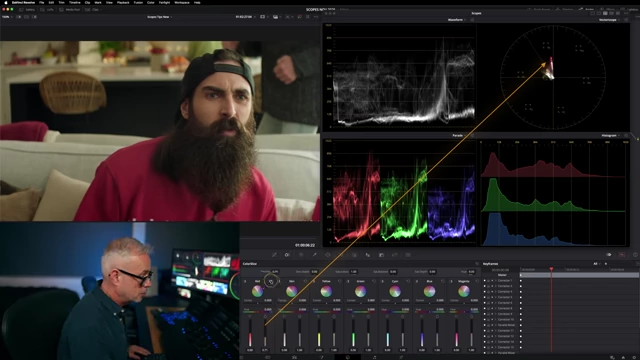
The four-up scope display after adjusting the warm, low-contrast shot, showing improved balance and contrast across the scopes. [ 00:10:33 ]
- Initial Assessment: Scopes indicate insufficient contrast, a low blue channel, and a dominant red/yellow hue (visible on Vectorscope). The image itself appears very warm.
- Analyzing a Shot with a Strong Yellow Cast [10:46]
- Initial Assessment: The Vectorscope clearly shows a massive spike towards the yellow quadrant. The Histogram and Parade scopes confirm a very low blue channel.
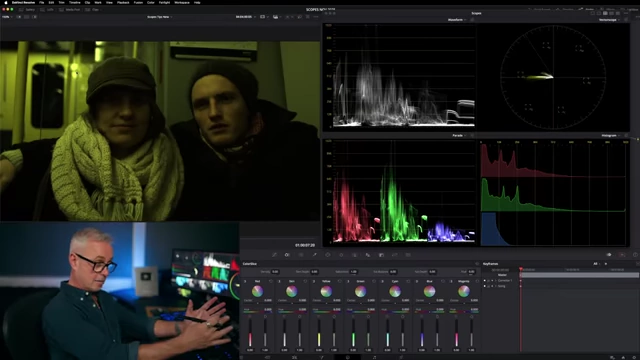
The four-up scope display for a shot with a strong yellow cast, clearly showing the vectorscope heavily skewed towards yellow and a low blue channel. [ 00:11:10 ] - Correction Process:
- The primary goal is to introduce blue to neutralize the yellow.
- Adjustments are made using the gain tool to push the yellow towards blue, guided by the Vectorscope, while continuously checking the visual result on the image.
- Contrast is then addressed by adjusting gamma and shadows.
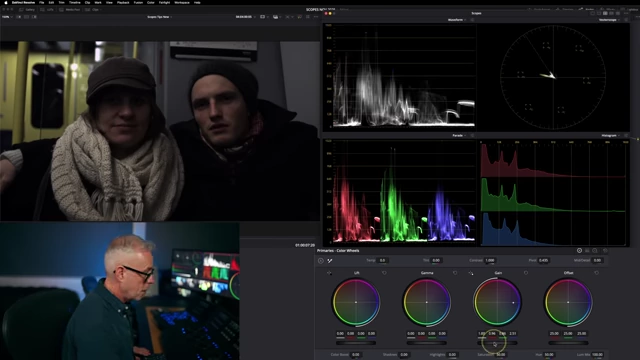
The four-up scope display after correcting the yellow cast, showing a more neutralized vectorscope and balanced channels. [ 00:11:54 ]
- Initial Assessment: The Vectorscope clearly shows a massive spike towards the yellow quadrant. The Histogram and Parade scopes confirm a very low blue channel.
- Analyzing a Night Shot [12:11]
- Key Insight: This shot emphasizes that scopes are not meant to always be "filled up." For a night scene, most information should naturally reside in the lower third of the scopes.
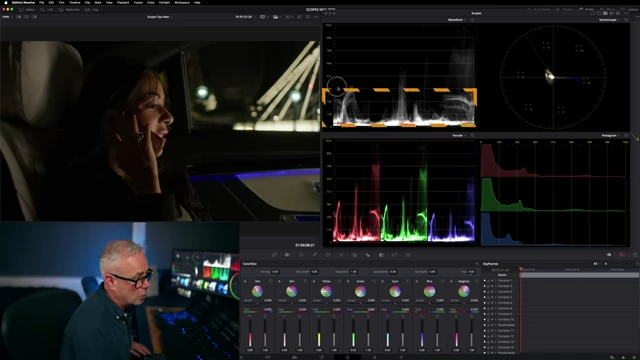
The four-up scope display for a night shot, where most luminance information is intentionally concentrated in the lower third of the scopes. [ 00:12:16 ] - Assessment & Adjustment:
- The scopes confirm the low light levels are intentional, with information concentrated in the darker ranges.
- A slight adjustment to lift is considered but deemed unnecessary as no clipping is occurring and the dark aesthetic is desired.
- The blue line on the Vectorscope for the car interior is noted as being close to the outer edge, indicating high saturation, but within acceptable limits for the creative intent.
- The importance of creative judgment is highlighted; forcing the Vectorscope center in a night shot would make the image look unnaturally cold.
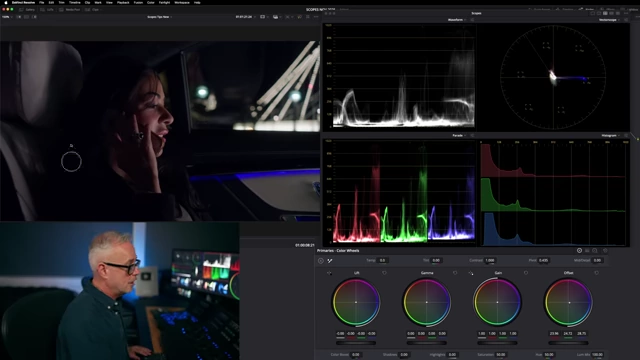
The four-up scope display of the night shot after an attempt to centralize the vectorscope, demonstrating how strictly following scope data can lead to an unnatural, cold image. [ 00:13:24 ]
- Key Insight: This shot emphasizes that scopes are not meant to always be "filled up." For a night scene, most information should naturally reside in the lower third of the scopes.
- Concluding Thoughts: No single scope is superior; they function as complementary technical measurement tools. The ultimate creative decision and aesthetic preference always rest with the colorist, using scopes as reliable feedback, especially when eyes get tired or for verifying technical accuracy like white balance.