A Beginner's Guide to Color Management: Understanding Color Space, Gamut, and Image Pipeline in DaVinci Resolve
Summary:
This video demystifies color management, emphasizing the importance of foundational concepts for effective color grading, regardless of the software used. Key takeaways include:
- Color Space and Gamut concepts are visually explained using the CIE Chromaticity scope ![3:21], showing how different color spaces encompass varying ranges of colors.
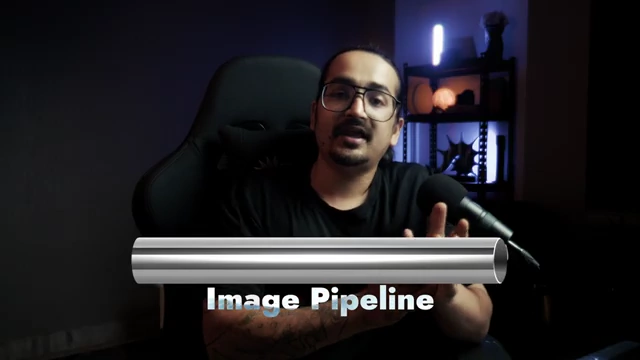
- The Image Pipeline is conceptualized as a pipe through which the image signal flows from recording to export ![5:00].
- Software Flow: Demonstrated with DaVinci Resolve's node-based structure, illustrating the left-to-right processing order [
:47].
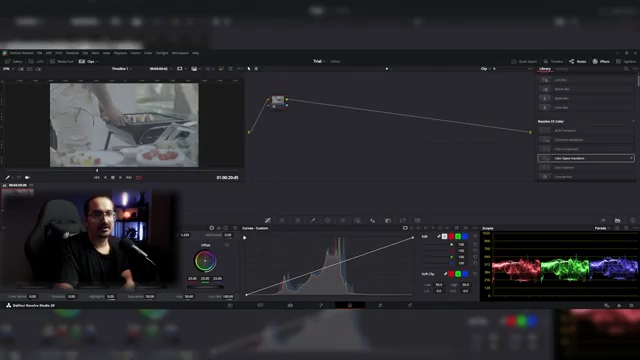
6 [ 00:08:48 ] - Practical Application: Learn to set up color science, timeline color space, and output color space in DaVinci Resolve's project settings ![7:14]. The Color Space Transform (CST) tool is shown converting footage into a flexible working space (like DaVinci Wide Gamut/Intermediate) and then to the final delivery space (e.g., Rec. 709 Gamma 2.4) ![9:00].
- Workflow Summary: The complete color management workflow is summarized, highlighting the key color spaces involved from source to final output [
], and visualized as a pipeline [![12:45].
12:41 [ 00:12:53 ]


Introduction & Core Concepts [0:04]
- The video begins by highlighting the speaker's journey from a beginner to a professional colorist, emphasizing that understanding fundamental concepts is crucial for anyone starting in color grading. [0:04]
Understanding Color Space and Gamut [1:04]
- To begin color grading, it's necessary to understand what "Color Space" and "Gamut" mean. [1:04]
- Defining Color Space: A color space defines the range of colors a device can either capture (record) or display. [1:12]
- Defining Gamut: Gamut is closely related to color space. For example, Rec. 709 color space might come with a gamma of 2.2 or 2.4. [1:53]
- A color space can be visualized as a 2D plane (X and Y axes), representing the chromaticity or specific hues available. [2:07]
- Gamut extends this concept into a 3D space, adding the dimension of luminance or brightness (the Z-axis), defining how many shades and intensities of those colors are available. [2:41]
- Simply put, color space refers to "which colors" and gamut refers to "how many" of those colors. [3:45]
- Visualizing Color Space and Gamut in Scopes: Using DaVinci Resolve's CIE Chromaticity scope, the entire "weird shape" represents all visible colors. [3:03]
- Specific color spaces, like Rec. 709, are plotted as triangles or polygons within this visible range, indicating the colors they encompass ![3:21].
- A larger triangle on the scope signifies a wider color space capable of capturing/displaying more colors (e.g., Sony S-Gamut3.Cine is much larger than Rec. 709). [3:51]
- The goal is often to record in a wide (larger) color space to capture more information and then display in a narrower (standardized) color space for broad compatibility. [4:18]
The Image Pipeline [4:51]
- Color management requires understanding the "Image Pipeline" – the journey of an image from creation to final output. [4:51]
- Concept of Image Flow: Imagine a pipe through which the image signal flows. This pipeline starts at recording (REC) and ends at export (EXP) [
].
<a href="https://youtube.com/watch?v=8KMgdgD3m70&t=300">5:00</a> [ 00:08:41 ] - Significance for Colorists: Throughout this pipeline, the image passes through various color spaces and gamuts. Colorists need to know: [5:10]
- Flow of Signal in Software: It's crucial to understand how your specific software processes the image signal. [5:57]
- Concept of Image Flow: Imagine a pipe through which the image signal flows. This pipeline starts at recording (REC) and ends at export (EXP) [

Implementing Color Management in DaVinci Resolve [6:45]
- Color management in DaVinci Resolve involves specific project settings and the use of the "Color Space Transform" effect. [6:45]
- Project Settings (Color Science, Timeline Color Space, Output Color Space): [7:14]
- These settings are configured within DaVinci Resolve's project settings under "Color Space & Transforms" ![7:14].
- Color Science: Choose DaVinci YRGB as it is universally accepted and ideal for general video work. ACES is another option, often used in film production. [7:20]
- Timeline Color Space: This should typically match your target output color space. For broadcast television, Rec. 709 with Gamma 2.4 is standard. For web delivery, Rec. 709 with Gamma 2.2 is common. [7:47]
- Output Color Space: For general purposes, set this to "Same as Timeline" to ensure consistency with your viewing environment. [8:21]
- Using Color Space Transform (CST): This tool is used to convert the color space of a clip. [8:36]
- Input Transformation: Identify the input color space and gamut of your footage (e.g., Sony S-Gamut3.Cine/S-Log3 if shot on a Sony camera in log). Apply a Color Space Transform effect as the first node [9:00].
- Working Space (DaVinci Wide Gamut/Intermediate): The output of the first CST should be set to a large working color space, such as DaVinci Wide Gamut with DaVinci Intermediate gamma. [10:17]
- Output Transformation: Before exporting, apply a second CST. [12:14]
- Project Settings (Color Science, Timeline Color Space, Output Color Space): [7:14]
Summary of Workflow [12:41]
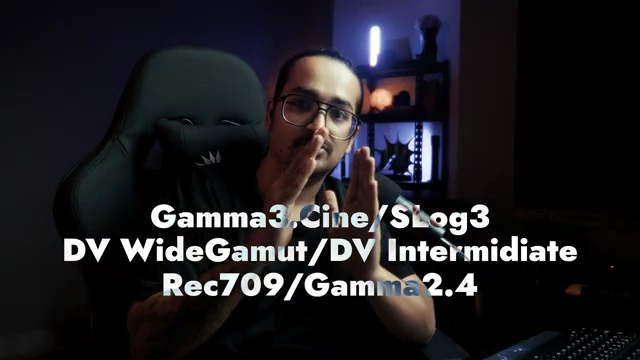
- The complete color management workflow involves: ![12:41]
- Taking the source footage (e.g., Gamma3.Cine/S-Log3).
- Transforming it into a wide, flexible working space (e.g., DV WideGamut/DV Intermediate).
- Performing all color grading manipulations in this working space.
- Before export, transforming the footage from the working space into the final display standard (e.g., Rec. 709/Gamma 2.4).
- This structured approach ensures accurate color representation, maximum creative control during grading, and proper delivery for various platforms [13:14]. This process can be visualized as a pipeline moving from source to working space to final output ![12:45].

