The LisaFPGA Project: Recreating the Apple Lisa with Modern Hardware and Overclocking
The LisaFPGA project is an open-source hardware and software recreation of the Apple Lisa computer on an FPGA board. It features a Xilinx Artix 700T FPGA, 2MB of SRAM for main memory, and an 8530 SCC chip for serial ports. Key modernizations include:
- USB-C for power and data, including JTAG programming and serial connections.
- HDMI audio and video output, with adjustable contrast and optional scanline simulation.
- Onboard ES-profile hard disk emulator and a planned floppy emulator (ESP32-based).
- USB keyboard and mouse support, converting modern peripherals to Lisa protocol.
- Selectable CPU and I/O ROMs for different software compatibility (e.g., HR for rectangular pixels, 3A for square pixels).
- Overclocking capability up to 75 MHz dot clock, making it four times faster than a stock Lisa.
The project aims for identical Lisa emulation with modern conveniences.

Introduction to the LisaFPGA Project [00:00:00]
The LisaFPGA project is a comprehensive recreation of the Apple Lisa computer entirely within an FPGA. The current hardware is Revision 2, with minor changes expected for Revision 3. This project integrates several modern features while maintaining the original Lisa's functionality.
Hardware Overview [00:00:38]
The core of the LisaFPGA is a sophisticated circuit board with various components:
- FPGA Chip [00:00:38]
- Uses a Xilinx Artix 700T FPGA.
- Responsible for emulating the vast majority of the Lisa's internal logic.

The Xilinx Artix 700T FPGA chip at the center of the LisaFPGA board [ 00:00:24 ]
- Power Circuitry [00:00:45]
- Generates multiple voltages required by the FPGA (+/- 12V, -5V, and three different FPGA voltages).
- Employs switching regulators for efficient power conversion.
- USB-C Port and Hub [00:01:00]
- Serves as the primary input for power and data.
- An integrated USB hub splits the connection for:
- JTAG programming for the FPGA.
- A serial connection to the SCC (Serial Communications Controller).
- Connections to onboard hard disk and floppy emulators.

The LisaFPGA board's power circuitry, USB-C port, and USB hub [ 00:01:00 ]
Audio and Video Capabilities [00:01:42]
The LisaFPGA provides both classic and modern audio-visual outputs:
- Audio Output Circuitry [00:01:42]
- Features an audio amplifier design that closely matches the original Lisa's, including similar output transistors.
- An external speaker can be connected for improved audio quality.
- Contrast DAC (Digital-to-Analog Converter) [00:02:05]
- Implemented using an op-amp for precise contrast control, reflecting the original Lisa's design.
- The contrast signal itself is generated within the FPGA.

Circuit diagram showing the Speaker Amp and Contrast DAC designs [ 00:02:10 ]
- Video Output Options [00:02:20]
- Includes a video output header for connecting to external RGB-to-HDMI converters.
- Features direct HDMI output for modern display connectivity.
- Supports dynamic video rescaling for different ROM aspect ratios (e.g., 3A ROMs).
Memory and Serial Ports [00:02:33]
- Main Memory (SRAM) [00:02:33]
- Equipped with a 2-megabyte SRAM chip for the Lisa's main memory.
- Jumpers allow selection of RAM size from 512KB up to the full 2MB in 512KB increments.
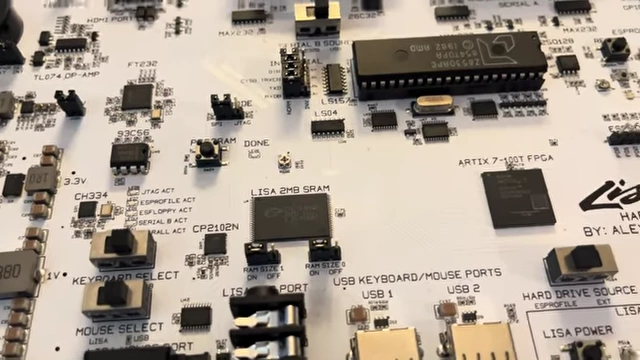
The 2-megabyte SRAM chip on the LisaFPGA board with RAM size jumpers [ 00:02:40 ]
- Serial Ports (8530 SCC) [00:02:53]
- Uses a physical 8530 SCC chip instead of an FPGA implementation due to the lack of an existing core.
- Provides two serial ports, Serial A and Serial B, mirroring the original Lisa.
- USB to Serial Functionality [00:03:17]
- Serial B has a CP2102 USB to serial chip on board.
- A switch allows users to connect to Serial B directly via a USB cable, eliminating the need for an external adapter for file transfer.

The CP2102 USB to serial chip [ 00:03:29 ] 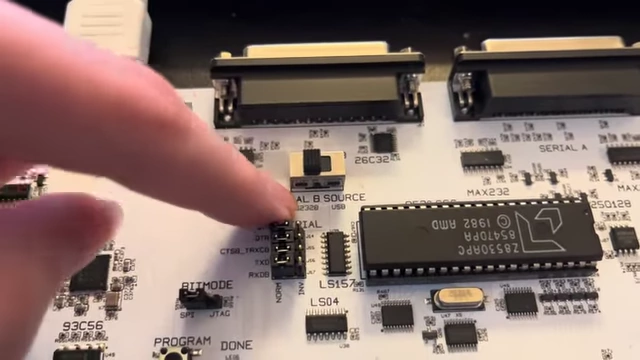
The switch to select the source for Serial B (RS232 or USB) [ 00:03:36 ]
Storage Emulation [00:04:01]
The project integrates modern emulation for the Lisa's storage devices:
- ES-Profile Hard Disk Emulator [00:04:01]
- An upgraded version of the speaker's own ES-profile design, now based on an ESP32S3 microcontroller and integrated directly onto the board.
- Uses an SD card for storing hard disk images.
- A switch allows choosing between the onboard ES-profile or an external physical profile drive.
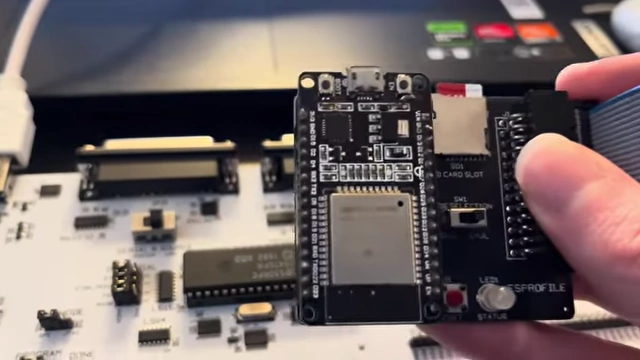
A comparison showing the older ES-profile board and the new integrated design on the LisaFPGA [ 00:04:09 ]
- ESP32-Based Floppy Emulator [00:04:21]
- An ESP32-based floppy emulator is planned, with most of the code written but not yet tested or functional.
- Intended to feature an OLED display for browsing floppy disk images and a dedicated interface.
- A switch allows selecting between the onboard emulator (once functional) or an external floppy drive.

The area designated for the ESP32-based floppy emulator and its interface [ 00:04:39 ]
User Controls and Connectivity [00:04:42]
- Lisa Front Panel Controls [00:04:42]
- Includes a soft power button with an LED indicator.
- Dedicated reset and NMI (Non-Maskable Interrupt) buttons, similar to the Lisa 2/10.
- Peripheral Connectivity [00:05:19]
- Ports for connecting original Mac/Lisa keyboards and mice.
- USB keyboard and mouse ports are provided, with the FPGA converting USB HID (Human Interface Device) protocols to the Lisa's proprietary protocol.
- Switches allow users to select between original Lisa peripherals or USB alternatives.

USB Keyboard and Mouse ports with switches for input selection [ 00:05:39 ]
- Additional Features [00:06:01]
- External Speaker Header: For higher quality audio output.
- Invert Video Jumper: A lesser-known option from the original Lisa's CPU board, allowing video inversion.
- Scan Lines Jumper: Simulates CRT scan lines on HDMI output by deleting rows of pixels, though this effect is difficult to capture on camera.
- GPIO Header: For developers to add custom I/O.

Various jumpers and connectors including the Invert Video Jumper and Scan Lines Jumper [ 00:06:18 ]
ROM Selection and Performance [00:06:52]
- CPU Board ROM Selection [00:06:52]
- Switches allow on-the-fly selection between:
- HR ROM: For software designed for rectangular pixels.
- 3A ROM: For software that benefits from square pixels, such as MacWorks.
- Switches allow on-the-fly selection between:
- I/O ROM Selection [00:07:12]
- Switches also control the I/O ROM:
- A8 ROM: Supports both 400K and 800K floppies.
- 40 ROM: For Twiggy drives (untested due to hardware unavailability).
- Switches also control the I/O ROM:
- Speed Select Switches (Overclocking) [00:07:37]
- Allows overclocking the Lisa's dot clock up to 75 MHz, significantly faster than the default 20 MHz.
- Selectable speeds include 20, 40, 60, and 75 MHz.
- The 75 MHz limit is due to SRAM limitations, but it still offers a substantial performance boost.
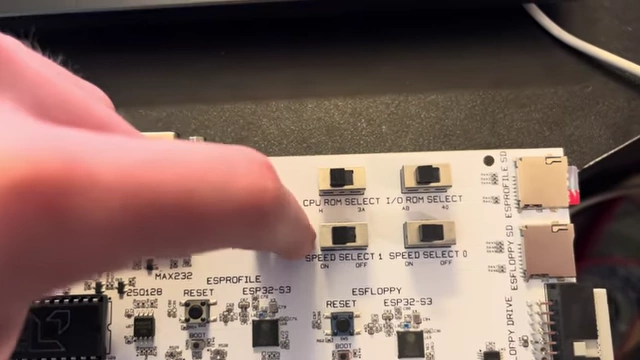
Switches for CPU and I/O ROM selection, and speed control for overclocking [ 00:06:58 ]
Demonstration and Features in Action [00:08:29]
The video demonstrates the LisaFPGA's capabilities:
- Initial Boot and Office System [00:08:29]
- The FPGA loads its bitstream, and the Lisa boots at the maximum 75 MHz and 2MB RAM.
- The system performs a self-test and loads the drive image catalog.
- Boots into the Lisa Office System 3.1 quickly, showcasing the speed of overclocking.

The Lisa selector displaying a list of hard disk images during boot [ 00:09:17 ] 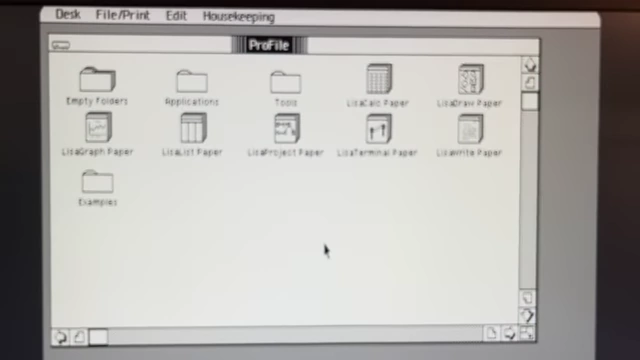
The Lisa Office System 3.1 desktop [ 00:09:58 ] - Adjusting Settings [00:10:01]
- Demonstrates functional contrast adjustment over HDMI.
- Shows dim level adjustment, though camera exposure compensated in the video.
- Speaker volume (soft/loud) is adjustable.
- The speaker's pitch changes with overclocking; returning to stock speed makes it sound normal.

Lisa Office System 3.1 preferences panel, showing contrast and speaker volume settings [ 00:10:07 ]
- Overclocking Impact [00:10:55]
- At stock speed, screen redraws are noticeably slower.
- At full overclocked speed, operations are instantaneous.
- Switching ROMs On The Fly [00:11:16]
- Flipping the CPU ROM switch instantly rescale the HDMI output for the 3A ROM aspect ratio, though the Office System display is corrupted as it expects the HR ROM.
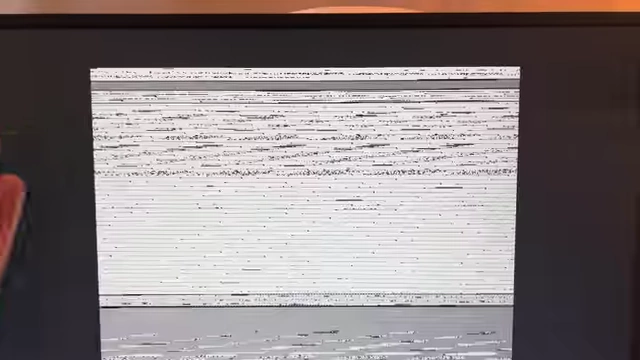
Corrupted screen display after switching ROMs on the fly [ 00:11:24 ]
- Flipping the CPU ROM switch instantly rescale the HDMI output for the 3A ROM aspect ratio, though the Office System display is corrupted as it expects the HR ROM.
- MacWorks Plus Demo [00:11:47]
- The system successfully boots into MacWorks Plus using the HR ROM.
- Demonstrates square pixel display, more akin to modern Mac OS.
- Confirms that the LisaFPGA runs every operating system supported by a real Lisa without compatibility issues.

MacWorks Plus 1.0.18 welcome screen [ 00:12:56 ] 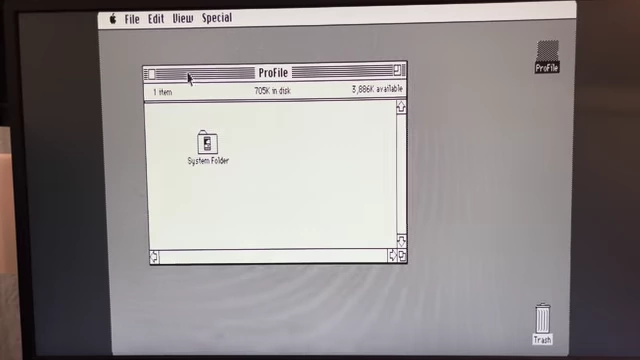
MacWorks desktop displaying rectangular pixels [ 00:12:32 ] - Keyboard and mouse functionality are shown working with USB peripherals.
- External Floppy Drive Demo [00:14:19]
- An external floppy emulator (ES-floppy) is connected via the floppy port.
- A MacWorks Plus 2 install image is loaded from the floppy, appearing as a mounted disk icon.
- Files are loaded from the floppy, confirming its functionality.
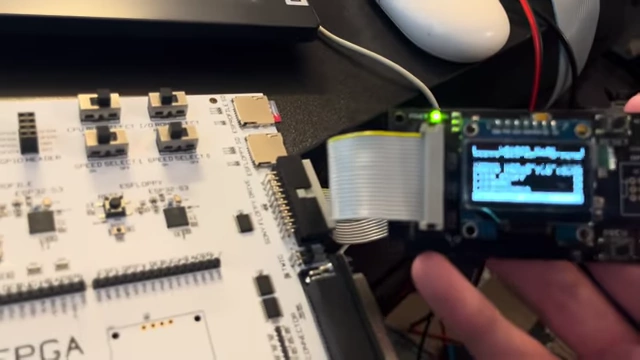
An external floppy emulator connected to the board, showing its OLED display [ 00:14:26 ] 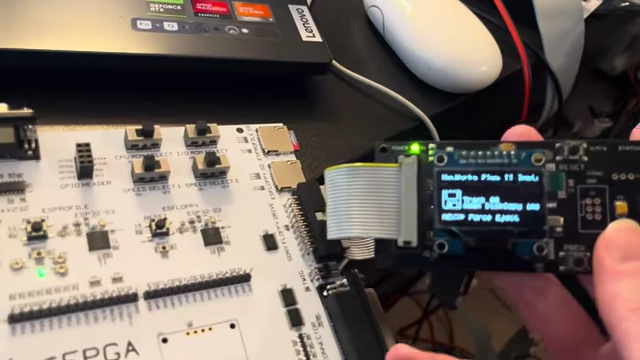
The external floppy emulator displaying the loaded MacWorks Plus 2 install image [ 00:14:42 ]