Playing Offline Music in Emacs with Ready Player Mode
Summary:
This video introduces Ready Player Mode, an Emacs package designed for offline music playback.
- The speaker developed Ready Player Mode to reduce reliance on music streaming services by facilitating offline music playback directly within Emacs.
- The package offers minimal configuration, an intuitive user interface, and allows opening music files just like any other file in Dired.
- It leverages MPV for actual audio playback and Dired buffers to manage playlists and files.
- Key features demonstrated include automatic playback, mouse and single-key shortcuts for controls (next, previous, shuffle), and browsing/searching a music collection.
- The package also supports downloading album artwork and offers "semi-headless" operation, allowing users to control playback via keybindings without the player buffer in focus.
Ready Player Mode interface showing album art and playback controls [ 00:02:45 ]
Playing Offline Music in Emacs [0:00:41]
The video begins by outlining the motivation behind Ready Player Mode, which is to play offline music directly within Emacs.
- Backstory and Goal [0:00:44]
- The speaker aimed to reduce dependency on streaming services by purchasing music for offline playback.
- While still using streaming for discovery, the majority of music consumption is now offline and managed within Emacs.
- The primary goal of the episode is to demonstrate how to play these local music files.
Introducing Ready Player Mode [0:01:16]
Ready Player Mode is a custom Emacs package built by the speaker for offline music playback.
- Design Principles [0:01:22]
- Minimal Configuration: Requires only a simple
(require 'ready-player)and(ready-player-mode 1)to enable.
Minimal configuration for Ready Player Mode [ 00:01:35 ] - Usable Out-of-the-Box: Designed to be functional immediately after installation.
- Intuitive UI: The user interface is straightforward, with familiar playback controls.
- Seamless File Opening: Music files can be opened in Dired just like any other file (e.g.,
.orgfiles or images), triggering playback. - Underlying Technologies: Playback is offloaded to
mpv, anddiredbuffers are used to manage the list of files.
- Minimal Configuration: Requires only a simple
Demonstrating Core Functionality and UI [0:01:52]
The speaker provides a live demonstration of Ready Player Mode.
- File Handling in Dired [0:01:52]
- When
ready-player-modeis enabled, opening a media file (like.m4aor.mp3) in a Dired buffer will initiate playback and display the player interface, instead of showing garbled binary data. - Other file types (e.g.,
.org,.png) open normally.
- When
- Player Interface [0:02:45]
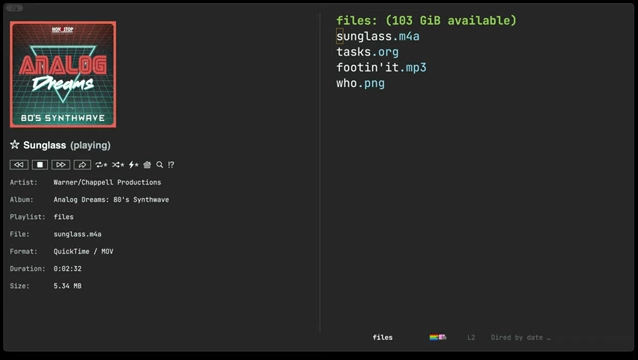
- Upon opening a media file, the player automatically starts playing if
autoplayis enabled.
Ready Player Mode displaying music details and album art while playing [ 00:02:45 ] - The interface includes standard controls like play/pause, next, previous, shuffle, and repeat.
- Users can interact with buttons using a mouse or navigate via
tab,shift-tab,back-tab. - Single-key shortcuts (e.g.,
nfor next,sfor shuffle) are also available. - The player automatically detects media files in the current Dired directory and creates a playlist from them.
- Upon opening a media file, the player automatically starts playing if
- Flexibility of Dired Buffers [0:04:22]
- Ready Player Mode relies on Dired buffers as its source of files, making it highly flexible.
- Dired buffers can be created in various ways, such as using the
findcommand-line utility or importing from playlist files, allowing users to craft custom playlists.
Advanced Features [0:04:45]
The video covers additional functionalities of Ready Player Mode for managing and interacting with music.
- Music Collection Management [0:04:47]
- Users can set a global
ready-player-music-collection-locationvariable to specify the root directory of their music library. - A "home" button in the player UI opens a Dired buffer representing this entire collection.
- Shuffle Play: The speaker often uses shuffle mode for casual listening and toggles it off to stay within a particular artist's tracks.
- Users can set a global
- Searching [0:05:36]
- Pressing
/within the player or collection buffer opens a fuzzy search prompt (usingconsult) to find specific artists or songs.
Fuzzy search interface for artists and songs [ 00:05:45 ] - Selecting a search result opens its corresponding Dired buffer and starts playback.
- Pressing
- Album Art Download [0:06:24]
- If a track lacks album art, users can invoke
ready-player-download-album-artwork. - The command prompts for a service (e.g., iTunes) to fetch the artwork and asks for confirmation to save it alongside the music file.

Album art successfully downloaded and displayed in Ready Player Mode [ 00:07:05 ]
- If a track lacks album art, users can invoke
- Semi-Headless Operation [0:07:18]
- Even if the Ready Player buffer is hidden, users can still control playback using global keybindings under the
C-c mprefix. C-c m mtoggles the player buffer to the foreground.C-c m nmoves to the next track, andC-c m pmoves to the previous track.- When these commands are used without the buffer in focus, a temporary notification appears in the minibuffer displaying the current track info and album art before fading away.

Semi-headless operation showing a momentary notification of the next track at the bottom of the screen [ 00:08:00 ]
- Even if the Ready Player buffer is hidden, users can still control playback using global keybindings under the
Conclusion and Engagement [0:08:25]
The speaker wraps up the demonstration, highlighting the benefits of Ready Player Mode and encouraging community interaction.
- Personal Experience: The speaker has been happily using offline music playback with Ready Player Mode for over a year.
- Extensibility: The package is designed to be extensible to fit individual user needs.
- Community Call: Users are invited to share their experiences with Emacs-based music players in the comments.