How to Create Clean and Editable Single-Span Surfaces in Rhino3D: A Comparison of Surfacing Commands
Summary:
This video, episode 7 of "Primary Surfacing," guides users on how to create "clean" single-span surfaces in Rhino3D, crucial for high-quality models, and identifies commands to avoid.
- Avoid Commands for Primary Surfacing:
Sweep 1(without "Simple Sweep"),Sweep 2(without "Simple Sweep" or with mixed degrees),Network Surface, andPatchare shown to generate excessively dense, tolerance-based, or internally discontinuous surfaces with "garbagey curvature." - Recommended Tools:
- Surface From Edge Curves: Ideal for four-sided holes, producing clean, single-span surfaces that are easily editable and matchable using a "sculpt and match" workflow.
- Loft Command: Excellent for shapes like wings and boat hulls, capable of producing clean, single-span surfaces, especially with the "Loose" option for advanced control point distribution.
The video emphasizes focusing on proper patch layout and correct surface degree over the initial command used, enabling a more editable and robust modeling workflow.
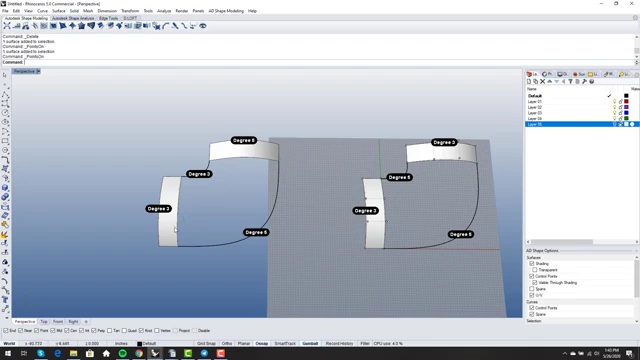
Initial setup showing two similar sets of input curves for testing surfacing commands, illustrating easy and mixed-degree cases. [ 00:01:20 ]
Introduction to Clean Surfaces in Rhino3D [0:00]
- Importance of Single-Span Surfaces
- The video discusses the significance of creating single-span surfaces for maintaining high surface quality and facilitating accurate matching in Rhino3D.
- Many Rhino commands unfortunately produce undesirable, overly dense surfaces.
- Test Case Setup
- Two similar sets of input curves are prepared for testing various surfacing commands.
- Right Example: Consists of degree 3 and degree 5 surfaces, which are identical with curvature-continuous degree 5 blends.
- Left Example: A more challenging test case with mixed degrees (degree 5 and degree 3 on opposite edges) and a tangent blend on the inside edge, requiring more complex surface handling.
Initial setup showing two similar sets of input curves for testing surfacing commands, illustrating easy and mixed-degree cases. [ 00:01:20 ]
Sweep 1 Command Analysis [0:02:02]
- Initial Attempt (without Simple Sweep)
- Applying
Sweep 1without the "Simple Sweep" option on the easy case (right example) results in an overly dense surface with 76 control points. This is deemed unacceptable for a primary surface. - The visible ISO curves indicate a complex surface topology unsuitable for clean modeling.
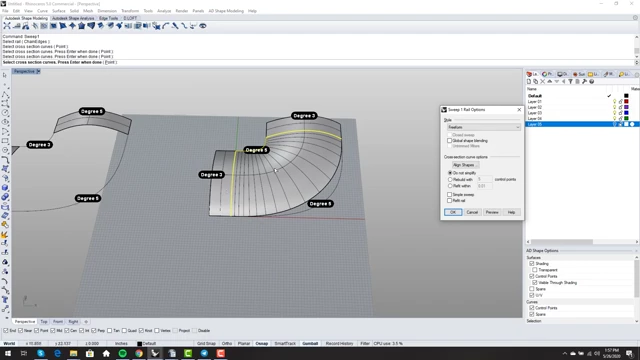
Sweep 1 result without "Simple Sweep" on the easy test case, showing an overly dense surface with many ISO curves and 76 control points. [ 00:02:40 ]
- Applying
- Using Simple Sweep
- Activating "Simple Sweep" produces a single-span surface, which is a step in the right direction.
- However, the control points are still oddly distributed, and the surface exhibits a slight "rise" in the middle, making it less ideal.
- It receives partial credit for being single-span and editable.
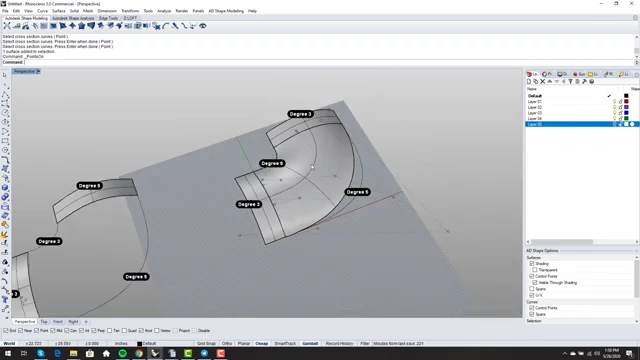
Sweep 1 result with "Simple Sweep" enabled on the easy case, showing a single-span surface with oddly distributed control points. [ 00:03:30 ]
- Handling Mixed Degrees
- On the more difficult (left) example with mixed degrees,
Sweep 1with "Simple Sweep" successfully bridges between degree 3 and degree 5 surfaces. - The output, while not perfect, is a single-span surface and considered better than the default
Sweep 1output, maintaining sculptability and matchability.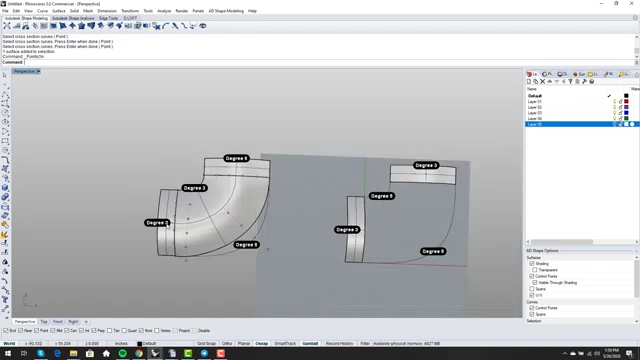
Sweep 1 with "Simple Sweep" on the mixed-degree example, showing the command elegantly bridging between degree 3 and degree 5 surfaces. [ 00:04:50 ]
- On the more difficult (left) example with mixed degrees,
Sweep 2 Command Analysis [0:05:28]
- Easy Case (without Simple Sweep)
- Applying
Sweep 2to the easy case without "Simple Sweep" again generates an excessively dense surface with a noticeable arch or rise in the middle. - This dense output is not suitable for a primary surface due to the difficulty in editing.
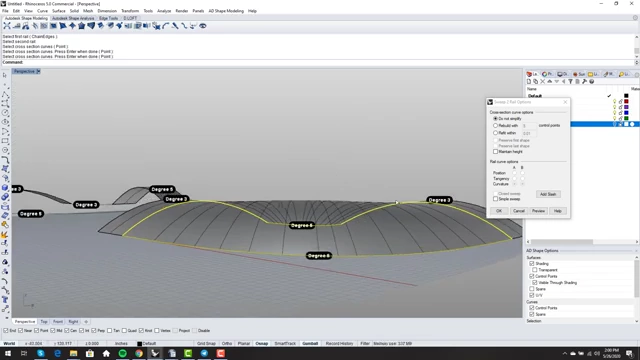
Sweep 2 result without "Simple Sweep" on the easy case, showing a dense surface with an unwanted arch in the middle. [ 00:05:50 ]
- Applying
- Using Simple Sweep
- With "Simple Sweep,"
Sweep 2produces a single-span surface, maintaining degrees (e.g., degree 3 in one direction, degree 5 in another). - However, it moves control points upwards, resulting in a slightly distorted surface. While editable, it's considered slightly better than the non-simple sweep but still has issues.
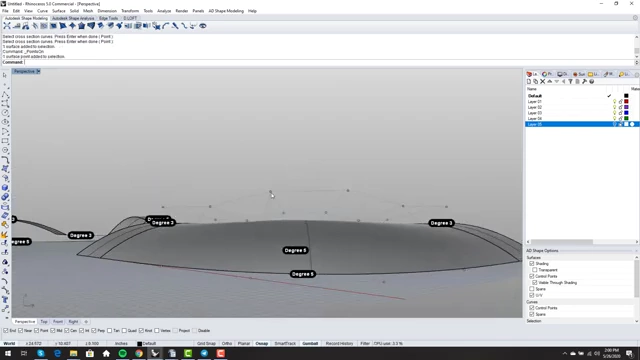
Sweep 2 result with "Simple Sweep" enabled, producing a single-span surface but with slightly displaced control points that create an odd shape. [ 00:06:10 ]
- With "Simple Sweep,"
- Limitations with Mixed Degrees and Reversed Rails
- When attempting
Sweep 2on the mixed-degree case, the "Simple Sweep" option becomes unavailable. - The resulting surface is a "wacky", overly dense output with a rise in the middle, making it challenging to edit. This outcome is deemed a failure for primary surfacing, setting up future problems.
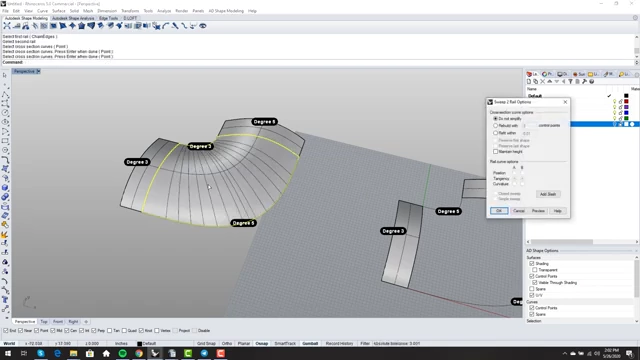
Sweep 2 on the mixed-degree example without the "Simple Sweep" option, resulting in a dense, uneditable surface with an undesirable rise. [ 00:08:00 ]
- When attempting
Network Surface Command Analysis (Strongly Discouraged) [0:08:37]
- High Point Density and Lack of Control
Network Surfacegenerates surfaces that might visually appear decent but come with an extremely high number of control points (e.g., 160-169 points for a quad patch).- This excessive density makes the surface difficult to edit, sculpt, or match effectively.
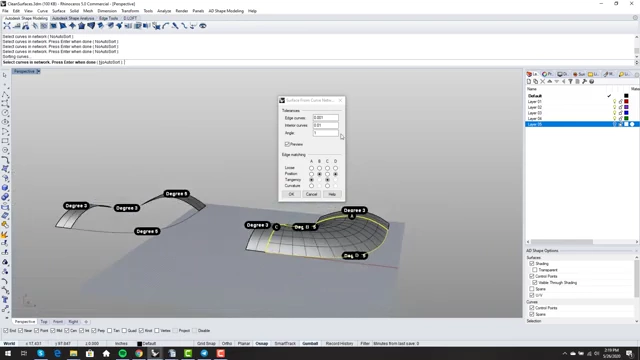
`Network Surface` output for the easy case, showing an extremely high density of control points (160 surface points), which is not conducive to clean surfacing. [ 00:09:10 ]
- Tolerance-Based Generation vs. Exact Geometry
- The command operates based on tolerance, meaning it approximates the input curves rather than creating exact geometry.
- This tolerance-based approach can lead to issues like wrinkles, non-watertight models, and compatibility problems when exporting to other CAD systems.
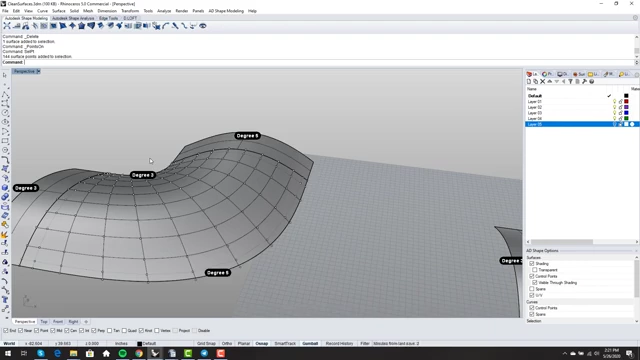
`Network Surface` output for the mixed-degree case, showing a dense, complex surface indicating tolerance-based generation. [ 00:10:40 ]
- Methodological "Box Canyon"
- The presenter strongly advises against using
Network Surfaceas a primary surfacing tool, likening its use to entering a "methodological box canyon" where the modeling process becomes increasingly problematic. - It encourages a "curves in, surfaces out" workflow that often leads to poor surface quality.
- This method is a significant contributor to common modeling issues like wrinkles and non-watertight geometry.
- The presenter strongly advises against using
Patch Command Analysis (Strongly Discouraged) [0:13:02]
- Trimmed Edges and High Point Density
- The
Patchcommand creates surfaces where all four edges are trimmed, increasing the risk of issues when transferring models. - It also generates surfaces with extremely high control point counts (e.g., 169 points for a simple patch), similar to
Network Surface.
`Patch` command output on the easy case, demonstrating a surface with trimmed edges and a very high density of control points (169 points). [ 00:14:00 ]
- The
- Inaccurate Edge Generation and Curvature Problems
- An input curve that is a smooth, single-span degree 5 curve can become a highly dense and irregular trimmed edge when used with
Patch. - Curvature analysis reveals internal discontinuities and "garbagey curvature," which propagates to any surfaces matched to it, compromising overall model quality.
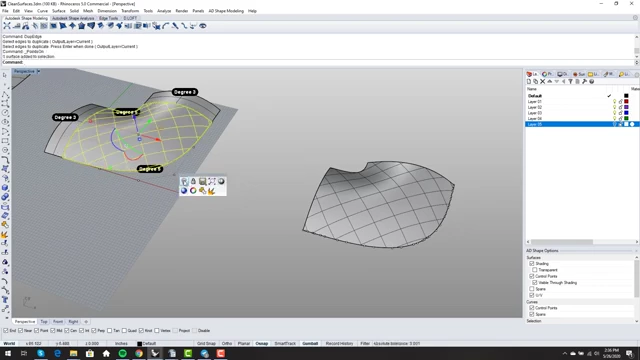
Comparison of a smooth input curve and the resulting irregular, dense trimmed edge created by the `Patch` command, highlighting the loss of surface quality. [ 00:16:40 ] 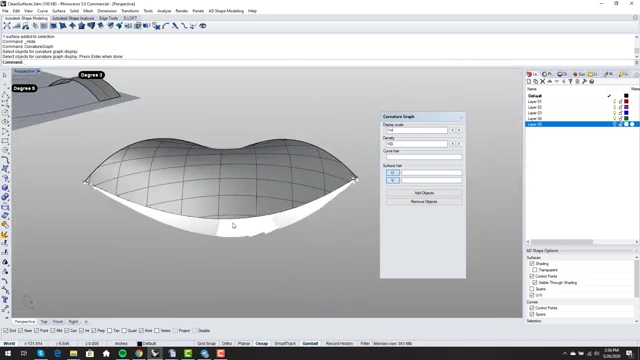
Curvature graph of a surface created with the `Patch` command, revealing internal discontinuities and poor curvature flow, which would negatively affect matching surfaces. [ 00:17:30 ]
- An input curve that is a smooth, single-span degree 5 curve can become a highly dense and irregular trimmed edge when used with
- Consequences of Poor Primary Surfacing
- Using
PatchorNetwork Surfacefor primary surfaces leads to a cascading "infection" of problems throughout the model, as subsequent matched surfaces inherit these issues. - This results in models with high point density, tangency issues, and wrinkles, making them difficult to work with and ensure watertight integrity.
- The presenter strongly advises against using
Patchif surface quality is a priority.
- Using
Demonstration of Bad Workflow Consequences (Network Surface Example) [0:18:26]
- Exaggerated Point Density
- A simple "soft corner of a box" shape, which could be made from three clean surfaces with a total of 16 control points, is intentionally created using
Network Surfaceby connecting multiple curves. - This results in a single surface with an astonishing 264 control points, demonstrating the severe inefficiency and complexity introduced by inappropriate command usage.
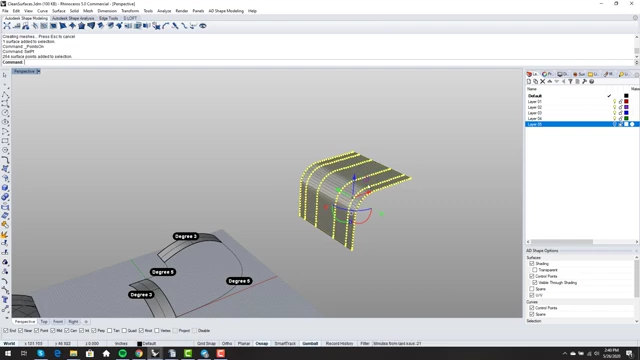
An example of a simple corner created with `Network Surface`, showing an extreme point count (264 points) where a few simple surfaces would suffice. [ 00:21:10 ]
- A simple "soft corner of a box" shape, which could be made from three clean surfaces with a total of 16 control points, is intentionally created using
- Curvature and Continuity Issues
- The curvature graph of this
Network Surfaceoutput is revealed to be "super garbagey," exhibiting severe discontinuities and even concavity where the surface should be flat or convex. - This poor curvature directly translates to problems like wrinkles, tangency issues, and difficulty achieving proper continuity in later stages of modeling.
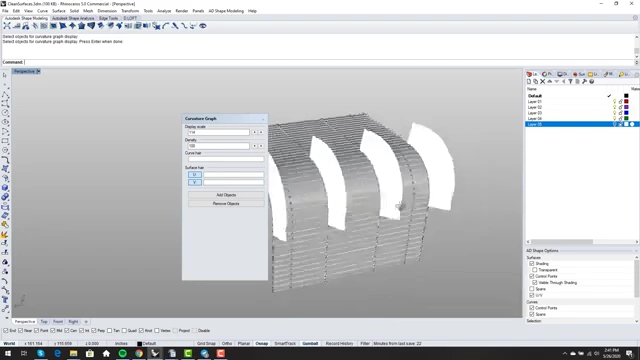
Curvature analysis of the `Network Surface` output for the simple corner, revealing chaotic curvature flow and negative (concave) regions, indicating severe quality issues. [ 00:22:30 ]
- The curvature graph of this
Recommended Commands for "Clean" Surfaces [0:23:01]
- 1. Surface From Edge Curves (SrfPt) [0:23:09]
- Primary Tool for Four-Sided Holes: This command is highlighted as the go-to tool for creating surfaces in any four-sided hole.
- Elegant and Exact Output: It produces beautiful, single-span surfaces that precisely follow the input curves without unwanted distortions or rises.
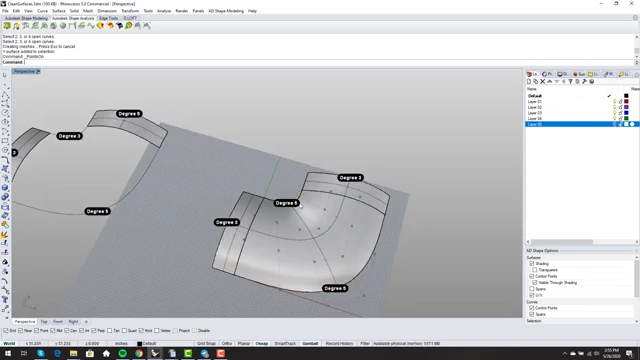
`Surface From Edge Curves` applied to the easy test case, resulting in a clean, single-span surface that accurately follows the input curves. [ 00:24:10 ] - Sculpt and Match Workflow: The process involves first creating the surface with the correct point count and degree, then using the
MatchSrfcommand to achieve desired tangency or curvature continuity. This separation of form creation and continuity matching allows for a more flexible and editable workflow.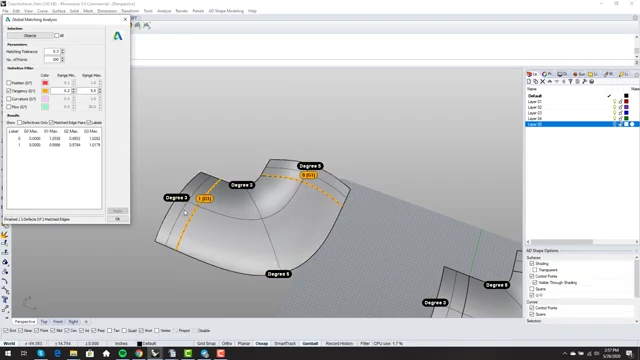
Using `MatchSrf` to achieve tangency between the newly created surface and an adjacent one, demonstrating the sculpt-and-match workflow. [ 00:26:00 ] - Editability: The resulting single-span surfaces have a manageable number of control points (e.g., 6 points for a degree 5 edge), making them highly editable and easy to match with other surfaces to ensure watertight models.
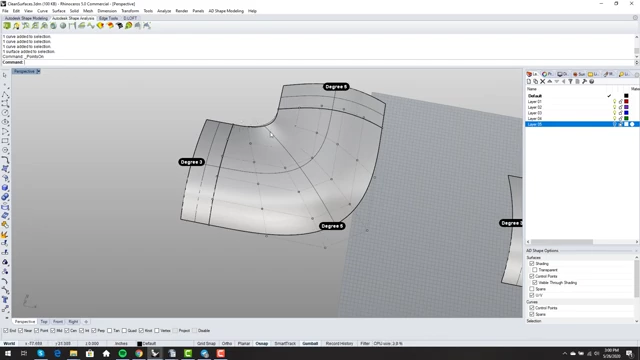
The surface from edge curves after matching, showing well-distributed control points which facilitate easy editing and further matching for continuity. [ 00:29:00 ]
- 2. Loft Command [0:32:28]
- Ideal for Specific Geometries:
Loftis excellent for creating forms defined by profiles, such as wings, boat hulls, or similar flowing shapes. - Clean Surface Generation: It reliably creates clean, single-span surfaces. It also intelligently elevates the degree of lower-degree input curves to match higher-degree ones, ensuring seamless transitions.
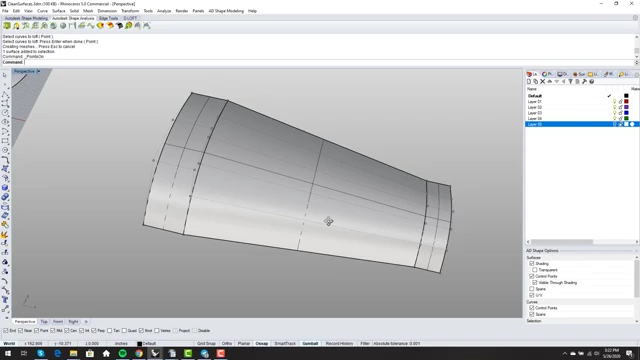
`Loft` command used on two profile curves, generating a clean, single-span surface suitable for wing-like geometries. [ 00:33:20 ] - "Loose" Option for Control: The "Loose" option in
Loftis particularly useful. Instead of forcing the surface to pass through the input curves, it uses the curves to define the surface's control points. This allows for creating complex, elegant forms like elliptical wings while maintaining optimal surface quality.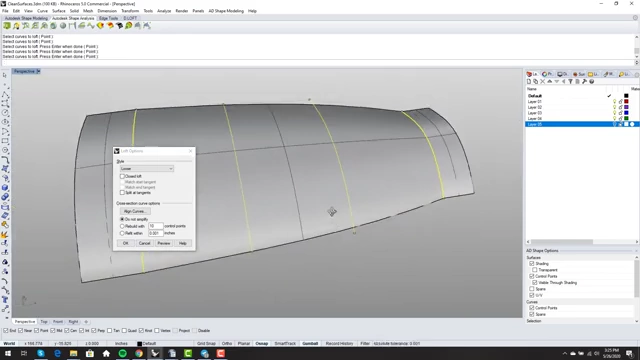
`Loft` command with the "Loose" option, creating a smooth, single-span surface using input curves to define control points. [ 00:36:20 ] 
A finished wing-like surface created with the `Loft` command and the "Loose" option, demonstrating a clean, single-span output that is degree 5 in one direction and degree 3 in the other. [ 00:37:00 ]
- Ideal for Specific Geometries:
Conclusion and Best Practices [0:37:09]
- Practice and Expectation Setting: Users are encouraged to consistently practice creating clean, single-span primary surfaces. Setting this expectation for oneself is crucial for developing good modeling habits.
- Focus on Design Intent: The key takeaway is that the specific command used to initially create a surface is less important than whether that command generates a surface with the correct point count, degree, and distribution to express the design idea.
- Avoid "Curves In, Surfaces Out" Mindset: Freeing oneself from the rigid "curves in, surfaces out" workflow prevents getting bogged down by command specifics and opens up more creative and effective surfacing solutions.
- Importance of Patch Layout and Degree Choice: If a single-span surface cannot express the desired design, the problem usually lies in either poor patch layout or an incorrect choice of surface degree.