Improving AI-Generated UI Design with a 4-Step Flow Engineering Workflow
This video explains how to elevate AI-generated UI from generic to personalized designs using a "flow engineer" workflow. Standard AI UIs often appear functional but lack distinctive style and detailed interactions. The proposed 4-step process involves:
- Layout Alignment: Rapidly define UI structure using ASCII wireframes to quickly confirm functionality and information hierarchy with the AI model.
- Theme Application: Customize aesthetic elements like colors, fonts, shadows, and borders using dedicated theme design tools or by extracting styles from existing UI mocks.
- Animation Design: Integrate subtle micro-interactions and entrance animations by providing concise descriptions of keyframes and triggers to the AI.
- Code Generation: Once a single UI component is refined with the desired layout, theme, and animations, this consistent style can be scaled across other components and entire pages, ensuring a cohesive and high-quality application. The Superdesign.dev extension facilitates this workflow directly within an IDE.
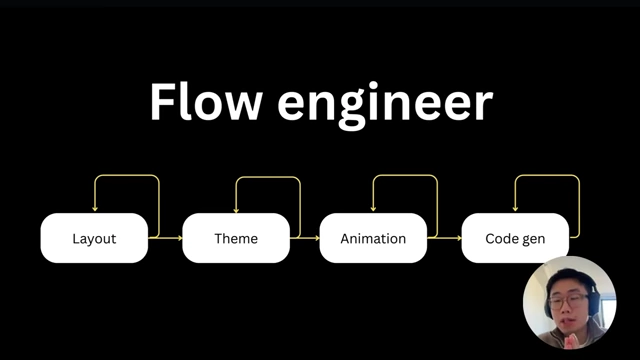
The 4-step "Flow Engineer" workflow [ 00:00:32 ]
4-Step Workflow [0:00]
Artificial Intelligence (AI) often generates User Interfaces (UIs) that look generic and are easily identifiable as AI-produced. To overcome this, a "flow engineer" approach is introduced, which distills expert design knowledge into an iterative workflow, moving beyond simple prompt engineering.

- The concept of "Flow Engineer" [0:31]
- Andrew Kupsh's idea: Instead of trying to find a single perfect prompt, break down the design process into an iterative flow.
- Goal: Construct the output from a large language model (LLM) iteratively, step by step.
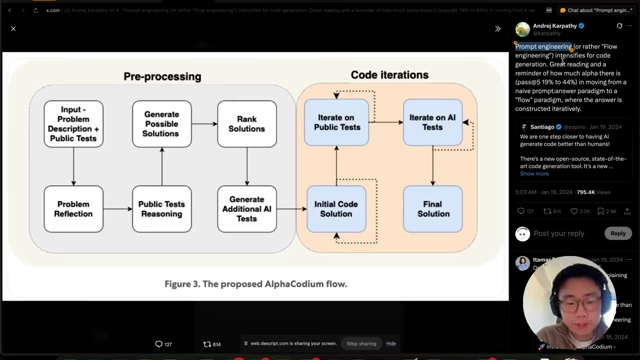
Andrew Karpathy's proposed AlphaCodium flow [ 00:00:40 ]
- The 4-step design workflow [0:56]
- 1. Layout: Focus on user journey and information hierarchy.
- 2. Theme: Apply branding, colors, fonts, and styling elements.
- 3. Animation: Add subtle micro-interactions and dynamic effects.
- 4. Code Generation: Implement the finalized design on the front end.
The 4-step "Flow Engineer" workflow [ 00:00:32 ]
- Iteration at each step [1:19]
- LLMs may produce multiple results for each step.
- Designers iterate until a satisfactory version is achieved before moving to the next step.
- Potential additional elements to experiment with [1:28]
- Reference mocks
- User flows
- Content hierarchy
Layout [1:41]
Initial AI-generated UIs often appear functional but lack proper design details, such as incorrect alignment or missing crucial information. Aligning on the layout early in the design process is critical for better results.
- Common issues with default AI UI [1:41]
- Lack of attention to detail (e.g., centered elements that should be left-aligned).
- Missing essential information or call-to-action buttons.
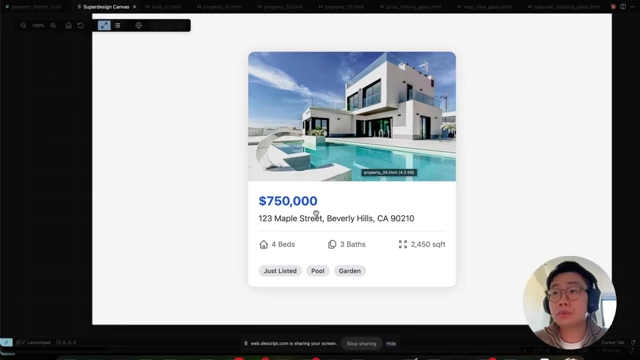
Initial AI-generated property listing card with common UI issues [ 00:01:44 ]
- Using ASCII Wireframes for quick layout alignment [2:04]
- Method: Prompt the LLM to generate UI layouts in ASCII format.
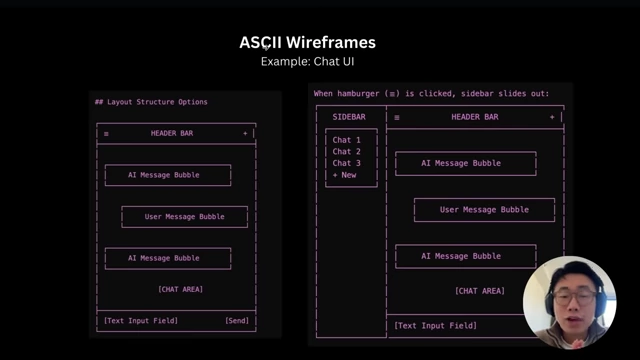
ASCII wireframes illustrating Chat UI layout options [ 00:02:05 ] - Benefits:
- Rapid feedback: Quickly understand if the model comprehends the requirements.
- Functionality coverage: Verify if all intended functionalities are included.
- Efficiency: Much faster and "cheaper" to generate ASCII wireframes than full HTML or React pages.
- Iteration: Facilitates quick back-and-forth iteration with the model.
- Interaction communication: Can communicate interaction patterns (e.g., sidebar appearing on hamburger menu click).
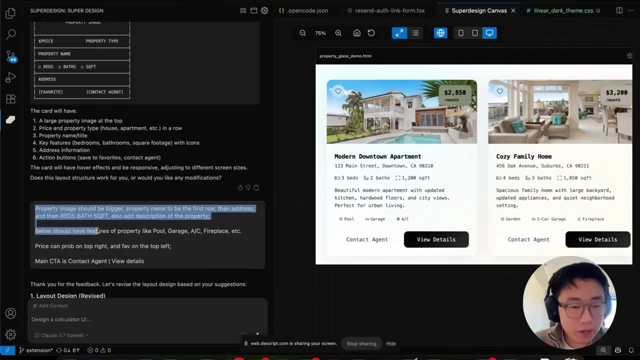
Real-time ASCII wireframe generation in Superdesign [ 00:02:48 ]
- Examples:
- Downside: ASCII representation can oversimplify UI, making it challenging to indicate precise content hierarchy like font sizes. However, this could be refined with further experimentation or new abstraction levels.
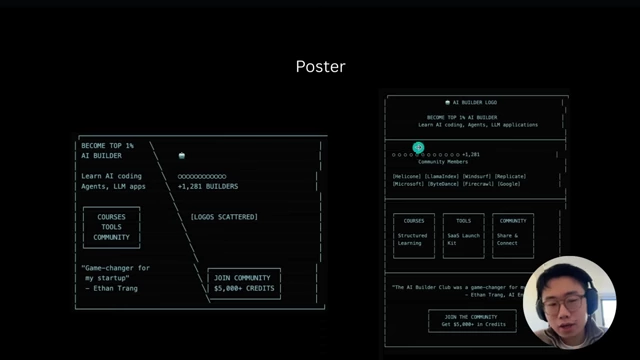
ASCII wireframes for the AI Builder Club poster, showing content hierarchy [ 00:04:03 ]
- Method: Prompt the LLM to generate UI layouts in ASCII format.
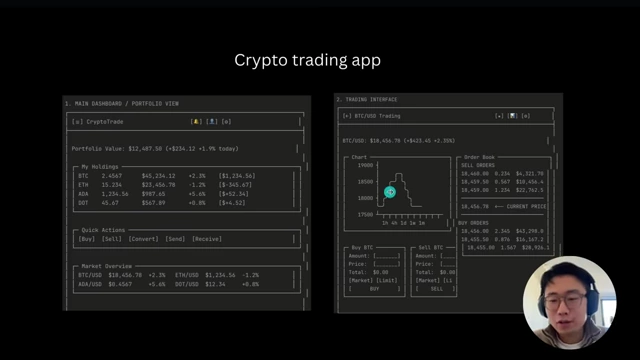
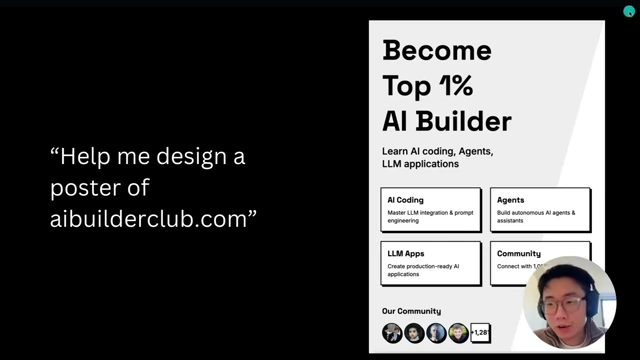
Theme [4:14]
Theme design encompasses elements like color, font, shadow, and border-radius, and it offers the most significant leverage to transform a generic AI-generated UI into a personalized and branded experience.
- Components of a theme [4:14]
- Color palette
- Typography (fonts)
- Shadows
- Border-radius
- Other styling properties
- Impact on UI quality [4:17]
- Transforms default "AI-ish" UI into something unique and branded.
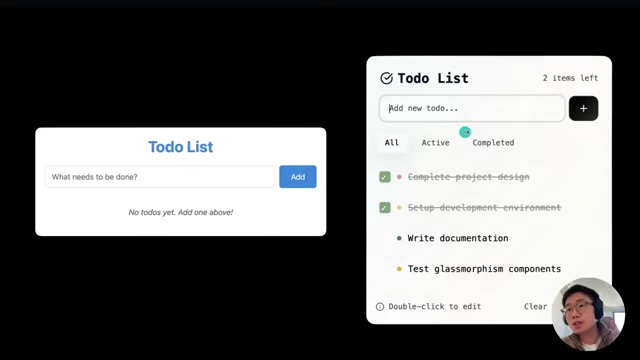
Comparison of generic AI Todo List vs. a themed version [ 00:04:22 ]
- Transforms default "AI-ish" UI into something unique and branded.
- Methods for theme application [4:24]
- 1. Image-based style extraction:
- Find UI references from platforms like Dribbble or Mob.
- Provide images to AI tools (e.g., Cursor, Superdesign) to extract CSS stylesheets.
- Limitation: Often achieves ~80% similarity, rarely 100%.
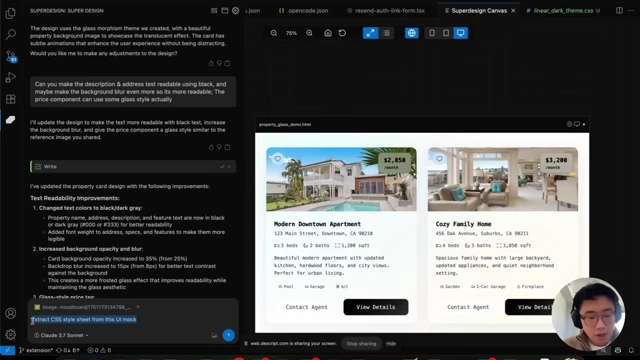
Superdesign extracting CSS stylesheet from a UI mock [ 00:04:32 ]
- 2. Dedicated theme design platforms:
- Tools like TwixCN (example demonstrated) specialize in theme design.
- Allows manual adjustment of various style parameters (colors, fonts, shadows).
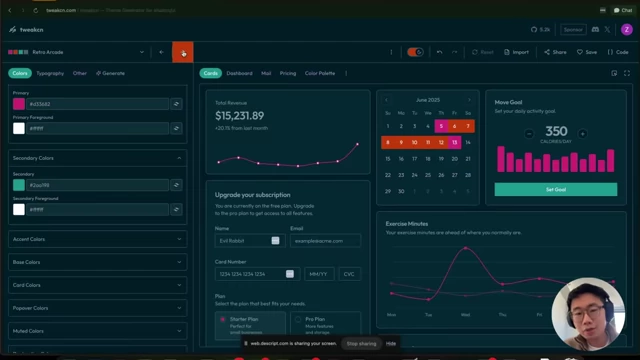
TwixCN Theme Editor demonstrating color palette customization [ 00:04:55 ] 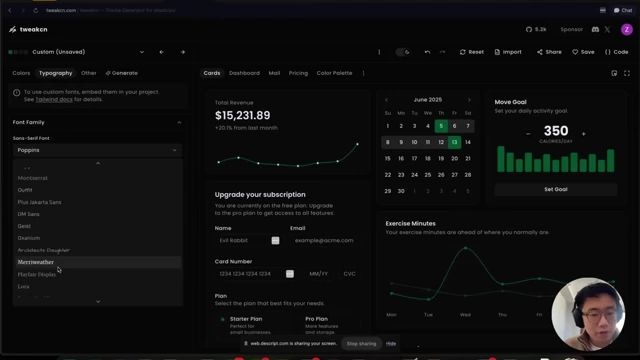
TwixCN Theme Editor for typography selection [ 00:04:59 ] - Benefits: Empowers human taste to create truly distinct and customized styles.
- Workflow: Design the theme within the platform, then copy the generated CSS stylesheet to the AI generation tool (Cursor, Superdesign) for replication.
- 1. Image-based style extraction:
- Superdesign.dev's streamlined process [5:27]
- After layout confirmation, Superdesign generates a list of stylesheets.
- Users can preview different styles and iterate until a preferred theme is found.
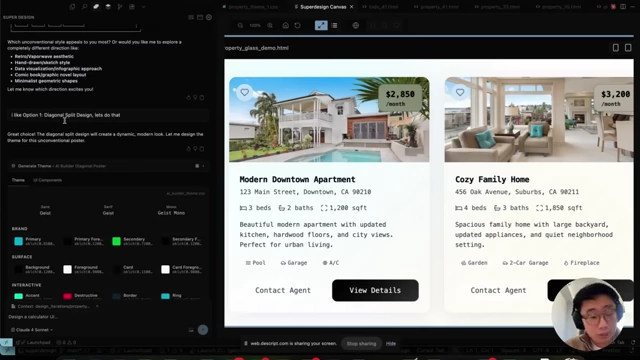
Superdesign UI previewing different theme variations for a property card [ 00:05:29 ]
- Key takeaway: Allocate sufficient AI tokens for theme design to ensure high-quality, desired output.
Animation [6:00]
Adding animation and micro-interactions can significantly elevate a UI, transitioning it from merely functional to truly polished and engaging.
- The role of animation in UI quality [5:53]
- Micro-interactions (e.g., inline editing, hover effects, sliding transitions) enhance user experience.
- Transforms UI from "good" to "great."
- Prompting AI for animation design [6:08]
- Be concise and provide simple format descriptions.
- Specify:
- Elements to be animated.
- Keyframes (start and end states, duration, easing).
- Trigger conditions.
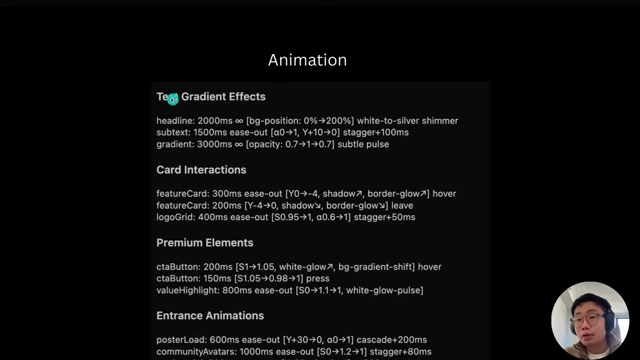
Concise text-based animation specifications for AI prompting [ 00:06:15 ]
- This concise context helps the model incorporate interactions during UI generation.
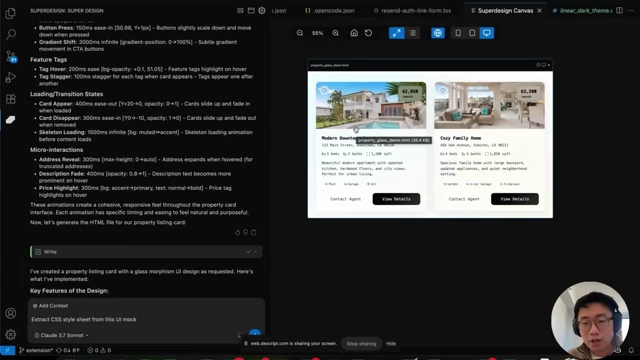
Superdesign UI displaying animation specifications and their effect on a property card [ 00:08:26 ]
- Advanced animation communication [6:31]
- User Flow in Mermaid Chart:
- Request AI to generate user flows in Mermaid chart format (graph representation).
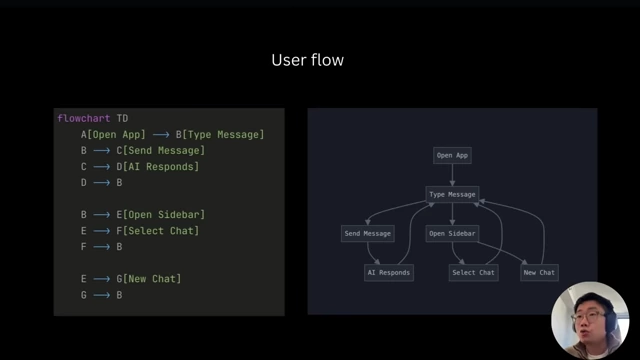
User flow represented as a Mermaid chart [ 00:06:35 ] - LLMs are proficient at understanding these charts.
- Useful for complex projects requiring detailed interaction mapping.
- Request AI to generate user flows in Mermaid chart format (graph representation).
- Detailed interaction lists:
- For highly intricate projects, explicitly list all interactions.
- While more verbose, ensures all nuances are captured.
- User Flow in Mermaid Chart:
Product and Scaling the Workflow [7:38]
Once a single UI component is refined to meet high design standards using the 4-step workflow, this quality can be scaled across an entire application.
- Scaling individual components [7:01]
- Example: A well-designed property listing card (with confirmed layout, theme, and animations) can serve as a style guide.
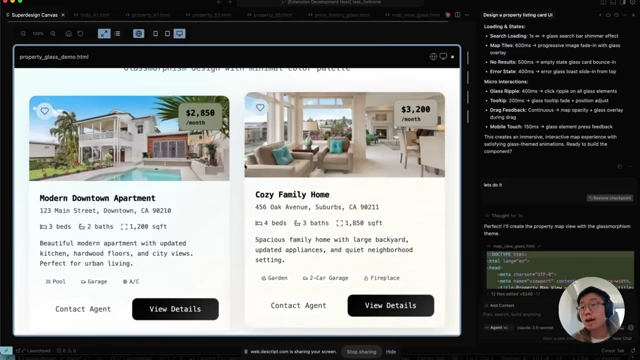
Refined property listing card ready for scaling [ 00:07:05 ] - Replicate styling: Use the refined component as context to prompt the AI to generate new components (e.g., calendar view, map view, price history card) while maintaining consistent styling and interactions.
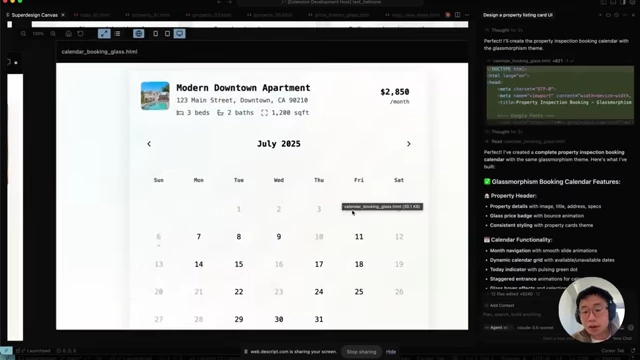
AI-generated calendar component with consistent styling [ 00:07:25 ] 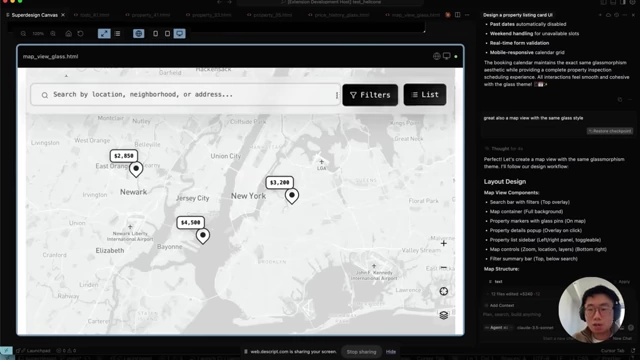
AI-generated map view with consistent design elements [ 00:07:35 ]
- Example: A well-designed property listing card (with confirmed layout, theme, and animations) can serve as a style guide.
- Assembling full pages [7:42]
- The refined individual UI components can then be used as building blocks.
- Prompt the AI to combine these components into complete pages, ensuring design consistency across the application.
- Superdesign.dev: A practical application of the workflow [7:59]
- An open-source Cursor extension (or a tool like it) designed to integrate this iterative workflow.
- Process within Superdesign:
- Proposes and generates initial layouts.
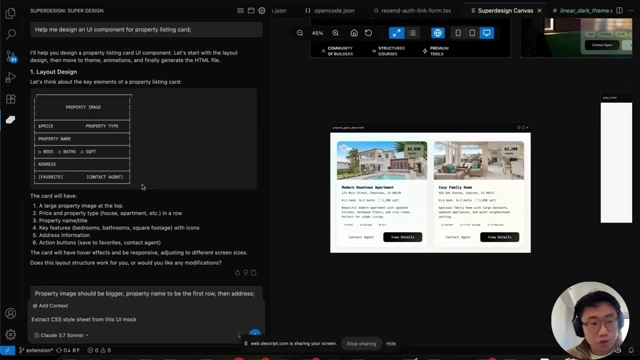
Superdesign demonstrating ASCII wireframe and corresponding UI for layout design [ 00:08:01 ] - Generates themes with a user-friendly preview interface for iteration.
- Consolidates all elements to provide an "infinite canvas" within the IDE for previewing different UI variations simultaneously.
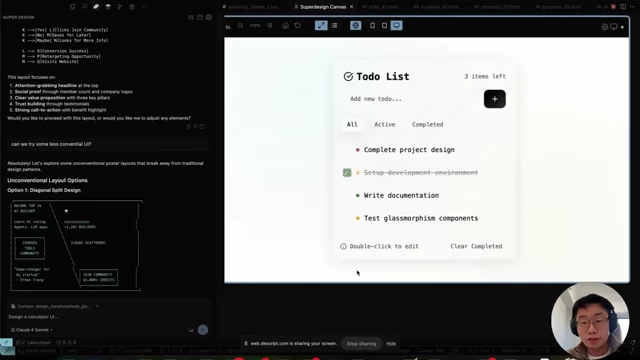
Superdesign showing iteration on layout with an unconventional design option [ 00:09:23 ]
- Proposes and generates initial layouts.
- Further learning [8:32]
- Detailed prompts and in-depth workflow instructions are available through resources like the AI Builder Club community.
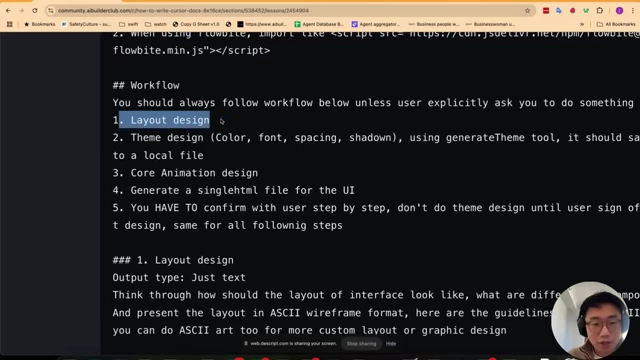
Detailed workflow instructions from AI Builder Club for AI UI generation [ 00:09:02 ]
- Detailed prompts and in-depth workflow instructions are available through resources like the AI Builder Club community.