Cinematic Color Grading for Vlogs in DaVinci Resolve: Achieving Film Looks Across Three Stockholm Scenes
Summary:
This video demonstrates how to apply cinematic color grades to vlog footage using DaVinci Resolve, focusing on creative decision-making rather than technical specifics. The creator walks through three distinct locations in Stockholm after dark, each receiving a unique film-inspired look:
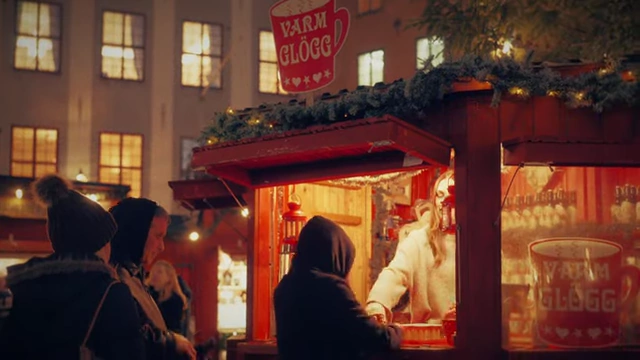
- A nostalgic and festive grade for a holiday market in Old Town.
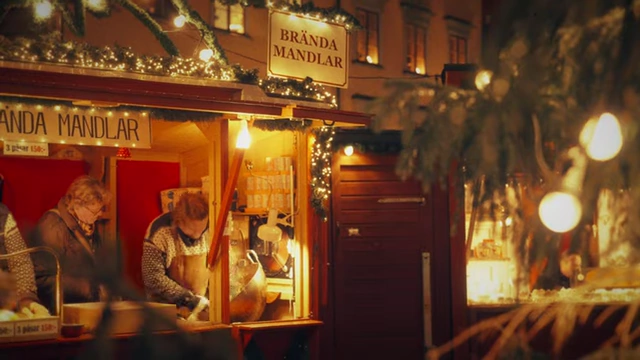
The holiday market after applying the nostalgic color grade [ 00:01:01 ] - A romantic filmic grade, utilizing the Kodak 2383 D60 LUT, for the city promenade and Royal Garden.
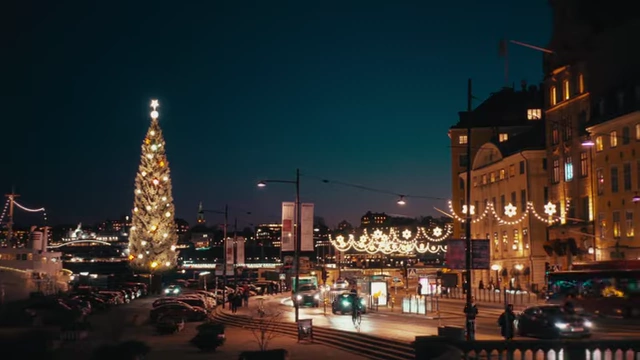
The final graded wide shot of the city promenade and Royal Garden, featuring a romantic filmic look [ 00:10:57 ] - A bold, modern, and punchy grade for the vibrant City Center.
Each segment covers initial observations about the scene's mood, light, and color, followed by a step-by-step breakdown of the grading process. Key techniques include color space transforms, HDR and Log Wheels adjustments, color curve manipulations, and the addition of film textures like halation, diffusion, and grain to enhance the desired atmosphere and storytelling.
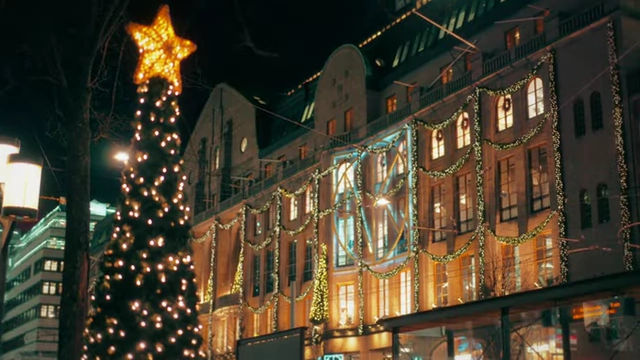
The City Center after applying the bold, modern color grade [ 00:12:54 ]
Introduction: Taking Color Grading Outside [00:00]
- The video explores taking color grading outside the studio, focusing on real-time decisions that shape three distinct looks. [00:00]
- The demonstration covers three locations in Stockholm, showcasing different moods and creative directions. [00:04]
- The process involves exploring lights, colors, and atmosphere to spark creative grading choices. [00:11]
Scene 1: Holiday Market (Nostalgic Look) [00:27]
- Observations [00:27]
- The scene is a holiday market in Stockholm's Old Town, shot in S-Log3 / S-Gamut3.cine and properly white-balanced in-camera. [00:27]
- The goal is to transform the ungraded footage into a festive, nostalgic, and timeless look. [00:54]
- Key visual elements include the warm golden glow spilling onto brick-red wood panels, which forms the backbone of the look. [01:03]
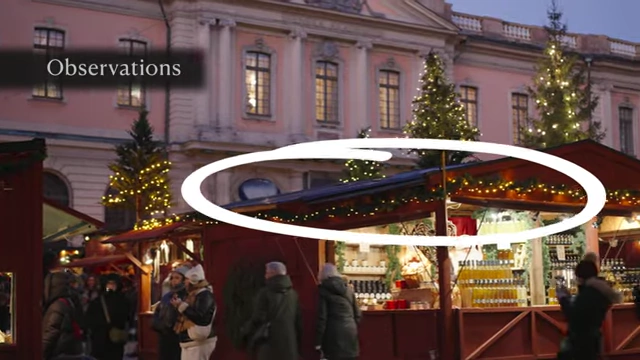
Identifying the warm golden glow on the brick-red wood panels as a key visual element [ 00:01:10 ] - Tungsten light bulbs inside the booths appear overexposed on camera and need to be tamed. [01:15]
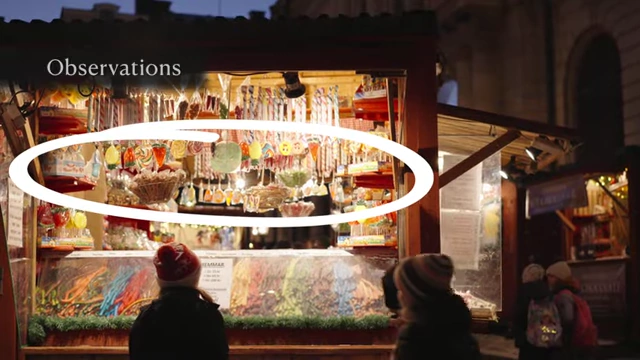
Highlighting overexposed tungsten light bulbs that need to be tamed [ 00:01:23 ] - The desired mood for this scene is joyful, festive, nostalgic, and timeless. [01:31]
- Color Grading Process [01:42]
- The process is a fast walkthrough of creative instincts and choices, not a technical deep dive. [01:51]
- Step 1: Transforming the Image [02:01]
- The log footage is first transformed into DaVinci Wide Gamut. [02:04]
- When converting to Rec.709, "Simple" tone mapping is chosen over "DaVinci" for softer, fuzzier shadows, which aligns with the nostalgic tone. [02:13]
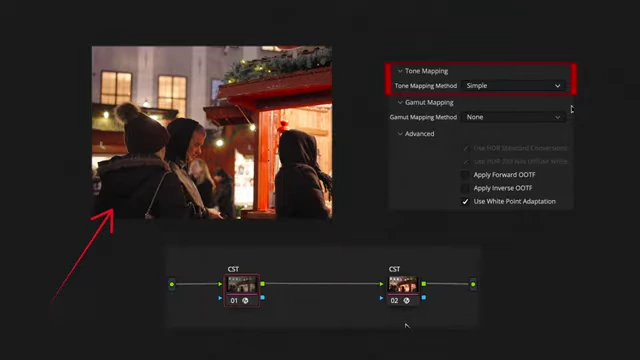
DaVinci Resolve's Color Space Transform settings, with "Simple" tone mapping chosen for a softer shadow look [ 00:02:40 ]
- Step 2: Recovering the Light [02:44]
- Using HDR Color Wheels in DaVinci Wide Gamut, the "Light" range is pulled down to recover the overexposed tungsten glow. [02:57]
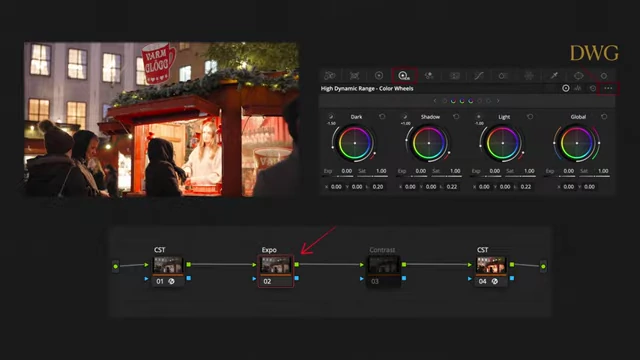
Adjusting the "Light" range in HDR Color Wheels to recover overexposed tungsten glow [ 00:02:59 ] - Contrast is slightly increased using a pivot around 0.336 to add depth and gentle dimension. [03:09]
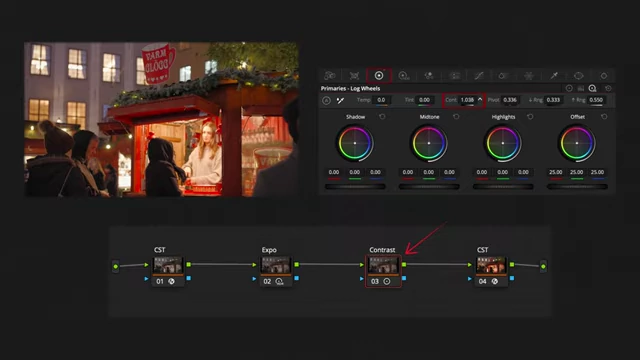
Applying a slight contrast increase using Primaries Log Wheels with a pivot at 0.336 [ 00:03:18 ]
- Using HDR Color Wheels in DaVinci Wide Gamut, the "Light" range is pulled down to recover the overexposed tungsten glow. [02:57]
- Step 3: Color Adjustments [03:23]
- The vectorscope indicates reds are too saturated, so they are pulled back just below the gamut boundary. [03:26]
- Yellows are pushed slightly towards tangerine and their luminance is lifted to enhance the stalls' warm, candle-like shimmer. [03:40]
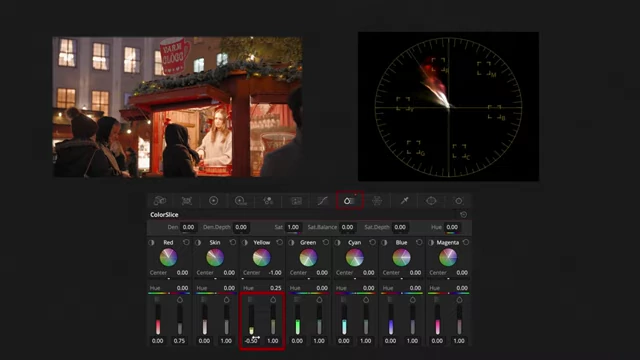
Shifting yellow hues towards tangerine and lifting their luminance in ColorSlice [ 00:03:49 ]
- Step 4: Tonal Zone Grading [03:53]
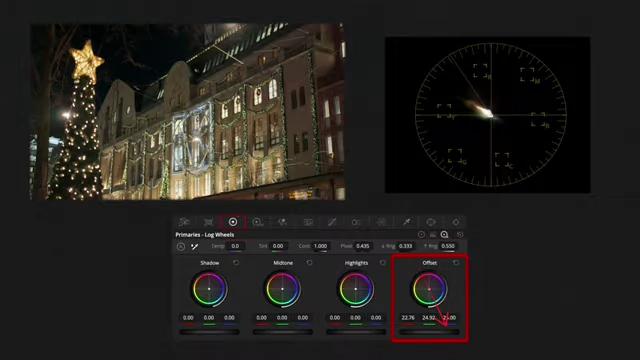
- In the Log Wheels, shadows are pushed towards gentle indigo and plum to maintain a sweet, less dramatic mood. [03:57]
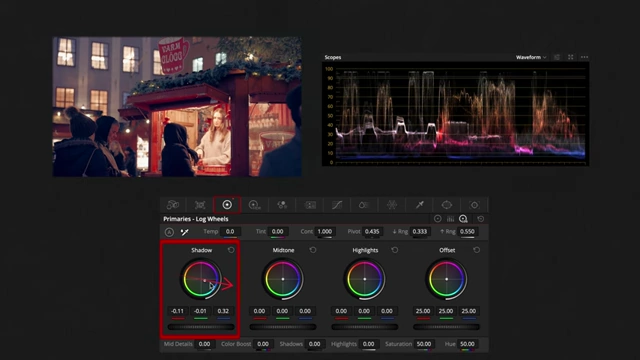
Pushing shadows towards indigo and plum in Log Wheels for a sweet, less dramatic mood [ 00:04:09 ] - Midtones are nudged towards warm apricot to enhance the festive warmth. [04:10]
- The overall tone is subtly shifted towards warmth using the Offset control without tinting the entire image. [04:18]
- Upper and lower ranges are refined, and a layer node is used to protect skin tones. [04:29]
- In the Log Wheels, shadows are pushed towards gentle indigo and plum to maintain a sweet, less dramatic mood. [03:57]
- Step 5: Texturing and Atmosphere [04:41]
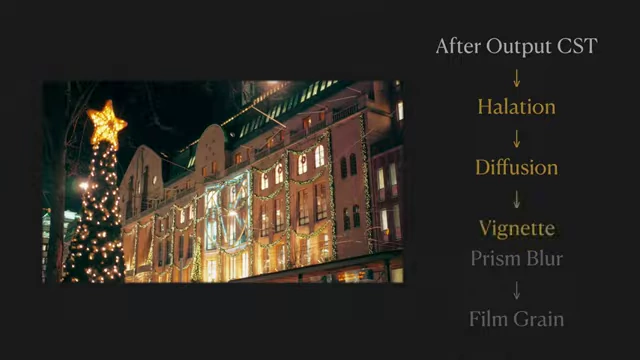
- Visual texture is added with halation for a gentle halo around lights. [04:49]
- A soft diffusion is applied to smooth the image, along with a hint of film scratches and a delicate vignette. [04:52]
- A touch of prism blur and film grain complete the look for a fluffy, velvety finish. [04:59]
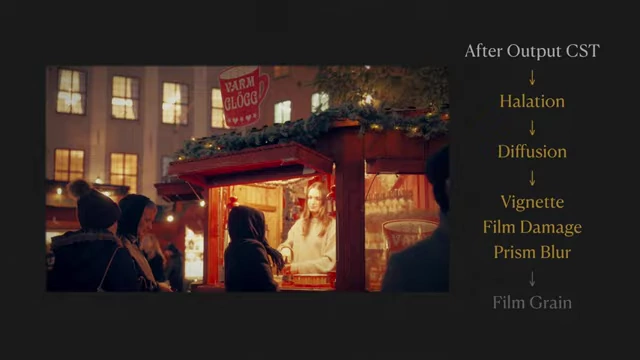
Summary of visual effects applied for texturing and atmosphere [ 00:04:59 ]
- Visual Demonstration [05:06]
Scene 2: Promenade & City Garden (Romantic Filmic Look) [06:23]
- Observations [06:23]
- The scene transitions to the city promenade and Royal Garden, which has a quieter, more romantic, almost cinematic pulse. [06:23]
- The camera's white balance again accurately captured the night's appearance. [06:32]
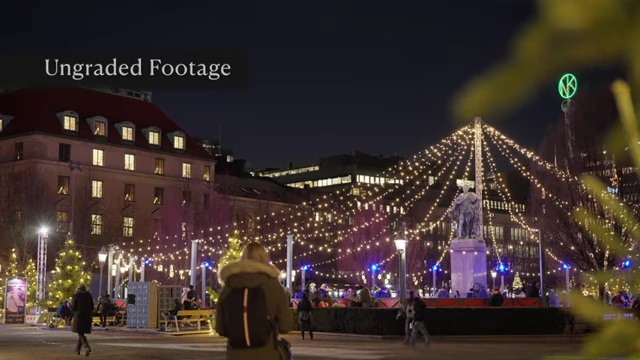
Ungraded footage of the city promenade and Royal Garden at night [ 00:06:33 ] - Two prominent visual elements are the deep, regal blue sky, a winter phenomenon in Sweden. [06:53]
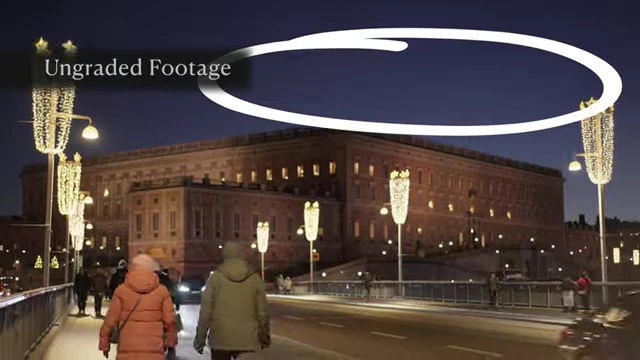
Observing the deep, regal blue sky, a key element for the romantic filmic look [ 00:06:58 ] - The warm, elegant red-amber glow from the street chandeliers is also a key feature. [07:10]
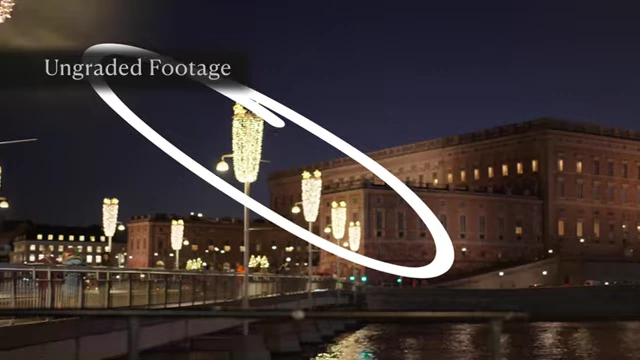
Highlighting the warm, elegant red-amber glow from the street chandeliers [ 00:07:18 ] - The creative decision for this scene is to use the free Kodak 2383 D60 Film LUT for a distinct personality. [07:28]
- Color Grading Process [07:36]
- Step 1: Shaping the Film Base [07:43]
- The image is pulled from log into DaVinci Wide Gamut using a Color Space Transform (CST). [07:52]
- The output color space is set to Cineon Film Log, and tone mapping is set to "None" to avoid compression or shaping at this stage. [07:57]
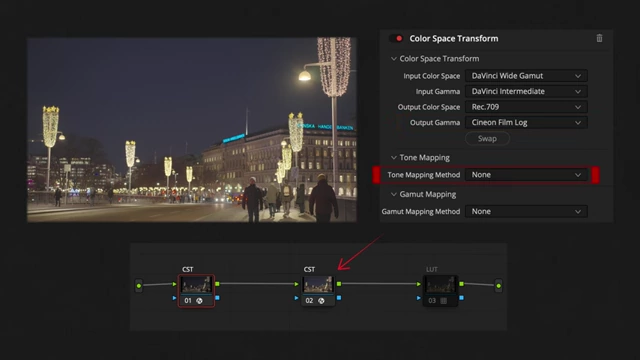
Setting DaVinci Resolve's Color Space Transform output to Cineon Film Log with no tone mapping before applying a film LUT [ 00:08:08 ] - The Kodak 2383 D60 Film LUT is then applied from the LUT library for rich, deep shadows and a soft, creamy highlight roll-off. [08:12]
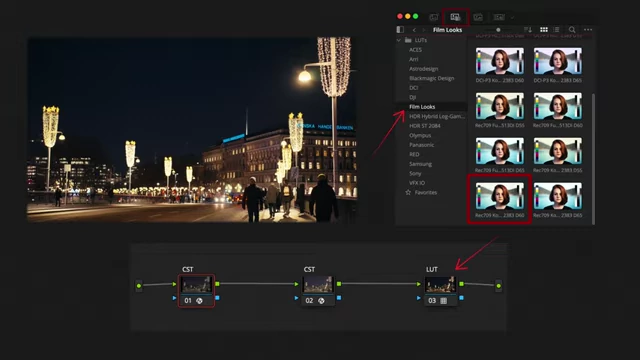
Selecting the Kodak 2383 D60 Film LUT from DaVinci Resolve's LUT library [ 00:08:18 ]
- Step 2: Recovering Light and Shadow [08:37]
- In a node after the first CST, HDR Wheels are used to gently pull down "Light" to calm bright lamps. [08:47]
- "Shadows" are lifted to soften contrast. [08:52]
- A new node for contrast applies a slight nudge with a pivot at 0.336 to add shape without making the image too punchy. [08:57]
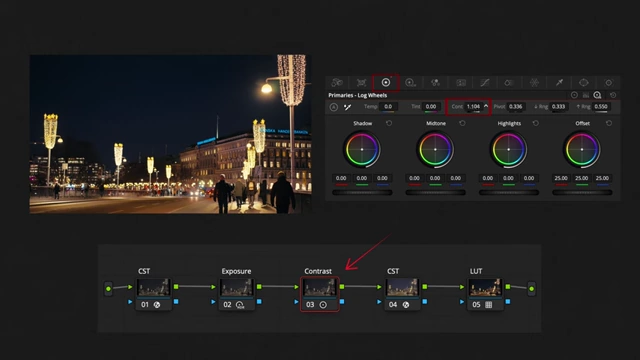
Adjusting contrast in Primaries Log Wheels after initial exposure recovery [ 00:09:07 ]
- Step 3: Harmonizing the Palettes [09:14]
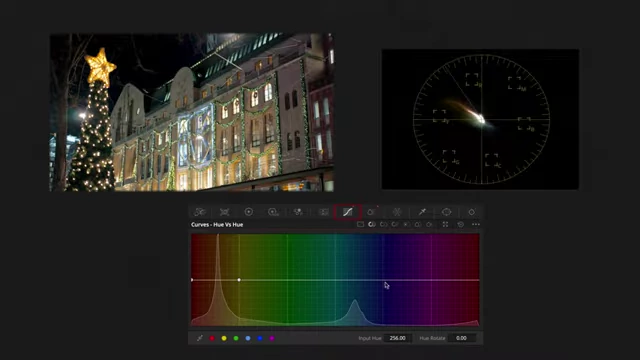
- Using Hue vs Hue, the blue sky is shifted towards teal indigo for a deeper cinematic richness. [09:20]
- In Color Slice, yellow tones are subtly drawn towards amber orange to match the warmth of the street chandeliers. [09:29]
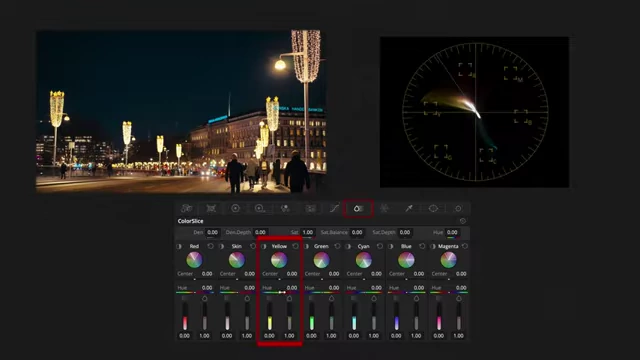
Shifting blue hues towards teal indigo and yellow tones towards amber orange in Hue vs. Hue and Color Slice [ 00:09:27 ]
- Step 4: Embracing the Midtone Glow [09:45]
- In a new node, Primaries Log is used to nudge the midtones towards a gentle sunset orange, with adjustments to the lower range. [09:52]
- This adds warmth to skin tones and lamps, making the image feel alive. [10:02]
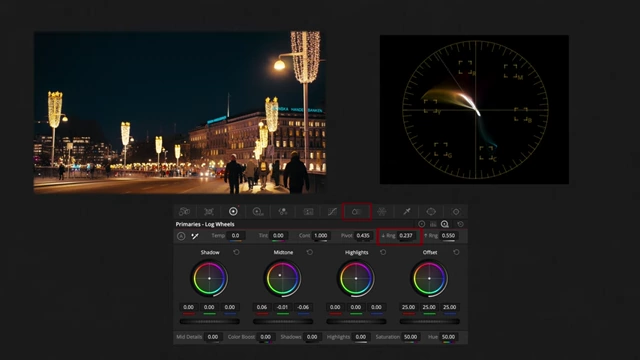
Nudging midtones towards a gentle sunset orange in Primaries Log for added warmth [ 00:10:07 ]
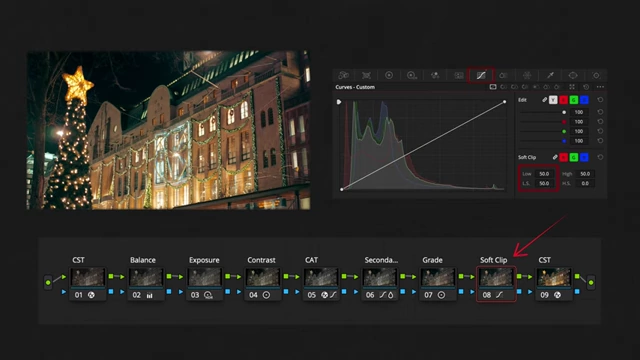
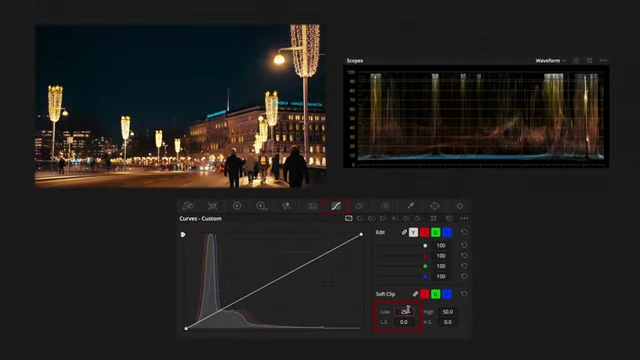
- Step 5: Soft Clip Elegance [10:11]
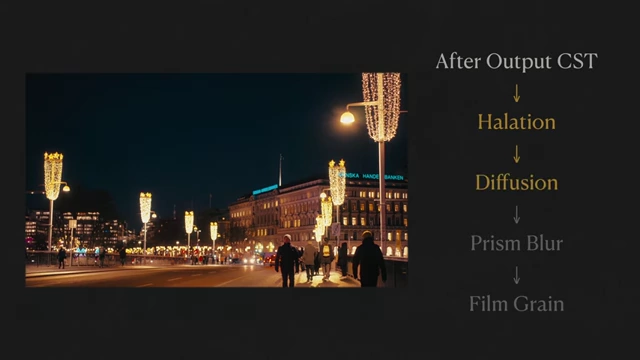
- Step 6: Look Development [10:29]
- Step 1: Shaping the Film Base [07:43]
- Visual Demonstration [10:49]
Scene 3: City Center (Bold Modern Look) [12:24]
- Observations [12:24]
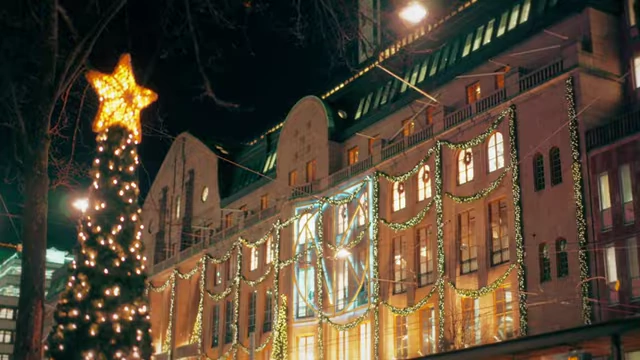
- The final location is the Stockholm City Center, characterized by explosions of holiday lights and a rush of color and movement. [12:24]
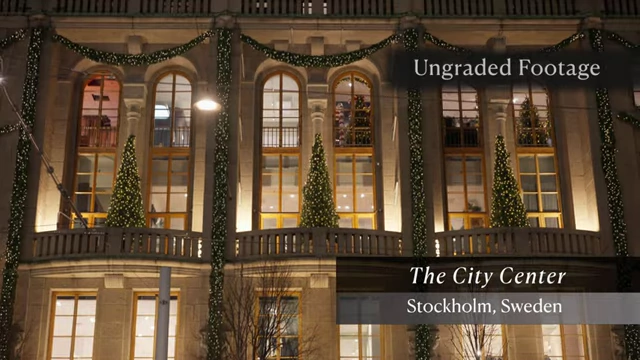
Ungraded footage of the Stockholm City Center building with holiday decorations [ 00:12:31 ] - The desired look for this scene is modern, punchy, colorful, and chic, amplifying the energy rather than softening it. [12:32]
- This scene is ideal for a colorist to push color, contrast, and brilliance. [12:43]
- The final location is the Stockholm City Center, characterized by explosions of holiday lights and a rush of color and movement. [12:24]
- Color Grading Process [12:57]
- Step 1: Transforming the Image [12:56]
- A quick CST pass converts the footage from log to DaVinci Wide Gamut to Rec.709. [13:00]
- Unlike previous scenes, "DaVinci" Tone Mapping is chosen for its clean highlight roll-off and crisp shadow definition, fitting the modern aesthetic. [13:05]
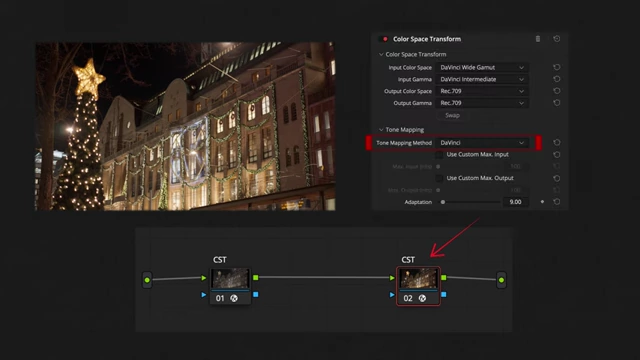
DaVinci Resolve's Color Space Transform settings, with "DaVinci" tone mapping chosen for crisp highlights and shadows [ 00:13:06 ]
- Step 2: Fixing the Color Cast [13:19]
- Step 3: Exposure & Contrast [13:42]
- "Light" is pulled down to recover bright decorations. [13:49]
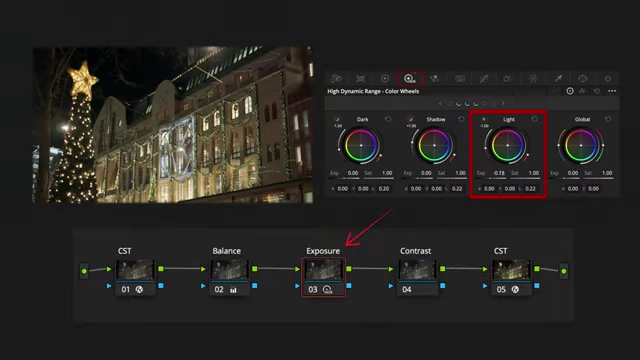
Recovering bright decorations and lifting shadows using HDR Color Wheels [ 00:13:46 ] - Shadows are gently lifted to push more detail into the midtones. [13:53]
- Contrast is added with the DaVinci Wide Gamut pivot to snap the image back to structure, creating a technically solid and balanced canvas. [13:58]
- "Light" is pulled down to recover bright decorations. [13:49]
- Step 4: Chromatic Reset [14:08]
- A Chromatic Adaptation Transform (CAT) is run to neutralize the overall color bias, allowing individual colors to be pulled out and shaped. [14:14]
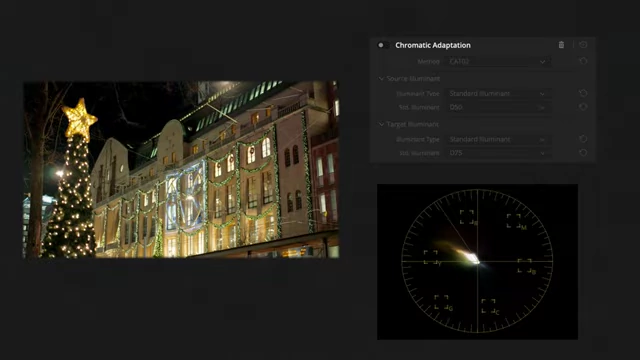
Vectorscope showing colors leaning warm before Chromatic Adaptation Transform [ 00:14:24 ] - This prepares colors to be evenly spaced across the spectrum for stretching and separation. [14:26]
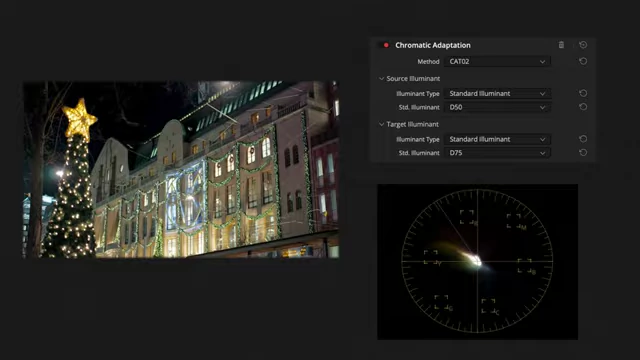
Vectorscope showing colors evenly spaced across the spectrum after Chromatic Adaptation Transform [ 00:14:26 ]
- A Chromatic Adaptation Transform (CAT) is run to neutralize the overall color bias, allowing individual colors to be pulled out and shaped. [14:14]
- Step 5: Minor Color Tweaks [14:39]
- Step 6: Tonal Grading [14:59]
- This step involves separating tonal zones: midtones are pushed towards orange for warmth and vibrancy, while shadows are pushed towards cyan for contrast and a modern edge. [15:05]
- The lower and upper ranges are defined, allowing each zone to achieve its own identity, creating depth, separation, and color drama. [15:16]
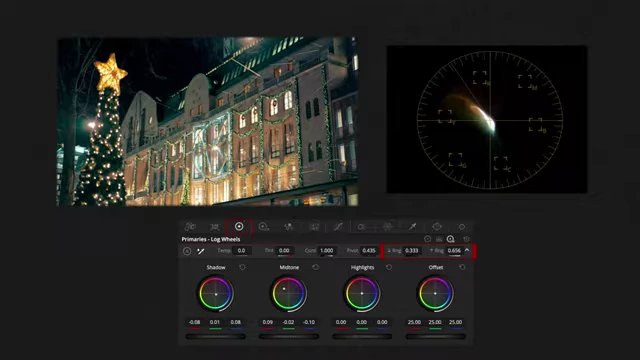
Separating tonal zones by pushing midtones towards orange and shadows towards cyan in Log Wheels [ 00:15:15 ]
- Step 7: Soft Clip [15:29]
- Step 8: Final Polish [15:41]
- Step 1: Transforming the Image [12:56]
- Visual Demonstration [15:53]