Efficient CI/CD Pipelines: Patterns and Antipatterns
This video discusses common CI/CD pipeline antipatterns and suggests best practices to build efficient and less frustrating pipelines. The speaker outlines 9 antipatterns and corresponding patterns, focusing on reducing frustration, boredom, and environmental impact.
- Antipattern 1: The Ritual – Running all steps all the time, regardless of relevance.
- Pattern 1: The Right Pipeline for the Job – Tailor pipeline steps to specific situations (e.g., PR, merge, nightly).
- Pattern 2: Conditional Pipeline Steps – Use logic to run only necessary steps based on changed modules.
- Antipattern 2: Hoarding – Keeping all artifacts forever, leading to storage issues and poor discoverability.
- Antipattern 3: The Aesthete – Ordering steps "naturally" instead of prioritizing faster feedback on failures.
- Pattern 3: Fail Fast – Arrange steps to run the most failure-prone tasks earliest.
- Antipattern 4: The One Pipeline – Using a single, long pipeline for everything, leading to long feedback loops.
- Pattern 4: Parallel Pipelines – Split into multiple parallel pipelines and use temporary artifacts for dependencies.
- Antipattern 5: Gift Wrapping – Using wrapper tasks instead of calling command-line tools directly, limiting flexibility.
- Pattern 5: Composable Pipeline Library – Build reusable, composable actions, or define pipeline logic in scripts.
- Antipattern 6: It's Complicated / Entangled – Making the pipeline its own complex software project, making it hard to change or migrate.
- Pattern 6: Scripted Pipeline – Offload complex logic to platform-agnostic scripts (e.g., Makefiles, PowerShell).
- Antipattern 7: Groundhog Day – Starting from scratch every time, neglecting caching opportunities.
- Pattern 7: Caching – Implement dependency and build output caching to significantly speed up pipelines.
- Pattern 8: Tooling Images – Bundle frequently used tools into cached Docker images for faster setup.
- Antipattern 8: Interference – Colliding with other pipelines due to shared, non-unique resources (e.g.,
latesttags, hardcoded database names). - Antipattern 9: Overloading – Running pipelines on underpowered machines.
- Pattern 9: Proper Build Agent Sizing – Ensure build agents are at least as powerful as the least powerful developer machine, or ideally the most powerful.
- Run Your Own Agents (Pros/Cons) – Discusses pros (control, right-sizing) and cons (maintenance, scaling, cost) of self-hosted agents.
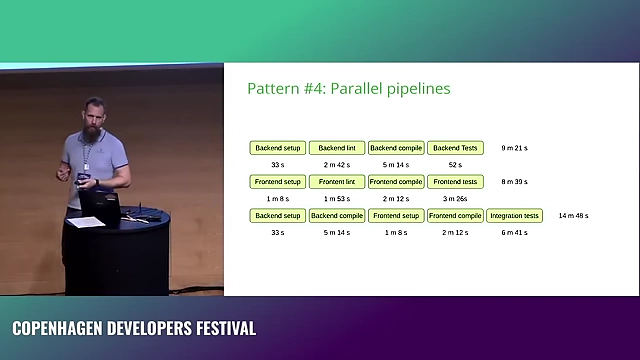
Comparison of a single, monolithic pipeline (top) versus parallelized pipelines (bottom) for backend, frontend, and integration tests, showing a reduction in perceived runtime. [ 00:17:53 ]
Introduction to CI/CD Pipeline Efficiency [0:00:19]
The speaker, Daniel Raniz Raneland, shares his experience migrating and working with various company pipelines, highlighting common issues that lead to frustration, boredom, and environmental impact. The goal of the talk is to address these problems by presenting patterns and antipatterns.
Antipattern 1: The Ritual - Doing Everything All the Time [0:02:46]
This antipattern involves pipelines running the exact same steps regardless of the trigger or context (e.g., pull request, merge to main, nightly run).
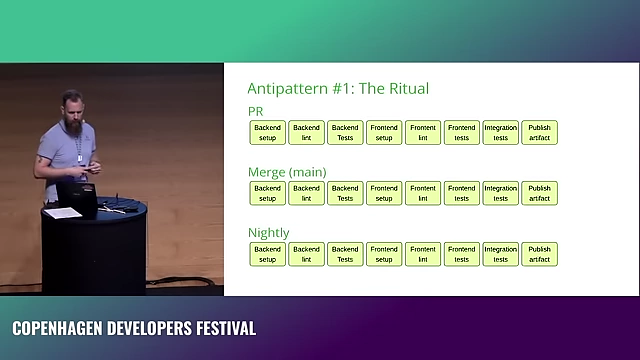
Problem Description [0:02:51]
- Example Scenario: A pipeline might include backend setup, linting, testing, frontend setup, linting, testing, integration tests, and even publishing an artifact for a pull request, merge to main, and nightly runs.
- Inefficiency: Many steps are unnecessary depending on the run type (e.g., publishing an artifact on a pull request, running linting and unit tests nightly if code hasn't changed).
- Wasted Resources: Unnecessary steps prolong pipeline execution, consuming more computing resources and increasing environmental impact.
Pattern 1: The Right Pipeline for the Job [0:05:36]
- Tailored Execution: Adapt pipeline steps to the specific situation.
- Pull Request: Run all tests (unit, integration) but skip publishing artifacts.
- Merge to Main: Run tests and publish artifacts, but skip linting if code quality has already been checked.
- Nightly: Only run integration tests to check external dependencies, as unit tests and linting should not fail if code hasn't changed.
Pattern 2: Conditional Pipeline Steps [0:06:11]
- Smart Execution: Add logic to run only the steps relevant to the changes made.
- Example: If only frontend code changes, skip backend setup, linting, and unit tests. If only backend code changes, skip frontend tasks. Integration tests should still run in both cases as they cover the interaction between components.
- Implementation (GitHub Actions):
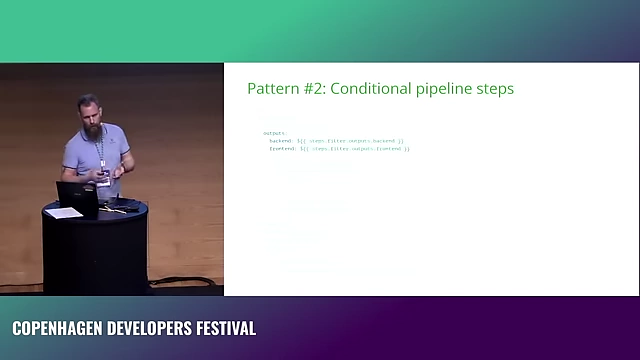
GitHub Actions YAML demonstrating conditional pipeline steps using output from a `paths-filter` job to run backend linting only if backend files have changed. [ 00:09:34 ] - Use a pre-job to identify changed files and map them to logical modules (e.g., backend, frontend).
- Export these flags as job outputs.
- Use
ifconditions in subsequent steps to execute them only when their corresponding module has changed. - This reduces pipeline runtime and resource usage.
Antipattern 2: Hoarding - Keeping All Artifacts Forever [0:10:15]
This antipattern involves indefinitely storing all produced artifacts (e.g., binaries, Docker images), which leads to storage issues and poor discoverability.
Problem Description [0:10:20]
- Storage Issues: Accumulation of old, unused artifacts fills up storage, potentially causing pipeline failures (disk full).
- Lack of Relevance: Older artifacts are rarely used as systems, dependencies, and environments evolve, making them undeloyable.
- Discoverability: Searching for a specific artifact among thousands of old versions becomes extremely difficult (e.g., 63 pages of Docker image tags).
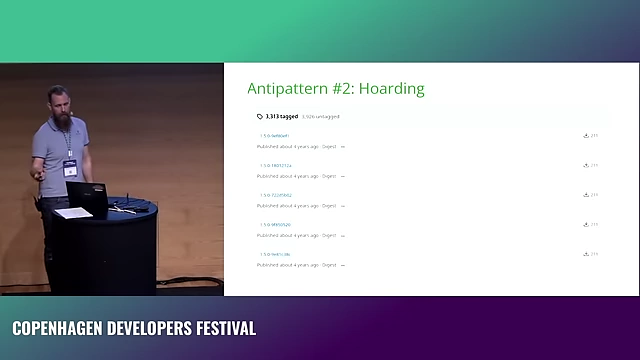
An example of artifact hoarding, showing 63 pages of Docker image tags, most of which are old and unlikely to be used again, making discoverability difficult. [ 00:12:12 ]
Solution: Delete Regularly [0:12:33]
- Retention Policies: Implement policies to automatically delete artifacts older than a certain period (e.g., one week). Rebuilding an artifact from source is usually feasible if needed.
Antipattern 3: The Aesthete - Natural Instead of Practical Ordering [0:12:47]
This antipattern refers to structuring pipeline steps in a "natural" sequence (e.g., setup, lint, compile, unit test, integration test, end-to-end test) rather than an optimal one that provides faster feedback on failures.
Problem Description [0:12:56]
- Delayed Feedback: If the most common or expensive failures occur late in the pipeline (e.g., integration tests failing after 13 minutes), developers waste significant time waiting for feedback.
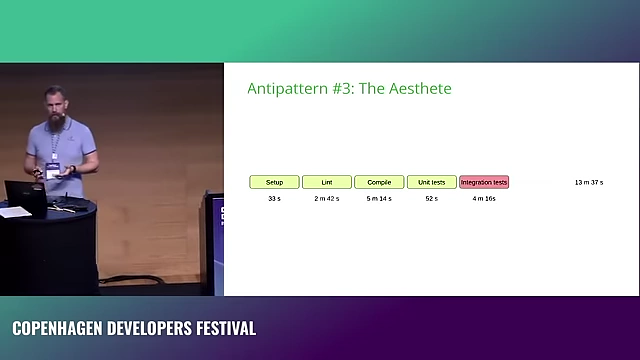
Pipeline stages ordered 'naturally,' where integration tests (highlighted in red) fail after 13 minutes, delaying feedback due to non-optimized step order. [ 00:13:55 ] - Context Switching: Long waiting times encourage developers to context switch, leading to productivity loss.
Pattern 3: Failing Fast [0:14:26]
- Prioritize Failure-Prone Steps: Identify which steps fail most frequently and move them earlier in the pipeline, provided there are no hard dependencies.
- Example: If integration tests commonly fail, run them immediately after compilation (and necessary setup), even before unit tests or linting if possible. This can reduce feedback time significantly.
Antipattern 4: The One Pipeline - One Pipeline to Rule Them All [0:15:04]
This antipattern is characterized by a single, monolithic pipeline that performs all tasks sequentially for all components (e.g., backend and frontend).
Problem Description [0:15:06]
- Long Execution Times: Sequential execution of many steps, especially for multiple components, results in very long pipeline runtimes (e.g., 25 minutes).
- Forced Context Switching: Extended waiting periods force developers to switch tasks, disrupting workflow.
Pattern 4: Parallel Pipelines [0:17:02]
- Component-Based Parallelization: Split the monolithic pipeline into multiple, independent pipelines that can run in parallel for different components (e.g., one for backend, one for frontend, one for integration tests).
Comparison of a single, monolithic pipeline (top) versus parallelized pipelines (bottom) for backend, frontend, and integration tests, showing a reduction in perceived runtime. [ 00:17:53 ] - Temporary Artifacts: Use temporary artifacts to pass outputs from one pipeline to another, avoiding redundant compilation steps. The integration test pipeline can depend on artifacts produced by the backend and frontend pipelines.
- Improved Efficiency: Reduces the overall perceived pipeline run time (e.g., from 25 minutes to less than 15 minutes), providing quicker feedback.
- Scalability: Cloud-based CI/CD platforms offer "infinite" parallelization, making this pattern highly effective. On-premise setups are limited by available build servers.
Antipattern 5: Gift Wrapping - Using Wrapper Tasks to Execute Command-Line Tools [0:20:25]
This antipattern involves using generic wrapper actions or tasks (e.g., a GitHub Action that wraps cargo build) instead of directly invoking the underlying command-line tools.
Problem Description [0:21:08]
- Limited Flexibility: Wrapper tasks constrain users to the arguments and features supported by the action's maintainer.
- Maintenance Dependency: New features or specific arguments might require waiting for the wrapper to be updated or forking the project if abandoned.
- Hidden Magic: Wrappers can introduce unexpected behavior or modify commands in ways not immediately apparent, making debugging difficult.
Pattern 5: Composable Pipeline Library (with Direct Tool Calls) [0:21:56]
- Direct Command-Line Invocation: Call command-line applications directly within pipeline steps, using multi-line YAML for readability. This provides full control over arguments and execution.
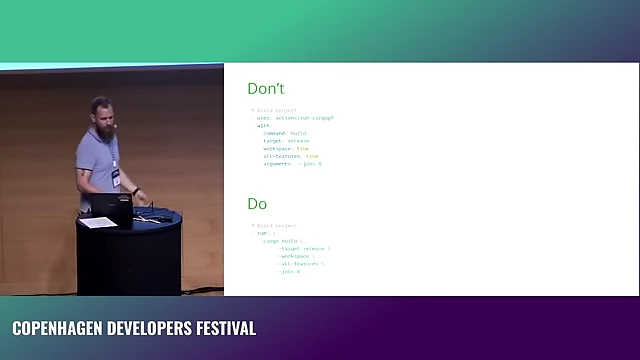
Comparison of 'Gift Wrapping' (Don't) using a wrapper action versus 'Composable Pipeline Library' (Do) directly invoking `cargo build` with full control over arguments. [ 00:22:14 ] - Leverage Setup Tasks: Use dedicated setup tasks (e.g.,
setup-python,setup-poetry) to install specific tool versions, but then execute the tools themselves directly. - Composable Actions (GitHub Actions): Create reusable, composable actions for common complex operations (e.g.,
compile-rust,test,publish-artifact). These actions can accept arguments to customize their behavior, promoting reusability without sacrificing control.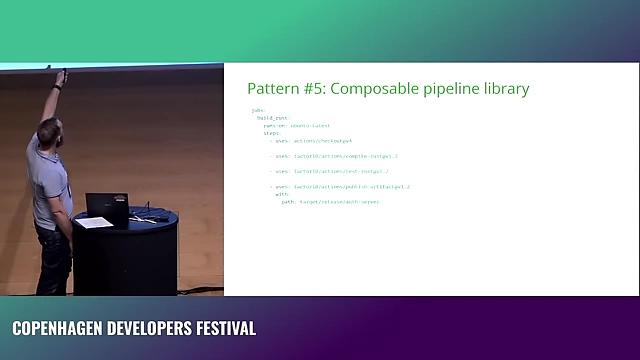
GitHub Actions YAML demonstrating a composable pipeline library using custom, reusable actions for `compile-rust`, `test-rust`, and `publish-artifact`. [ 00:26:01 ]
Antipattern 6: It's Complicated - The Pipeline is its Own Software Project [0:23:56]
This antipattern occurs when pipeline logic becomes excessively complex, often written in a platform-specific language or library, making it difficult to understand, maintain, or migrate.
Problem Description [0:24:02]
- High Complexity: Pipelines become large, custom-built applications with their own bug trackers and versioning systems.
- Vendor Lock-in: Logic deeply embedded in a specific CI platform's language (e.g., Jenkins Groovy) makes migration to other platforms extremely challenging.
- Difficult to Test Locally: Debugging pipeline issues requires running the full pipeline on the CI system, leading to long feedback loops.
Pattern 6: Scripted Pipeline [0:28:39]
- Externalize Complex Logic: Move complex build and test logic out of the pipeline definition and into platform-agnostic scripts (e.g., Makefiles, shell scripts, Powershell scripts).
- Simplify Pipeline Definition: The pipeline merely calls these scripts, keeping its definition clean and readable.
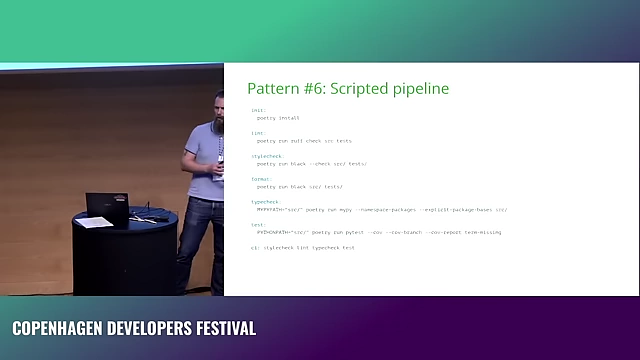
A Makefile illustrating a 'Scripted Pipeline' pattern, where complex build and test logic is externalized from the CI definition into platform-agnostic scripts, enabling local debugging. [ 00:30:56 ] - Local Debugging: Scripts can be run and debugged locally on a developer's machine, providing instant feedback and significantly speeding up development and debugging.
- Portability: Decoupling logic from the CI platform makes it easier to migrate between different CI/CD systems.
Antipattern 7: Groundhog Day - Starting from Scratch All the Time [0:31:32]
This antipattern refers to pipelines that always perform a full, clean build, reinstalling all dependencies and recompiling everything, even if nothing relevant has changed.
Problem Description [0:31:43]
- Long Runtimes: Fetching dependencies, linting, and compiling from scratch every time are time-consuming steps.
- Wasted Resources: Repeatedly downloading and processing the same data consumes network bandwidth and CPU cycles unnecessarily.
Pattern 7: Caching [0:33:14]
- Dependency Caching: Store frequently used dependencies locally on a cache server. While fetching from cache might not always be significantly faster than direct download, it improves reliability and reduces network variability.
- Build Output Caching: For incrementally compiled languages (e.g., Rust, C++, C#), cache the intermediate build output. This significantly speeds up linting and compilation steps, as only changed parts need to be reprocessed.
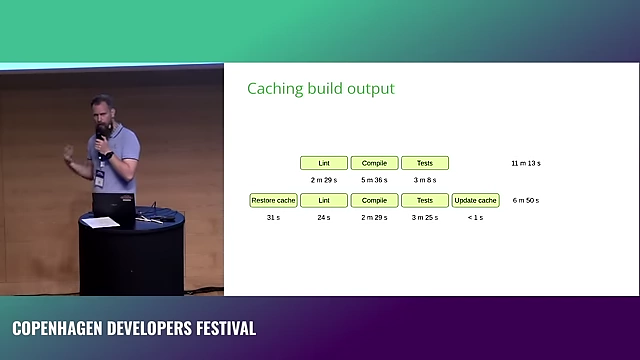
Impact of caching build output: The top pipeline runs steps from scratch, taking over 11 minutes. The bottom pipeline uses caching, reducing total time to under 7 minutes by reusing lint and compile outputs. [ 00:37:23 ] - Note: This is less effective for languages like TypeScript or CSS compilation that recompile everything regardless of changes.
Pattern 8: Tooling Images [0:39:16]
- Pre-built Tooling Images: Create Docker images that contain all necessary tools and dependencies for the pipeline.
- Leverage Docker Build Kit for Caching: Use
buildxwith Docker's Build Kit to enable remote caching of Docker layers. This allows the build process to reuse layers from previous builds, even across different pipeline runs or machines, drastically reducing build times for images. - Conditional Image Builds: Combine with conditional logic (Pattern 2) to only rebuild the tooling image when its underlying dependencies or definition changes. Otherwise, use the latest cached version.
Antipattern 8: Interference - Colliding with Other Pipelines [0:40:51]
This antipattern occurs when multiple pipelines or concurrent runs interact negatively due to shared, non-unique resources or identifiers.
Problem Description [0:40:54]
- Shared Latest Tags: If multiple pipelines publish tooling images or artifacts using a non-unique tag like
latest, a concurrent pipeline might inadvertently pick up an image from another run, leading to unexpected failures or inconsistent results.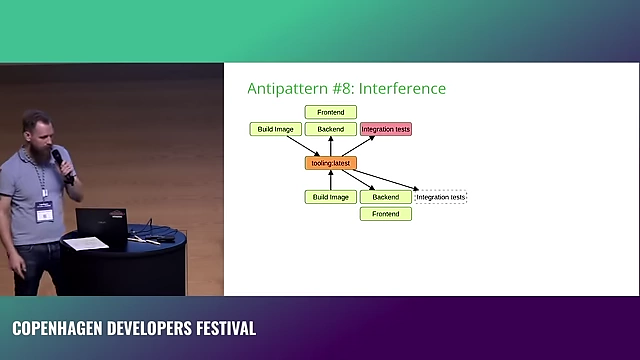
Diagram illustrating how concurrent pipelines can interfere by overwriting shared `tooling:latest` images, causing a later-running integration test to fail unexpectedly. [ 00:41:58 ] - Shared Test Resources: Using hardcoded names for shared resources like databases in integration tests can cause conflicts when multiple test suites run concurrently.
Solution: Unique Identifiers [0:41:50]
- Git Commit SHA: Use a unique identifier, such as the Git commit SHA, when publishing tooling images or artifacts to ensure that each pipeline run uses the exact version it produced or expects.
- Dynamic Resource Naming: Parameterize shared test resources (e.g., database names) with a unique ID per pipeline run to avoid collisions.
Antipattern 9: Overloading - Running on Underpowered Machines [0:42:36]
This antipattern involves provisioning CI/CD build agents with insufficient hardware resources, leading to slow pipeline execution and developer frustration.
Problem Description [0:42:39]
- Slow Pipelines: Underpowered machines prolong build and test times, negating the benefits of other optimization efforts.
- Resource Exhaustion: Pipelines may fail due to out-of-memory errors or other resource limitations.
Raniz's Rules of Thumb for Build Agent Sizing [0:42:51]
- Minimum Power: The build agent should be at least as powerful as the least powerful developer machine.
- Ideal Power: Ideally, the build agent should be as powerful as the most powerful developer machine. This makes CI faster than local builds, encouraging developers to rely on it.
- Beef Up Resources: If a build fails due to resource limitations (e.g., memory), the quickest and often cheapest fix is to simply give the build agent more resources (RAM, CPU).
- Custom Configurations: If available build agent configurations are insufficient, consider rolling your own agents.
Should You Run Your Own Agents? (Pros and Cons) [0:44:17]
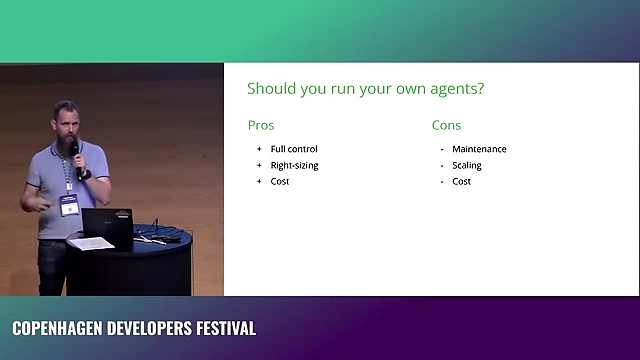
- Pros:
- Full Control: Complete control over operating systems, hardware, and software versions.
- Right-Sizing: Can precisely match resource allocation to pipeline needs (e.g., 6 GB RAM instead of 4 or 8).
- Cons:
- Maintenance: Requires ongoing effort to update operating systems, CI agent software, and tools.
- Scaling: Manual management of scaling to handle concurrent workloads and prevent long queues.
- Cost: While cloud-rented build agents are expensive per hour (e.g., ~€1 per hour for GitHub/GitLab vs. ~€0.10 for a generic cloud server), the "cost" of internal maintenance (staff time, infrastructure) can outweigh the savings if a dedicated IT department is not already handling it efficiently.
What's Next in CI/CD Pipelines? [0:47:27]
The speaker mentions two emerging tools: Dagger and Earthly.
- Shared Principles: Both are built on Docker's Build Kit, leveraging its advanced caching mechanisms. This means compilation steps are cached if source code hasn't changed, effectively providing conditional logic for free.
- Dagger: Uses programming languages to define pipelines. The speaker expresses caution about this, as it could lead to complex "software projects" within pipelines (Antipattern 6).
- Earthly: Uses a blend of Makefiles and Dockerfiles, which offers less room for overly complex logic and encourages external scripting, aligning with Pattern 6.