Kubernetes Explained: Core Concepts, Architecture, and Problem-Solving in 15 Minutes
Summary:
This video provides a concise explanation of Kubernetes, covering its fundamental aspects:
- Definition and Purpose: Kubernetes is an open-source container orchestration tool, originally from Google, designed to manage large-scale containerized applications across various environments.
- Problem-Solving: It addresses the complexity of managing hundreds or thousands of containers in microservice architectures by providing features for high availability, scalability, and disaster recovery.
- Basic Architecture: A Kubernetes cluster consists of Master nodes (running API server, controller manager, scheduler, etcd, and virtual network) and Worker nodes (running
kubeletand actual application containers). - Core Concepts:
- Pods: The smallest deployable unit, acting as a wrapper for one or more containers, each assigned a unique IP.
- Containers: The actual application processes running inside pods.
- Services: Provide a stable, permanent IP address and load balancing for ephemeral pods, enabling reliable communication.
- Configuration: Users interact with Kubernetes declaratively, defining the desired state of their applications (e.g., number of replica pods) using YAML or JSON files, which the system then automatically maintains.
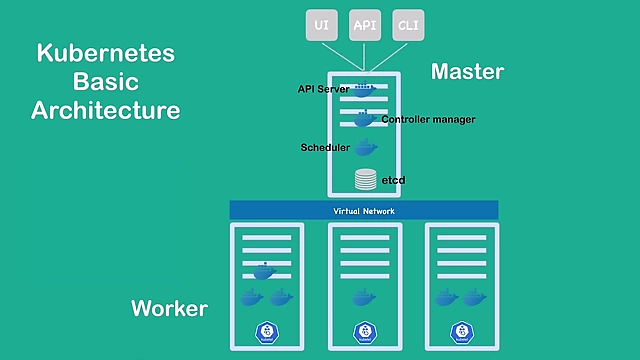
Kubernetes Cluster Basic Architecture including Virtual Network [ 00:07:55 ]
Official Definition of Kubernetes [0:59]
Kubernetes is an open-source container orchestration framework.
- Developed by Google.
- Manages containerized applications (Docker or other technologies) that may consist of hundreds or thousands of containers.
- Deploys applications across various environments:
- Physical machines
- Virtual machines
- Cloud environments
- Hybrid deployment environments
Why Container Orchestration Tools Are Needed [1:40]
The increasing adoption of microservices led to a greater need for container technologies.
- Trend from Monolith to Microservices: Applications evolved from large monolithic structures to smaller, independent microservices.
- Increased Container Usage: Containers became the ideal host for these small, independent microservices.
- Management Complexity: Managing hundreds or thousands of containers across multiple environments using manual scripts became complex and often impossible.
- Demand for Orchestration: This complexity created a strong demand for container orchestration technologies like Kubernetes.
Features Offered by Orchestration Tools [2:35]
Container orchestration tools like Kubernetes provide critical functionalities to manage complex containerized applications:
- 1. High Availability (No Downtime):
- Ensures applications are always accessible to users.
- 2. Scalability (High Performance):
- Guarantees fast application loading and quick response rates for users.
- 3. Disaster Recovery (Backup and Restore):
- Provides mechanisms to back up data and restore the application to its latest state in case of infrastructure problems (e.g., data loss, server failure).
- Ensures no data is lost and applications can resume operation from the most recent stable point.
Kubernetes Basic Architecture [3:40]
A Kubernetes cluster comprises at least one Master node and multiple Worker nodes, interconnected via a virtual network.
- Worker Nodes:
- Perform the actual work by running application containers.
- Each worker node has a
kubeletprocess running, acting as a "node agent" to enable communication within the cluster and execute tasks. - Typically have more resources (CPU, memory) than master nodes as they host many application containers.
- Master Node:
- Controls and manages the worker nodes and the entire cluster.
- Runs several crucial Kubernetes processes:
- API Server:
- The primary entry point for the Kubernetes cluster.
- All Kubernetes clients (UI, API, CLI tools like
kubectl) communicate with the API server to manage the cluster.
- Controller Manager:
- Monitors the cluster's state continuously.
- Responsible for repairing and maintaining the desired state of the cluster (e.g., restarting a container if it dies).
- Scheduler:
- Intelligently assigns new pods/containers to available worker nodes.
- Decisions are based on workload distribution and available resources on each node.
- etcd:
- A distributed key-value store that acts as Kubernetes' backing store.
- Stores the current state of the entire Kubernetes cluster, including configuration data and the status of all nodes and containers.
- Critical for disaster recovery, as snapshots of
etcdcan be used to restore the cluster's state.
- API Server:
- Virtual Network:
- Spans across all master and worker nodes within the cluster.
- Unifies all individual nodes into a single, powerful machine with combined resources, facilitating communication between components.
- Master Node Importance:
- The master node is significantly more critical than individual worker nodes.
- Losing the master node means losing access to and control over the cluster.
- In production environments, multiple master nodes are deployed for high availability to ensure continuous cluster operation even if one master fails.
Kubernetes Basic Concepts: Pods, Containers, Services [8:08]
Understanding these core components is essential for deploying and managing applications in Kubernetes.
- Pods:
- The smallest deployable unit that users interact with and configure in Kubernetes.
- Acts as a wrapper around one or more containers.
- Typically, one pod runs one main application (e.g., a database, message broker, or server application).
- Multiple containers within a single pod are usually for a main application and its tightly coupled helper containers.
- Each pod is assigned its own unique IP address by the virtual network, making it a self-contained server.
- Pods automatically manage containers running inside them; if a container stops, the pod restarts it.
- Ephemeral Nature: Pods are designed to be short-lived and frequently recreated (e.g., when scaled or due to failures), meaning their IP addresses are dynamic.
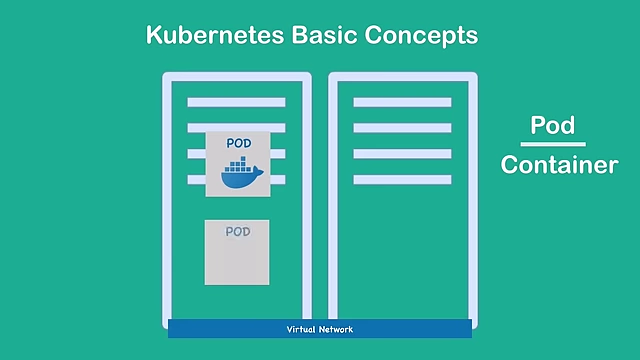
A Kubernetes Pod is the smallest unit, serving as a wrapper for one or more containers on a worker node. [ 00:08:29 ]
- Containers:
- The actual application processes that run within a pod.
- While applications are containerized, in Kubernetes, users primarily manage and interact with pods, not directly with individual containers.
- Services:
- A crucial Kubernetes component that solves the problem of ephemeral pod IP addresses.
- Sits in front of one or more pods and provides a permanent, stable IP address.
- Decouples the network access from the pod's lifecycle, so even if a pod dies and is recreated with a new IP, the service's IP remains constant.
- Two main functionalities:
- 1. Permanent IP Address: Offers a stable IP for communication between pods, eliminating the need to track dynamic pod IPs.
- 2. Load Balancer: Distributes incoming traffic across multiple replica pods associated with the service, ensuring high availability and scalability.
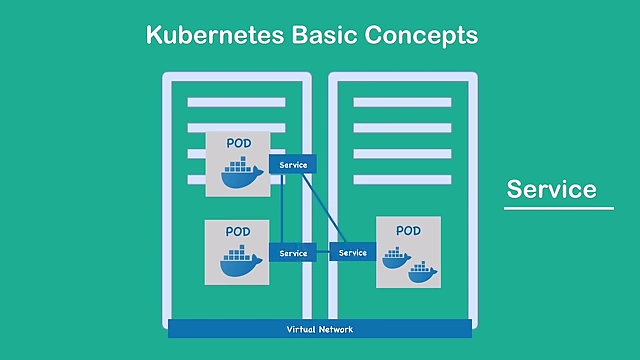
Kubernetes Services act as stable interfaces with permanent IP addresses and load balancing, routing traffic to ephemeral pods. [ 00:10:59 ]
Example Configuration File [11:31]
Kubernetes configurations are managed declaratively using YAML or JSON files.
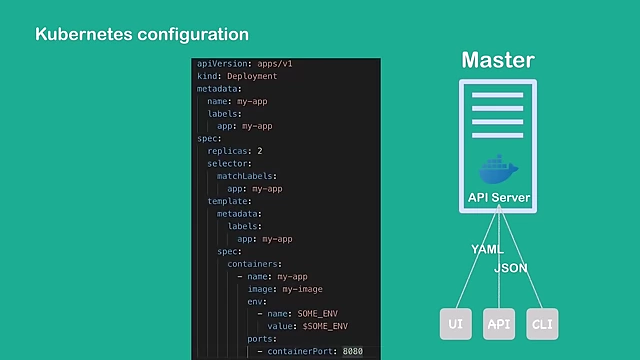
- Interaction with API Server: Configuration requests are sent to the API server from various clients (UI, API, CLI like
kubectl). - Declarative Approach:
- Users define the desired state of their application or cluster components.
- Kubernetes, particularly the Controller Manager, continuously works to ensure the actual state matches the desired state.
- For example, if a configuration specifies two replica pods and one dies, the Controller Manager automatically recreates it to meet the desired count.
- Deployment Component:
- A common Kubernetes component defined in configuration files.
- Acts as a template or blueprint for creating and managing pods.
- Example YAML Configuration:
- Specifies details such as
apiVersion,kind: Deployment. metadata: Name (e.g.,my-app), labels.spec:replicas: Defines the desired number of identical pods (e.g.,2).selector: Matches labels to identify which pods belong to this deployment.template: Defines the pod specification.metadata: Pod labels.spec:containers: Defines the containers within the pod.name: Container name.image: Docker image to use (e.g.,my-image).env: Environment variables for the container.ports: Port configuration for the container.
- Specifies details such as