Minisforum MS-R1 Arm Mini PC Review: Addressing Homelab Potential, GPU Compatibility, and Power Efficiency Challenges
The Minisforum MS-R1 is an Arm mini PC with a 12-core Cix CPU, Mali G720 iGPU, full-size PCIe slot, 64GB RAM, NVMe storage, and dual 10 Gbps networking.
- While hardware design and expandability are excellent, the system faces significant challenges, particularly high idle power draw (17W), which is comparable to or worse than many Intel/AMD systems and other Arm devices.
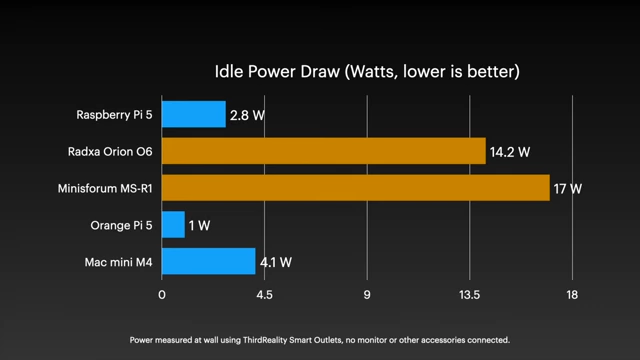
Comparison of Idle Power Draw for various Arm mini PCs, showing the Minisforum MS-R1 at 17W [ 00:03:34 ] - CPU performance is decent, outperforming Raspberry Pi 5 but falling short of Apple's M1. Integrated GPU performance is better than a Raspberry Pi but has limited Vulkan support out-of-the-box.
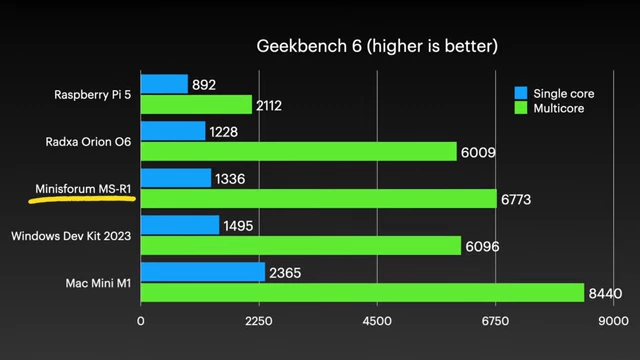
Geekbench 6 scores comparing Minisforum MS-R1 with other Arm systems, showing its position relative to Raspberry Pi 5 and Mac Mini M1 [ 00:02:34 ] - Initial attempts to install an NVIDIA RTX A2000 dGPU faced driver issues on Minisforum's custom Debian image. However, installing a generic Ubuntu OS automatically provided full GPU acceleration, drastically improving AI inference (71 tokens/s vs 12 on CPU) and graphics benchmarks.
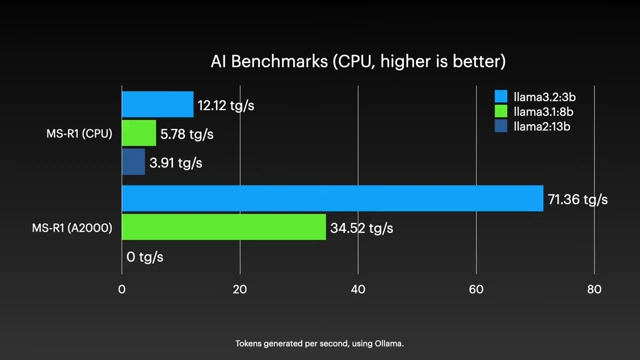
AI Benchmarks showing significant improvement with NVIDIA A2000 GPU (71.36 tg/s) over MS-R1 CPU (12.12 tg/s) for Llama models [ 00:08:21 ] - The system has homelab potential with its expansion options and published guides for Proxmox/Jellyfin, but its high power consumption and initial software/driver complexities make it a poor value proposition for its $400-$500 price compared to more efficient Intel, AMD, or Apple alternatives, unless specifically targeting Arm development.
Hardware overview [00:00:00]
The Minisforum MS-R1 is presented as a new Arm workstation PC, featuring a robust hardware design but with underlying issues.
- Initial impressions
- The device appears well-designed and quiet, using a 19V power adapter.
- It's lauded as having some of the nicest hardware outside of Apple's ecosystem.
- Key specifications
- Features a 12-core Arm CPU with a Mali G720 iGPU.
- Includes a full-size PCIe slot for expansion.
- Comes with NVMe storage.
- Supports Wi-Fi 6E.
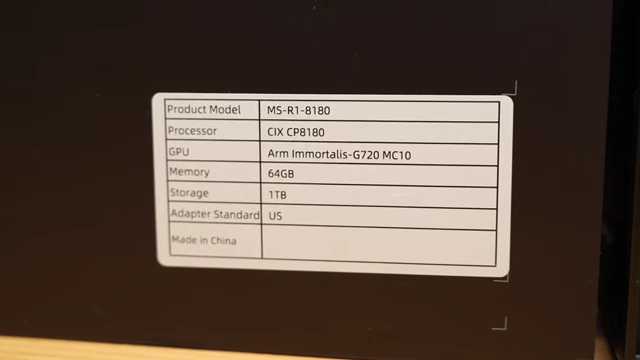
A sticker showing key specifications of the Minisforum MS-R1, including its CIX CP8180 processor, Arm Immortalis-G720 MC10 GPU, 64GB memory, and 1TB storage [ 00:00:49 ]
- Port configuration
- Offers 9 USB ports, including two Type-C with DisplayPort.
- Provides HDMI and dual 10 Gbps network jacks.
- Includes an audio combo jack.

Detailed diagram showing the front and back ports of the Minisforum MS-R1, including USB, HDMI, and dual 10Gbps network jacks [ 00:01:00 ]
- Internal design and expandability
- The chassis is easily opened by pulling a lever, revealing internal components.
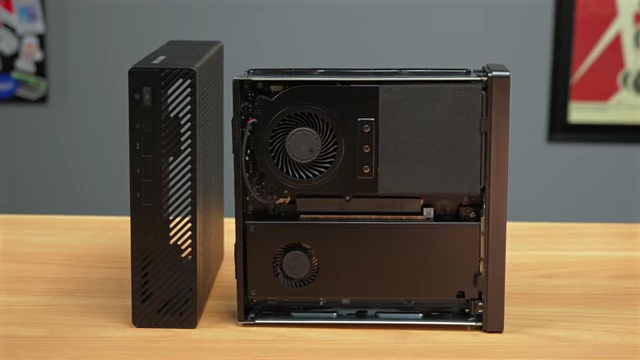
An inside view of the Minisforum MS-R1 chassis, showing the internal layout and components [ 00:00:10 ] - The package includes adapters for U.2 or a second M.2 drive, which can replace the Wi-Fi card for additional expansion.
- The chassis is easily opened by pulling a lever, revealing internal components.
Cix's 12-core Arm SoC [00:01:47]
The integrated GPU (iGPU) and CPU performance of the Cix 12-core Arm SoC show mixed results.
- iGPU performance
- Using Minisforum's default Debian 12 installation, GLMark2 ran well, scoring significantly higher than a Raspberry Pi (6322 vs 1935).
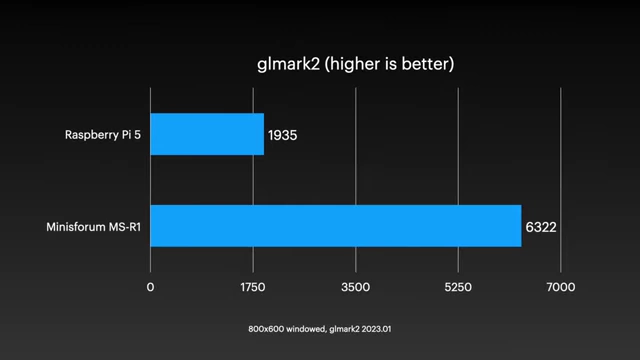
A bar chart comparing GLMark2 scores, showing the Minisforum MS-R1 significantly outperforming the Raspberry Pi 5 [ 00:02:00 ] - Vulkan support was problematic, with
vulkaninfocrashing and VKMark not running initially. - GravityMark did run, showing the G720 iGPU performance is comparable to Qualcomm's Adreno 750 (Snapdragon 8cx Gen 3).
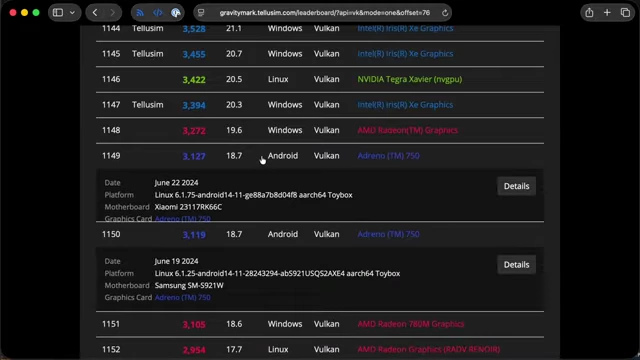
A snippet from the GravityMark leaderboard showing the Adreno 750's performance relative to other GPUs [ 00:02:13 ]
- Using Minisforum's default Debian 12 installation, GLMark2 ran well, scoring significantly higher than a Raspberry Pi (6322 vs 1935).
- CPU benchmarks
- Geekbench 6 scores were 1336 for single-core and 6773 for multi-core, beating SBCs like Raspberry Pi 5 and Radxa Orion O6.
- However, these scores are still considerably lower than Apple's 4-year-old M1 chip.
A bar chart comparing Geekbench 6 scores (single-core and multi-core) for various Arm systems, including Minisforum MS-R1, Raspberry Pi 5, Radxa Orion O6, Windows Dev Kit 2023, and Mac Mini M1 [ 00:02:34 ] - In real-world use under Linux, the system felt fast, capable of handling 4K YouTube video playback while multitasking.
Deeper problems [00:02:57]
The Minisforum MS-R1 exhibits significant power consumption issues, which is unusual for an Arm-based system.
- Idle power draw
- The idle power draw of the MS-R1 is high at 17W, which is considerably more than the Raspberry Pi 5 (2.8W), Orange Pi 5 (1W), and Mac mini M4 (4.1W).
A bar chart illustrating the idle power draw (in Watts) of various Arm mini PCs, where lower is better, showing the Minisforum MS-R1 consuming 17W [ 00:03:34 ] - This is also higher than some modern Intel (GMKtec G3 Plus: 9.3W, LattePanda Mu: 5.5W) and AMD (Framework Desktop: 12.5W) mini PCs.
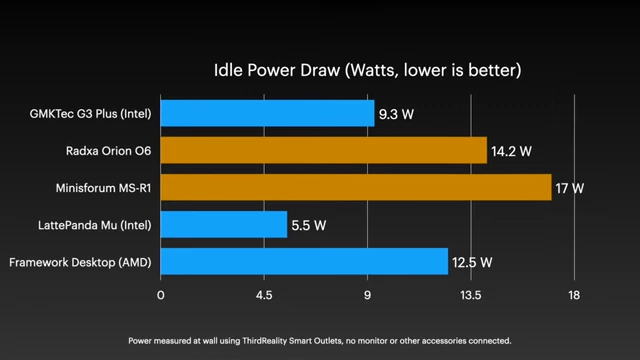
A bar chart comparing idle power draw for various mini PCs, including Intel, AMD, and the Minisforum MS-R1, highlighting its 17W consumption [ 00:03:51 ]
- The idle power draw of the MS-R1 is high at 17W, which is considerably more than the Raspberry Pi 5 (2.8W), Orange Pi 5 (1W), and Mac mini M4 (4.1W).
- Theories on high power consumption
- The high idle power draw is hypothesized to be due to the CPU core layout, requiring the chip to be powered up significantly for stability and efficient core-to-core memory access.
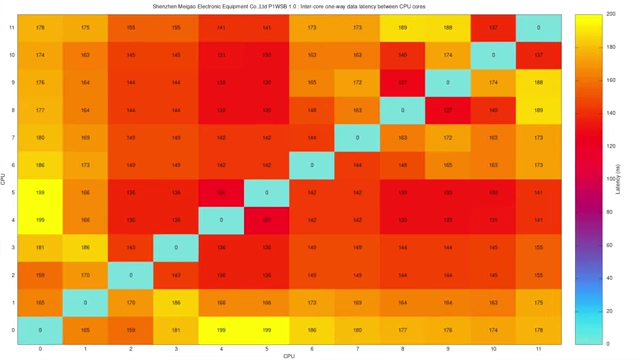
A heatmap showing inter-core one-way data latency between CPU cores, illustrating latency variations [ 00:03:14 ] - Minisforum and Cix are reportedly working on optimizing power draw.
- The high idle power draw is hypothesized to be due to the CPU core layout, requiring the chip to be powered up significantly for stability and efficient core-to-core memory access.
- Memory access speed
- Despite power concerns, memory access speeds (memcpy and memset) are relatively fast compared to other SBCs, though still below the Mac mini M4.
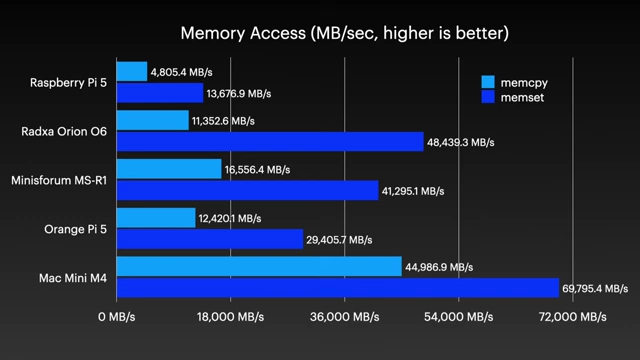
A bar chart comparing memory access speeds (MB/sec) for various mini PCs, showing Minisforum MS-R1 with high speeds in both memcpy and memset tests [ 00:03:19 ]
- Despite power concerns, memory access speeds (memcpy and memset) are relatively fast compared to other SBCs, though still below the Mac mini M4.
- Overall efficiency
- The HPL Efficiency benchmark (Gflops/W) shows the MS-R1 at 1.08 Gflops/W, which is less efficient than a Raspberry Pi 5 (3.2 Gflops/W) and significantly behind the Mac mini M4 (7.57 Gflops/W).
- This challenges the common perception of Arm systems being inherently more efficient.
10 Gbps Networking and AI inference [00:03:55]
The MS-R1 offers strong networking capabilities but has mixed results in CPU-based AI inference.
- Networking performance
- The onboard NICs deliver full 10 Gbps speeds.
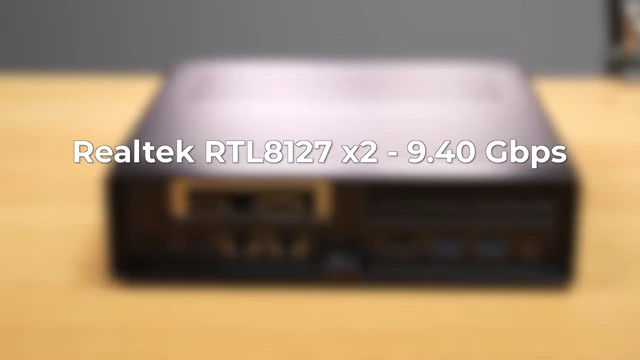
Text overlay indicating Realtek RTL8127 x2 providing 9.40 Gbps networking speeds [ 00:03:58 ] - Built-in Wi-Fi 6E achieved gigabit speeds on the network.
- The onboard NICs deliver full 10 Gbps speeds.
- AI inference on CPU
- With 64GB of RAM, the system has potential for local AI inference on the CPU.
- Benchmarks using Llama models showed the MS-R1 underperforming the older Radxa Orion O6 board, despite using the same CPU, with scores ranging from 3.91 to 12.12 tokens per second.
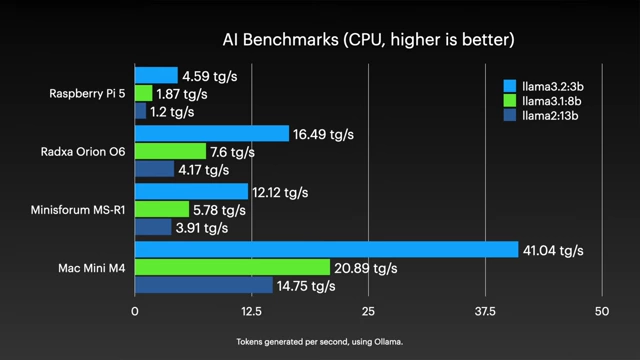
A bar chart comparing CPU-based AI inference benchmarks (tokens generated per second) for various systems, showing the Minisforum MS-R1 performance across different Llama models [ 00:04:13 ]
Installing a dGPU (RTX A2000) [00:04:55]
Adding a dedicated GPU (dGPU) to the MS-R1 for enhanced performance proved to be a challenging but ultimately successful endeavor with the right OS.
- GPU selection and physical fit
- A half-height, single-slot NVIDIA RTX A2000 laptop GPU with 8GB VRAM (costing ~$250) was chosen to fit the tiny PCIe slot.
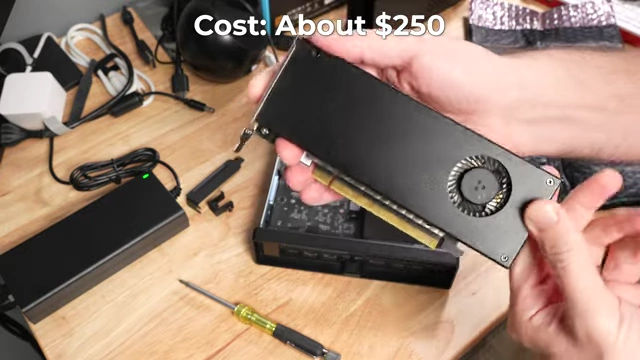
The NVIDIA RTX A2000 SFF GPU shown, highlighted with its cost of about $250 [ 00:05:18 ] - Minisforum included ventilation holes on the top of the chassis to aid cooling for such an installation.
- Installation was easy but finicky, with a foam spacer used to prevent shorts.
- A half-height, single-slot NVIDIA RTX A2000 laptop GPU with 8GB VRAM (costing ~$250) was chosen to fit the tiny PCIe slot.
- Driver issues on Debian
- After installation, the GPU was detected by
lspcion Minisforum's default Debian image.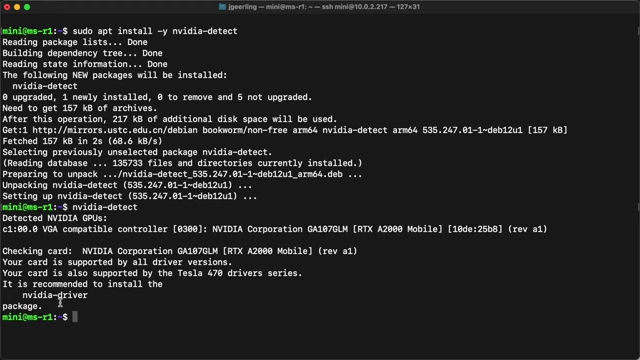
Terminal output showing `nvidia-detect` successfully identifying the NVIDIA RTX A2000 Mobile GPU on the Debian system [ 00:05:42 ] - However, attempts to install NVIDIA drivers (both direct downloads and Debian packages) failed, likely due to the Debian image being cross-compiled, making kernel module building difficult.
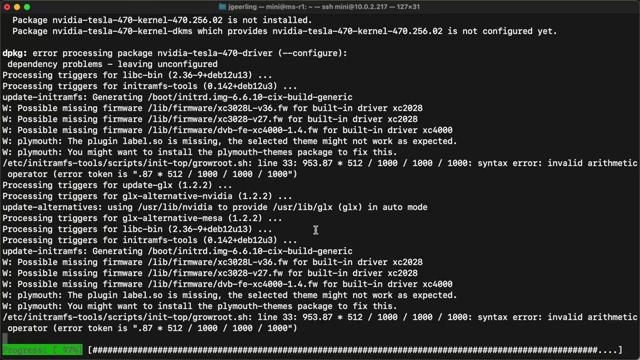
Terminal output showing an error during the installation of NVIDIA drivers on the Debian system, indicating dependency problems [ 00:05:48 ]
- After installation, the GPU was detected by
A BIOS detour and AC Power Loss bug [00:06:15]
While attempting to resolve software issues, the reviewer explored the BIOS and found a bug with the AC Power Loss setting.
- BIOS features
- The BIOS is quite comprehensive, offering settings for USB, RAM, and Power On behavior.
- Many settings are labeled "Beta," indicating ongoing development.
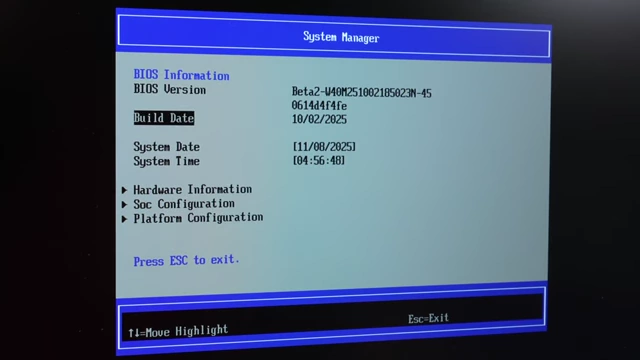
A screenshot of the BIOS "System Manager" showing "Beta2" version and build date, with various configuration options below [ 00:06:23 ]
- AC Power Loss bug
- The BIOS setting for "Restore AC Power Loss" (to turn on when power is restored) did not function as expected.
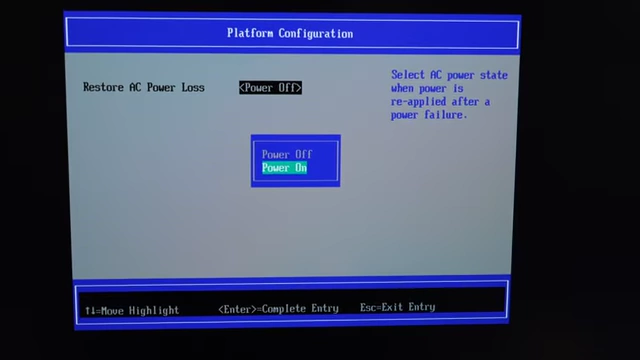
A screenshot of the BIOS setting for "Restore AC Power Loss" with "Power Off" and "Power On" options, which was found not to work via software [ 00:06:32 ] - It was discovered that a physical hardware switch on the motherboard, not the BIOS setting, controls the AC power loss behavior.
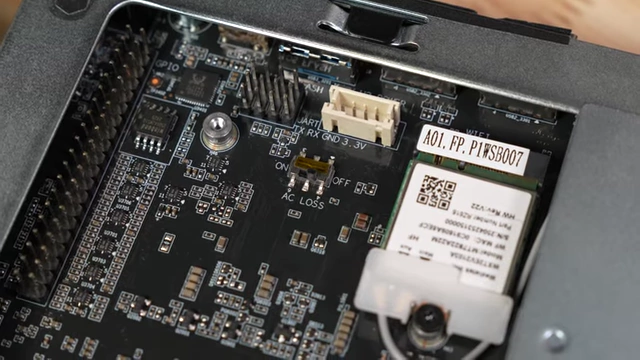
A close-up of the motherboard showing a physical toggle switch labeled "AC LOSS ON / OFF" [ 00:06:43 ]
- The BIOS setting for "Restore AC Power Loss" (to turn on when power is restored) did not function as expected.
Trying an Intel GPU (A310 ECO) [00:06:50]
An alternative dGPU, the Intel Arc A310 ECO, was also tested but failed to function.
- Installation and detection
- An Intel Arc A310 ECO with 4GB VRAM was installed, fitting physically better than the A2000.
- Upon boot, the fan on the A310 spun up, but
lspcicould not detect the card, indicating a signaling issue. - This problem has been encountered with the same card on a Raspberry Pi.
Installing Ubuntu and getting GPU acceleration [00:07:20]
Switching to Ubuntu resolved the dGPU driver issues and unlocked significant performance improvements.
- Easy Ubuntu installation
- Installing Ubuntu from an Arm ISO on a USB drive was straightforward.
- While the internal HDMI output froze during boot, switching the monitor to the A2000's HDMI port revealed a working desktop.
- NVIDIA driver success
- Ubuntu automatically loaded the correct NVIDIA driver.
- CUDA could be installed, and
nvidia-smiconfirmed proper driver and GPU detection.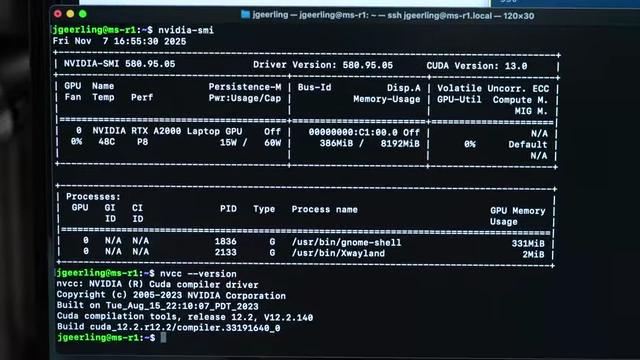
Terminal output showing `nvidia-smi` successfully detecting the NVIDIA RTX A2000 Laptop GPU, its driver version, and CUDA version on Ubuntu [ 00:07:52 ]
- Performance improvements with dGPU
- VKMark ran smoothly, scoring over 10,000 with the A2000, significantly higher than the iGPU's 3,037.
- AI benchmarks for Llama 3.1:3B model increased from 12 tokens/second (CPU) to 71 tokens/second (A2000).
- Efficiency also improved, reaching 0.76 tokens/watt on the GPU compared to 0.34 on the CPU.
- Larger 8-billion parameter models saw inference jump from 5.78 to 34.52 tokens/second.
A bar chart comparing AI benchmarks (tokens generated per second) for the MS-R1 CPU versus the MS-R1 with an NVIDIA A2000 GPU across different Llama models [ 00:08:21 ] - GravityMark also ran much smoother with the A2000, scoring 16,679 compared to the iGPU's 3,037.
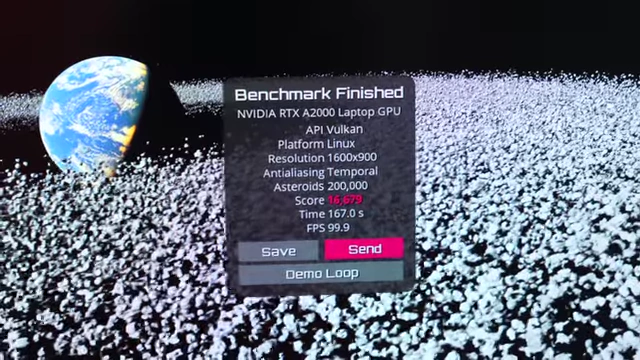
Benchmark results for GravityMark 1.89 Vulkan, showing a score of 16,679 with the NVIDIA RTX A2000 Laptop GPU [ 00:08:36 ]
Arm Homelab in a box? [00:08:40]
The Minisforum MS-R1 has potential as a homelab box due to its expansion capabilities but is hindered by its price-to-performance ratio and software immaturity.
- Homelab suitability
- The full PCIe slot, coupled with U.2 and NVMe adapters, makes it highly expandable for storage and other cards.
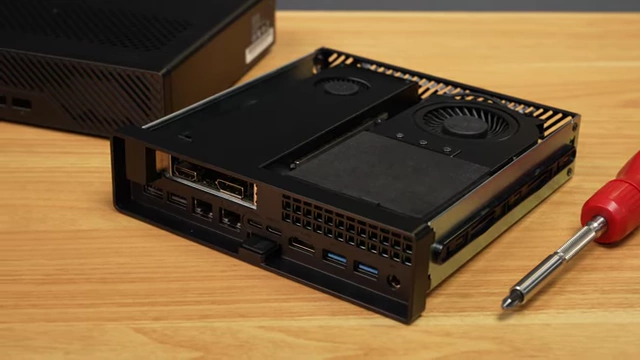
The Minisforum MS-R1 with its chassis partly slid open, revealing the internal components and PCIe slot [ 00:08:48 ] - Minisforum provides guides for installing Proxmox and Jellyfin with hardware passthrough and iGPU acceleration, indicating its intended use as a homelab device.
- Its expansion options surpass other Arm machines, including the Mac mini.
- The full PCIe slot, coupled with U.2 and NVMe adapters, makes it highly expandable for storage and other cards.
- Value proposition
- As an Arm desktop, it performs better than most SBCs.
- However, at $400-$500, it offers poor value compared to more efficient and mature Intel or AMD mini PCs, or even the Apple M1/M4 Mac mini (which offers superior performance but lacks bare-metal Linux support).
- Current state and future outlook
- The MS-R1 is considered "half-baked" due to power consumption issues and driver complexities on generic Linux distributions.
- Questions remain about potential firmware fixes, mainline driver integration for all Linux distros, and NVIDIA Windows on Arm driver support.