Streamlining DaVinci Resolve Fusion Workflow: Custom Nodes, Presets, and Performance Optimization (DaVinci Resolve 20)
Thom Lyons | Visual+Aid Productions
Summary:
This video provides essential workflow hacks for DaVinci Resolve Fusion to save time and improve efficiency. Key takeaways include:
- Custom Node Defaults: Learn to set default parameters for individual nodes like background color or text font for instant application.
- Creating Custom Nodes and Groups: Save frequently used node setups or groups of connected nodes as reusable presets within Fusion, accessible via the "Select Tool" pop-up.
- Performance Optimization: Discover methods to improve Fusion's playback performance by adjusting settings such as high quality, motion blur, proxy modes, and managing cache.
- Edit Page Templates: Create custom Fusion compositions that appear as editable templates on the Edit page, ideal for consistent client graphics like lower thirds.
- Macro vs. Group: Understand the difference between saving as a "Macro" (a single, uneditable node) and a "Group" (an expandable and editable set of nodes).
- Editing Macros: Learn how to manually convert a macro into a group via a text editor for post-creation modification.
- Macro Lab Tool: Explore "Macro Lab," a recommended free web tool that simplifies macro creation with a user-friendly interface for better organization and customization of controls, making the built-in macro editor obsolete.

Right-click menu on a node in Fusion showing the 'Settings' submenu with 'Save Default' highlighted. [ 00:01:00 ]
Repeated Actions [00:25]
- Repetitive tasks in Fusion, such as manually dragging and changing the same nodes, waste significant time.
- The video aims to address two key questions:
- What tasks are consistently repeated?
- How can these tasks be automated or made instant?
Changing Node Default Settings [00:55]
- Customizing Node Defaults:
- Users can modify settings on any node (e.g., changing a background node's color to a brand-specific red or a Text+ node's font and size).
- To save these changes as the default for that node, right-click on the node and select "Settings > Save Default." [00:55]
- Subsequently, every new instance of that node will automatically load with the custom default settings.
- Resetting Defaults:
Creating Custom Nodes [01:34]
- Saving Custom Node Presets:
- Instead of changing the default, users can save a version of a node with specific settings as a new, custom node.
- Right-click the configured node and select "Settings > Save As..." [01:43]
- Save the
.settingfile in the Fusion "Macros" folder to make it appear as an available node within Fusion. [01:54] - The location of Fusion folders is provided in the description for both PC and Mac.

The 'Save File' dialog box displaying the file path to the Fusion Macros folder for saving custom node presets. [ 00:01:55 ]
- Accessing Custom Nodes:
- Once saved, these custom nodes can be quickly added to the flow by pressing Shift + Spacebar and typing their name in the "Select Tool" pop-up. [02:04]
Custom Groups Of Nodes [02:11]
- Saving Multiple Nodes as a Group:
- Users can save a collection of interconnected nodes (e.g., a 3D scene setup including a Merge 3D, Camera 3D, and Renderer 3D) as a single, reusable preset.
- Select all desired nodes (excluding the Media Out node), right-click one, and go to "Settings > Save All As..." [02:29]
- Name the group (e.g., "Scene 3D") and save it in the same Fusion "Macros" folder. [02:34]

A selected group of 3D nodes (Merge3D, Camera3D, Renderer3D) in the Fusion node graph, ready to be saved as a custom group. [ 00:02:30 ]
- Instant Scene Setup:
- This allows for the instant addition of complex node structures, pre-connected and with custom settings (e.g., lighting and shadows enabled on the renderer), to the node graph. [02:45]
Improving Computer Performance For Fusion [02:58]
- Playback Performance Controls:
- Right-clicking in the transport control area (near playback buttons) reveals hidden performance settings that only affect the preview during work, not the final render quality. [03:11]

The right-click context menu in the Fusion transport controls, showing options for 'High Quality', 'Motion Blur', and 'Proxy'. [ 00:03:25 ] - High Quality:
- Motion Blur:
- This acts as a master switch to temporarily disable motion blur across all enabled nodes in the project. [03:46]
- Disabling it speeds up preview rendering without individually turning off motion blur on each node.
- Proxy Mode:
- Lowers the resolution of the image during playback, reducing the number of pixels processed for faster performance. [04:14]
- Auto Proxy:
- Right-clicking in the transport control area (near playback buttons) reveals hidden performance settings that only affect the preview during work, not the final render quality. [03:11]

- Caching:
- Enable caching under the "Playback" menu to store rendered frames for smoother playback. [04:51]
- It is highly recommended to enable automatic cache deletion in "Resolve Settings > User > Cache Management" to prevent cache files from quickly filling up the hard drive. [04:56]

The DaVinci Resolve Settings window, showing the 'Media Storage' and 'User' tabs, with 'Cache Management' options to automatically delete cache files. [ 00:05:00 ]
Creating Templates For The Edit Page [05:12]
- Fusion Compositions as Edit Page Templates:
- DaVinci Resolve includes pre-built templates (transitions, titles, generators, effects) that are essentially Fusion compositions. [05:24]
- These can be dragged onto the Edit page timeline and have customizable controls exposed in the Inspector, allowing direct editing without entering the Fusion page. [05:35]

The DaVinci Resolve Edit page displaying a Fusion-generated honeycomb background with its customizable controls visible in the Inspector panel. [ 00:05:40 ] - Opening these templates in Fusion reveals their underlying node structure, providing a valuable learning opportunity to deconstruct and understand their creation. [05:44]

A right-click menu over a Fusion node group from an Edit page template, showing the 'Expand Group' option. [ 00:05:51 ] 
The expanded node structure of a Fusion-generated honeycomb background, revealing its individual components. [ 00:05:58 ]
- Building Custom Edit Page Templates:
The Macro Editor [06:18]
- Exposing Parameters:
- The Macro Editor panel displays every possible parameter for the selected nodes. [06:24]
- Users select which parameters (e.g., styled text, size, tracking for text nodes) should be exposed and editable on the Edit page's Inspector. [06:26]
- It is crucial to label nodes clearly in Fusion to easily identify parameters in the Macro Editor. [06:48]
- Parameters can be renamed for clarity (e.g., "Styled Text" to "Name" or "Job Title"). [07:00]

The Fusion Macro Editor panel, displaying a comprehensive list of parameters from various nodes, allowing users to select and expose specific controls for the Edit page. [ 00:06:30 ]
- Saving Macro for Edit Page:
- Give the macro a name (e.g., "Lower Third Client X"). [07:22]
- Use the three-dot menu to select "Save." [07:27]
- Navigate to the specific folder structure to make the macro appear on the Edit page:
Fusion/Templates/Edit/Titles(orEffects,Generators,Transitionsas appropriate). [07:37] - If these subfolders do not exist, they must be created with exact names. [07:44]
- A subfolder can be created for organization (e.g., "Client X" within "Titles"). [08:09]
- Saving as Group for Edit Page:
- Alternatively, choose "Save as Group" from the three-dot menu. [08:14]
- Save it in the same Edit page templates folder, adding "Group" to the name for distinction. [08:19]

The 'Save Macro As' dialog box in Fusion, showing navigation to the specific template folder structure 'Fusion/Templates/Edit/Titles/Client X' for saving Edit page templates. [ 00:08:00 ]
Macro Vs Group [08:45]
- Macros (Saved via "Save"):
- Groups (Saved via "Save as Group"):
- When opened on the Fusion page, a group appears as a stack of nodes, indicating it's an expandable node group. [09:16]
- Right-clicking on the group allows users to "Expand Group" or "Ungroup" to reveal and modify the individual nodes within. [09:22]
- This preserves editability, making "Save as Group" preferable for templates that might require future modifications (e.g., font updates for a client). [09:30]
How To Turn A Macro Into A Group [09:39]
- Manual Text Editing:
- If a template was saved as a macro but needs to be editable as a group, the
.settingfile can be manually edited. [09:44] - Open the
.settingfile in a text editor. [09:50] - Locate the phrase "Macro Operator" near the top of the code. [09:54]
- Change "Macro" to "Group", ensuring no space between "Group" and "Operator". [09:57]
- Save and close the file. [10:04]
- After restarting Resolve (if necessary), when the modified template is added to the timeline and opened in Fusion, it will appear as an expandable node group, allowing for full editing. [10:06]
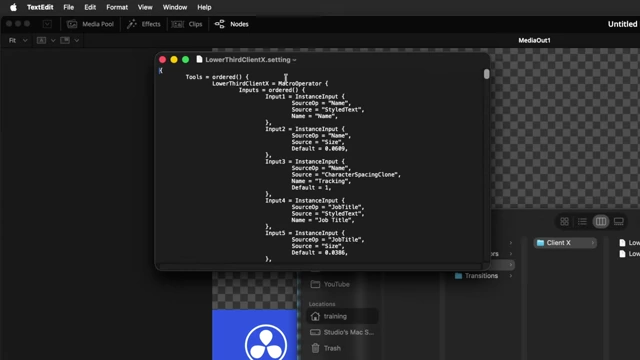
A text editor displaying a Fusion .setting file, with the phrase 'Macro Operator' highlighted for modification to 'Group Operator'. [ 00:09:55 ]
- If a template was saved as a macro but needs to be editable as a group, the
Why I'll Never Use The Macro Editor Again [10:18]
- Limitations of Built-in Macro Editor:
- The native Macro Editor in DaVinci Resolve is described as clunky and lacking UI customization. [10:24]
- The order of controls on the Edit page is dictated by the node selection order, with no user control over arrangement or labels. [10:31]
- Extensive customization requires manual code editing in a text editor. [10:42]
- Introducing Macro Lab:
- "Macro Lab" (macrolab.app) by Matt McCool is a free web tool that offers a significantly improved macro creation experience. [10:46]
- Users build their Fusion composition, copy the nodes to the clipboard, and paste them into Macro Lab (or upload a
.settingfile). [11:12] - Macro Lab provides an intuitive interface to:
- The tool is continuously being improved.
- Patrick Stirling is also developing a similar tool called "Macro Machine" to watch out for. [11:42]

The Macro Lab web interface, showing a user pasting nodes to create a macro with sections for 'Paste Nodes' and 'Layout' for organizing controls. [ 00:11:25 ]