Linux User Experience: Addressing Network Share and Disk Management Frustrations for New Users
Summary:
- The video argues that the Linux user experience (UX) is problematic, often being "technically correct" but "objectively wrong" for most users, especially those migrating from Windows.

Desktop Operating System Market Share Worldwide (May 2026) [ 00:00:20 ] - Two main examples from Linus Tech Tips' Linux challenge highlight these failures:
- Mounting Network Shares: Linux lacks an intuitive, guided process for mounting network drives (like SMB shares), leading to confusion and resorting to installing random applications.
A simple mounting wizard is suggested as a fix.
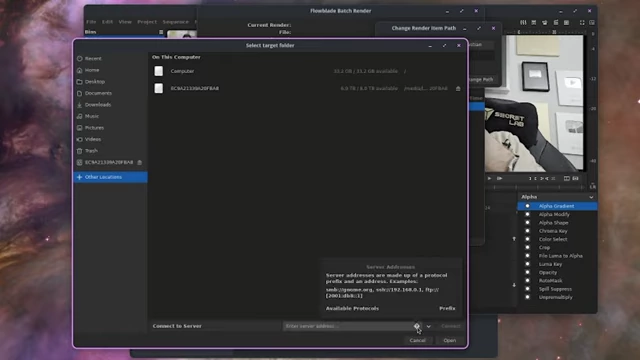
Attempting to enter SMB network path in Flowblade render dialog, resulting in an error [ 00:02:45 ] - GNOME Disks Utility: The disk management tool has an unintuitive multi-step process for formatting (delete partition table, create new, then format), and uses ambiguous labels like "FAT" instead of "FAT32," causing confusion even for experienced users.
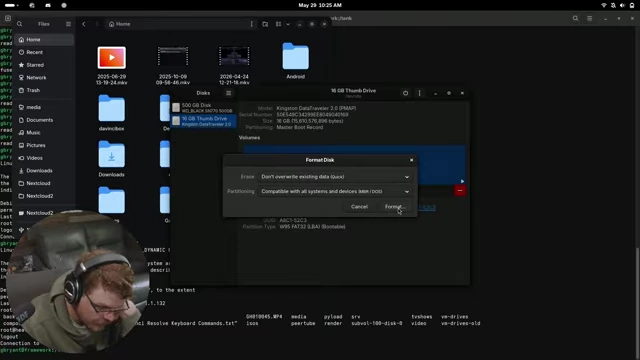
GNOME Disks utility showing a three-step process for formatting a disk [ 00:08:08 ] 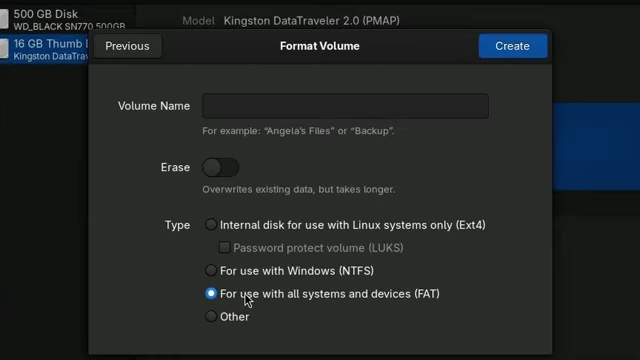
GNOME Disks 'Format Volume' screen showing the ambiguous 'FAT' option [ 00:11:09 ]
- Mounting Network Shares: Linux lacks an intuitive, guided process for mounting network drives (like SMB shares), leading to confusion and resorting to installing random applications.
- The video criticizes the "noise brigade" within the Linux community for blaming users and resisting UX improvements, often citing adherence to the "Linux way" or fearing "Windows bloat."

Comment blaming users for not knowing partition schemes, asserting the UX is fine [ 00:09:19 ] - It emphasizes the need for Linux to adopt user-centric design principles, learn from Microsoft's investment in UX research, and make software accessible to everyone, not just "elite hackers," to truly promote free and open-source software.
Linux User Experience Issues [00:00]
The video begins by asserting that the Linux user experience (UX) is fundamentally flawed, often being "technically correct" but "objectively wrong" for a vast majority of users.
- Dominance of Windows: The presenter highlights that Windows remains the dominant operating system, meaning Linux UX design must consider how Windows users expect functionalities to work to attract new users.
Desktop Operating System Market Share Worldwide (May 2026) [ 00:00:20 ] - Rejection of "Windows-like" design: Despite advocating for more intuitive design, the presenter faces criticism from segments of the Linux community who fear "Windows-ification" of GNU/Linux.
- Goal of FOSS: The ultimate goal should be to make the benefits of Free and Open Source Software (FOSS) accessible to everyone, which is undermined if new users are forced to abandon decades of PC experience.
- LTT Challenge as Proof: The Linus Tech Tips (LTT) Linux daily driver challenge vividly demonstrated these UX failures to a broad audience.
Mounting Network Shares on Linux is a Horrible Experience [01:47]
The first major UX failure discussed is the difficulty in mounting network drives, specifically SMB shares.
- Lack of intuitive process: In the LTT challenge, participants like Elijah and Linus struggled to mount network shares. There was no obvious way to do so within file managers like Dolphin or KDE settings.
Attempting to enter SMB network path in Flowblade render dialog, resulting in an error [ 00:02:45 ] - Linus's workaround: Linus eventually solved the problem by installing a "random app" after the system dialogue incorrectly indicated support for the SMB protocol he was trying to use.
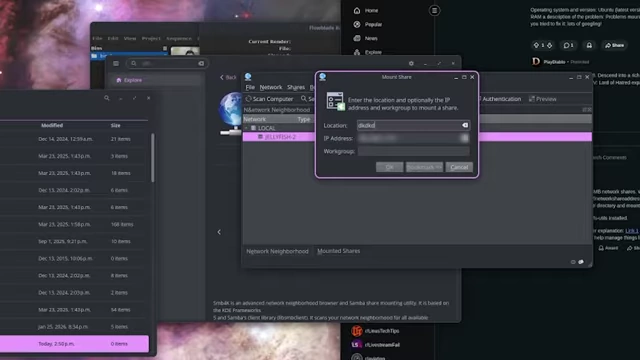
Mount Share dialog box from a third-party application Linus used to connect to a network share [ 00:03:17 ] - Proposed Fix [03:21]:
- Add a simple context menu option or a tab in file properties for network shares.
- Implement a mounting wizard that helps with:
- Installing missing dependencies.
- Deciding scope (user-specific or all users).
- Configuring credentials.
- Providing advanced options.
- Adding the mount point to the file system tab.
- "The Noise Brigade" Arguments [03:50]:
- Some Linux users argue this violates the "Linux way" of programs doing "only one thing."
- They perceive such additions as "Windows bloat" and threaten to switch desktops or fork projects.
- Counter-argument: Modern file managers like Dolphin and Nautilus already support numerous protocols (SMB, FTP, MTP, PTP, WebDAV, NFS), so integrating a mounting wizard is a natural extension, not bloat.
- Why Solve These Issues [05:09]:
- Roadblocks lead new users back to the familiar comfort of Windows.
- The community's tendency to blame the end-user for UX failures is "increasingly distasteful."
GNOME Disks UX Fail [06:07]
The second significant UX failure highlighted is the unintuitive nature of the GNOME Disks utility for managing and formatting drives.
- Technically correct but unintuitive workflow: To reformat a disk, GNOME Disks requires a three-step process: delete the existing partition table, create a new one, then allocate the raw space as a formatted partition. This sequence is not obvious to an average user.
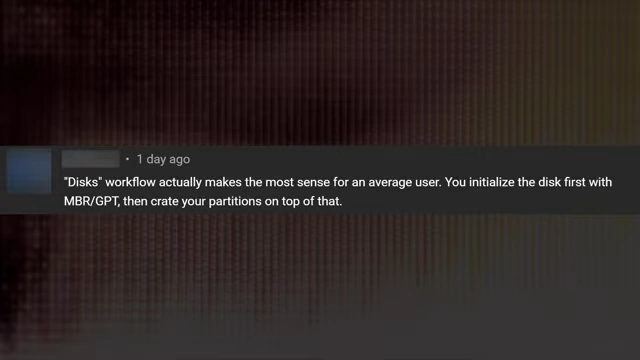
Screenshot of a comment stating that GNOME Disks' workflow makes sense for the average user by initializing, creating, and then formatting partitions [ 00:06:52 ]
GNOME Disks utility displaying the 'Format Disk' options including erasing data and selecting a partitioning scheme [ 00:08:08 ] - Confusion for experienced users: Both Linus and Elijah in the LTT video, despite being tech-literate, were tripped up by this workflow. The presenter, with decades of Linux experience, also found it confusing.
- Unnecessary multi-step process: The presenter questions why a user would delete a partition table without immediately wanting to create a new partition, making the separate steps illogical for most use cases.
- "The Noise Brigade" Responds [09:01]:
- Comments like "You probably shouldn't mess with partitions if you're unsure... it's a 'must-know' kind of knowledge" exemplify gatekeeping and arrogance.
A comment suggesting users shouldn't mess with partitions if they're unsure, and that UX-wise, the tool is fine [ 00:09:19 ] - The presenter vehemently rejects this, arguing that users shouldn't need deep technical knowledge (e.g., OSI model, quantum physics of hard drives) to perform basic tasks.
- Comments like "You probably shouldn't mess with partitions if you're unsure... it's a 'must-know' kind of knowledge" exemplify gatekeeping and arrogance.
- Disks Fails Twice, Though... [10:42]:
- The process of creating a new partition after the initial reformatting is also problematic.
- Mislabeled File Systems: The "Format Volume" screen presents "FAT" as an option, which is a deeply confusing label for anyone with filesystem knowledge. It should explicitly say "FAT32."
GNOME Disks 'Format Volume' screen showing the ambiguous 'FAT' option for all systems and devices [ 00:11:09 ] - Deduction required: The user has to click "Other" to see other options like "XFAT" and then deduce, through a process of elimination, that the "FAT" option on the previous screen must refer to FAT32.
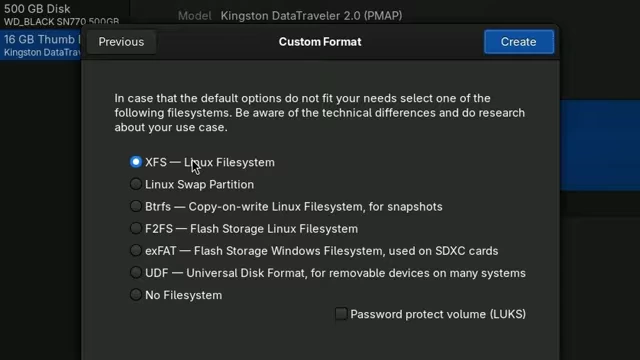
GNOME Disks 'Custom Format' screen showing various file system options including exFAT after clicking 'Other' [ 00:12:05 ] - This confusing labeling further complicates what should be a straightforward task.
- An additional example of UX failure is GParted showing an invisible button (white text on a white background).
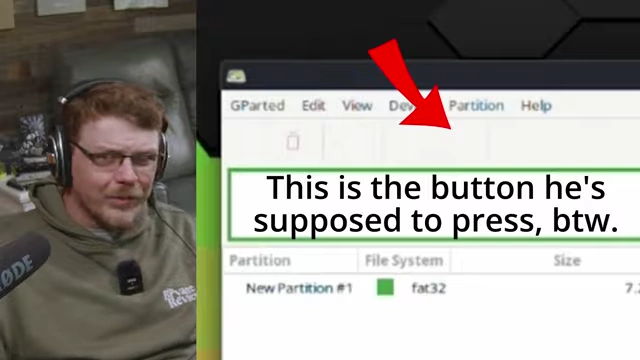
GParted interface showing a menu with a button labeled in white text on a white background, making it invisible [ 00:08:36 ]
Hammers Without Handles [13:04]
The video concludes with a powerful metaphor about the state of Linux UX.
- Metaphor Explained: Linux provides powerful "hammers" (functionality) but often without "handles" (user-friendly interfaces).
- Community's flawed response: When new users point out the lack of handles, the community tells them to build their own, even drill the necessary holes, and then ridicules those who opt for "handled" (paid, user-friendly) alternatives.
- Impact on the FOSS movement: This approach results in "cool things that nobody uses," hindering the broader adoption of FOSS and turning user rights into a privilege for the technically savvy.
- Call to action: The Linux community must critically evaluate its UX, learn from the millions Microsoft invests in user testing, and prioritize intuitive design to truly respect the rights of all users, from beginners to experts.