Introducing Magic Grade: An Intuitive Color Grading and Film Texture OpenFX Tool for DaVinci Resolve Free & Studio
Magic Grade is a new OpenFX tool designed to simplify color grading for non-colorists within DaVinci Resolve Free & Studio.
- It allows users to perform essential color adjustments directly on the edit page using intuitive click-and-drag controls with keyboard shortcuts for exposure, contrast, saturation, and white balance.
- The tool provides immediate visual feedback and a quick before/after comparison.
- It also features "Magic Grade Texture" for easily adding film grain (with various presets), halation, and bloom effects to achieve stylized looks.
- The plugin is lightweight, ensuring smooth playback, and aims to offer professional-looking results without the complexity of DaVinci Resolve's dedicated color page.
- It is currently in development, with enhanced looks being created in collaboration with a colorist, and will be available for purchase soon.
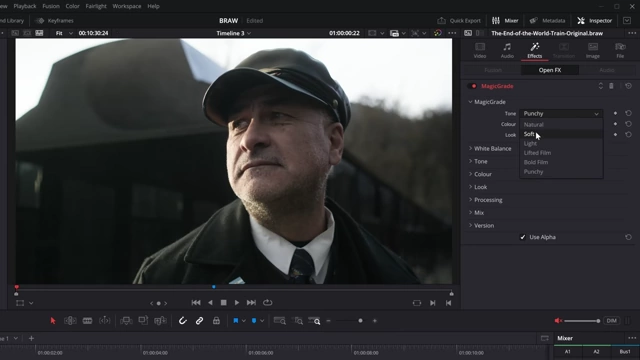
Magic Grade inspector panel with Tone, Color, and Look options [ 00:01:24 ]
Introducing Magic Grade: Simplifying Color Grading [00:00:00]
The video introduces "Magic Grade," a new OpenFX tool for DaVinci Resolve, designed to make color grading accessible and easy for individuals who are not professional colorists.
Core Philosophy
- The tool aims to simplify the complex process of color grading, allowing users to achieve professional-looking results without in-depth knowledge of DaVinci Resolve's extensive color page.
- It works seamlessly within both the free and Studio versions of DaVinci Resolve.
Initial Demonstration
- The presenter showcases how quick adjustments can transform footage directly on the edit page.
- This includes setting white balance, adjusting exposure, contrast, and saturation in just a few clicks.
- The process is demonstrated with a before and after comparison, highlighting the speed and effectiveness.

Original footage before any color grading [ 00:00:15 ]
- The tool is also teased to include features for applying film grain, halation, and bloom with similar ease.
OpenFX Integration and Basic Controls [00:00:53]
Magic Grade functions as an OpenFX plugin, which can be easily added to clips on the edit page, offering a streamlined workflow.
Accessing the Tool
- Users can find and drag "Magic Grade" from the OpenFX section of the effects library onto their footage.
Inspector Panel Overview
- The inspector panel provides initial control categories:
- Tone: Adjusts contrast and tone curves.
- Color: Applies specific color looks.
- Looks: Offers film and popular aesthetic presets.
- These presets are still under development to ensure high-quality results.
Magic Grade inspector panel with Tone, Color, and Look options [ 00:01:24 ]
Interactive On-Screen Color Grading [00:01:43]
The most innovative aspect of Magic Grade is its ability to perform primary color corrections directly on the preview screen using keyboard modifiers and mouse actions.
Exposure Adjustment [00:01:56]
- By holding
Controland dragging the mouse up or down on the preview screen, users can adjust the clip's exposure. - On-screen scopes provide real-time feedback during adjustment.
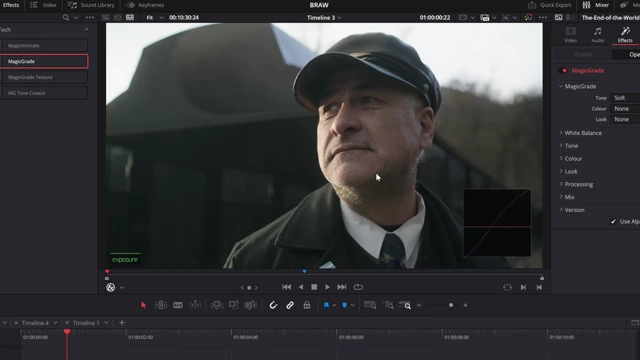
On-screen exposure adjustment with real-time scope feedback [ 00:02:00 ]
Contrast Adjustment [00:02:21]
- Holding
Altand dragging the mouse up or down manipulates the contrast of the image.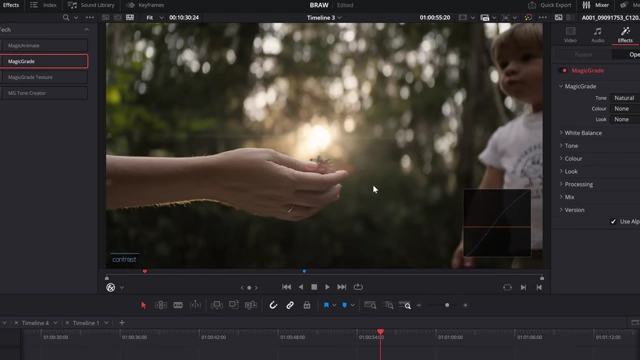
On-screen contrast adjustment with a tone curve display [ 00:04:31 ]
Saturation Adjustment [00:02:34]
- Holding
Shiftand dragging the mouse allows users to increase or decrease color saturation. - A color palette overlay appears during this adjustment to guide the user.
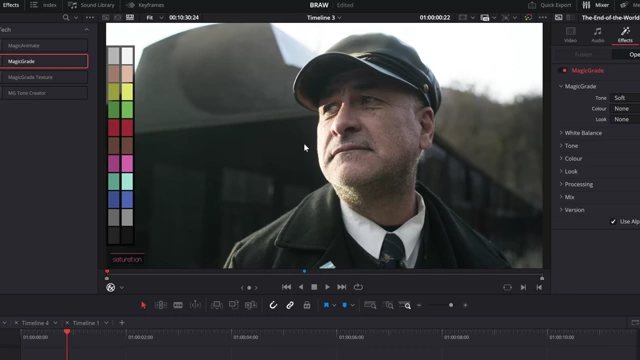
Interactive saturation adjustment with color palette overlay [ 00:02:35 ]
Before and After Comparison [00:02:39]
- A quick comparison of the original and graded footage can be made by holding
Control + Alt + Shiftand clicking.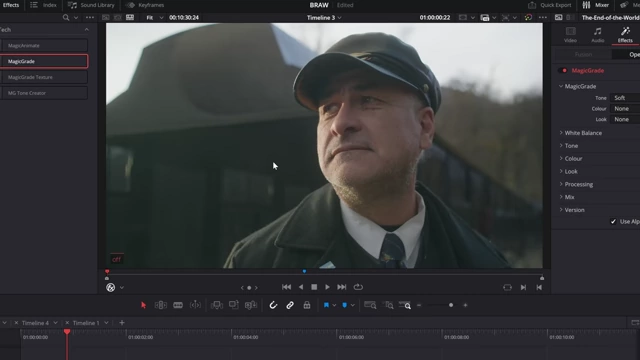
Before and after comparison using a single click [ 00:02:45 ]
White Balance Correction [00:02:58]
- Holding
Control + Altenables white balance adjustment. - Users can click on a neutral grey or white area in the image to set the white balance, or drag to manually adjust color temperature.
- A warm/cool overlay indicates the color balance.
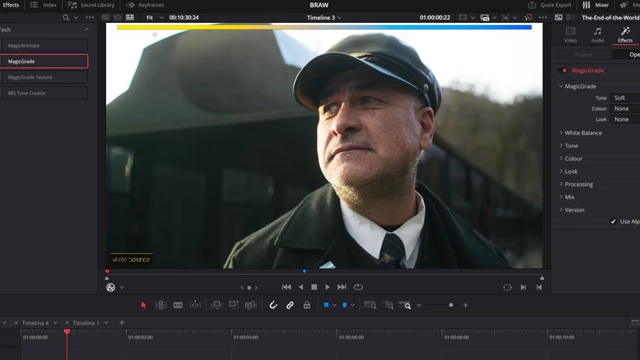
White balance adjustment with warm/cool indicators [ 00:03:05 ]
Shadow and Highlight Recovery [00:03:33]
- Holding
Control + Shiftactivates a visualization mode:- Red areas indicate blown-out highlights.
- Blue areas indicate crushed shadows.
- The screen is split with a dotted line; dragging in the bottom half recovers shadows, and dragging in the top half recovers highlights.
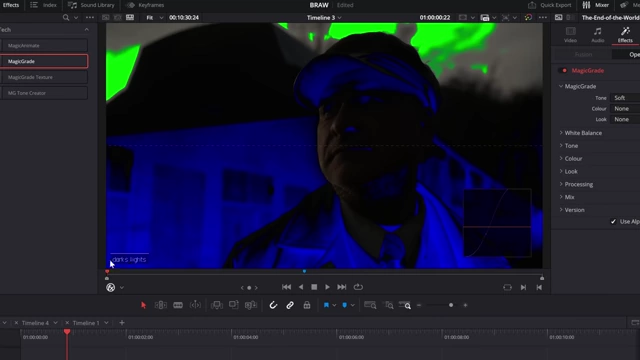
Visualization of crushed shadows (blue) and blown highlights (red) [ 00:03:44 ]
Individual Color Adjustments [00:04:47]
- Holding
Alt + Shiftallows for targeted adjustments to individual colors within the image. - Clicking on a specific color (e.g., greens in a background) and dragging down desaturates that color, while dragging up increases saturation.
- Dragging left or right can adjust the density of the selected color.
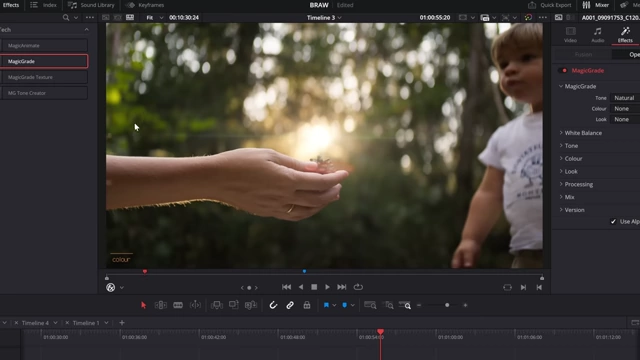
Adjusting individual colors directly on the preview screen [ 00:04:57 ]
Rationale for Creation [00:05:50]
The developer created Magic Grade out of a personal need for a simpler color grading solution, recognizing that many video editors are not colorists.
Addressing Complexity
- The DaVinci Resolve color page, while powerful and industry-standard, can be overwhelming for those not specialized in color science.
- Magic Grade distills essential color adjustments into user-friendly, on-screen controls, eliminating the need to delve into complex interfaces.
Focus on Practicality
- The tool is designed to achieve pleasing and stylized looks quickly, rather than aiming for absolute scientific accuracy in color reproduction.
- It incorporates underlying knowledge of good color practices (e.g., how to make saturation "look nice") into simple controls.
Film Texture Effects with Magic Grade Texture [00:08:25]
Complementing the primary grading features, "Magic Grade Texture" provides options to add film-like textures and visual effects.
Film Grain Simulation
- Includes various grain presets (subtle, standard, heavy, 8mm, 16mm).
- Customizable parameters:
- Amount: Controls the intensity of the grain.
- Size: Adjusts the granularity.
- Color: Allows for colored RGB grain or monochrome grain.
- Balance: Distributes grain based on image luminance (shadows vs. highlights), mimicking how film grain naturally appears more in midtones.
- Features an optional defocus effect to enhance the "filmy" aesthetic.
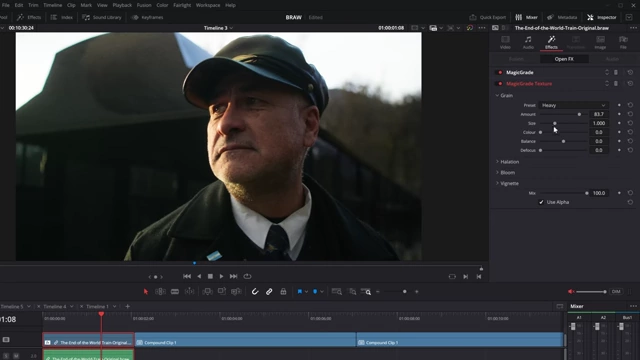
Magic Grade Texture panel for film grain simulation with customizable parameters [ 00:09:03 ]
Halation and Bloom Effects
- Halation: Offers presets (subtle, standard, stronger) to create a glowing effect around bright areas, simulating light bleeding on film stock.
- Adjustable parameters include amount, radius, threshold, and warmth.
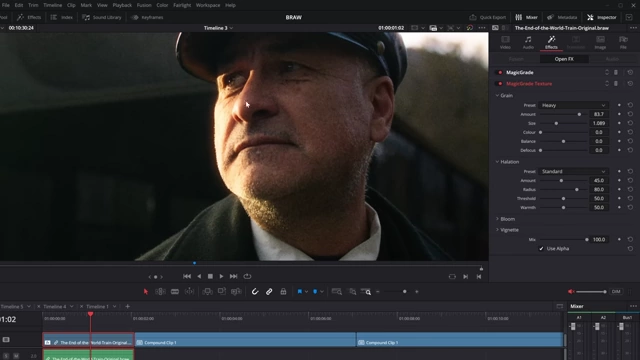
Halation effect applied to highlights, with control panel [ 00:10:27 ]
- Adjustable parameters include amount, radius, threshold, and warmth.
- Bloom: Provides a diffusion-like effect to soften highlights and add a dreamy quality to the image.
Availability and Future Plans [00:11:00]
Magic Grade is nearing completion and will soon be available for purchase, with ongoing efforts to refine its features and support.
Development Status
- The tool is still a work in progress, particularly regarding the built-in color "looks."
- The developer is collaborating with a professional colorist to ensure the quality and appeal of the integrated presets.
Pricing and Launch
- Pricing has not yet been determined but is expected to be higher than previous tools due to its comprehensive nature and advanced features.
- Users will be kept informed about its release.
Commitment to Improvement [00:11:40]
The developer acknowledges past shortcomings in maintaining older products and expresses a commitment to improving user experience across all "Magic" tools.
Upcoming Updates
- Plans are in place to improve existing tools such as Magic Zoom, Magic Animate, and Magic Subtitle.
- A focus on better communication and support for the user base is emphasized.