Automating Google's Nano Banana Pro with n8n: 5 Real-World Visual Automation Examples
This video demonstrates how to powerfully automate Google's Nano Banana Pro image generation model using the n8n automation tool, presenting five practical and impactful visual automation use cases.
- 1. Image Annotations: Learn to automatically generate detailed technical diagrams and annotations on various images, from F1 cars to software interfaces, by feeding them from Airtable to Nano Banana via n8n, significantly streamlining content creation and explanation.
- 2. YouTube Visual Cheat Sheets: Discover how to effortlessly create visually appealing and comprehensive cheat sheets from YouTube video transcripts, effectively summarizing key information for quick reference and visual learning.
- 3. Real Estate Home Staging: See how to automate the generation of 2D floor plans and virtually staged images for real estate listings, transforming raw property photos into attractive presentations for potential buyers.
- 4. E-commerce Sales Reports: Implement a system to produce daily visual infographics that clearly summarize e-commerce sales data directly from Google Sheets, providing easily digestible business insights.
- 5. Personalized Podcast Thumbnails: Master the creation of hyper-personalized podcast invitation thumbnails, featuring potential high-profile guests' profile pictures alongside the host, designed to create a "wow effect" and boost guest engagement.
The video also delves into essential technical details, explaining how to integrate Nano Banana Pro's API via Kai into n8n, covering aspects like managing image inputs and implementing efficient task polling for workflow completion.

AI-generated daily e-commerce sales recap infographic [ 00:13:00 ]
Introduction to Nano Banana Pro [00:00:00]
The presenter introduces Nano Banana Pro, Google's new image generation model, highlighting its potential as a "visual brain" rather than just an image generator. The video's main objective is to demonstrate how to automate Nano Banana Pro with n8n, an automation tool, to create five real-world visual automation examples. The goal is to inspire viewers to build their own systems to save time, produce visual content on the fly, and even close podcast guests.

Automation Demonstration Overview [00:00:00]
The video begins with quick demonstrations of the five automation examples:
- Personalized Podcast Thumbnails: An overview of using a Google Sheet with LinkedIn URLs to generate personalized podcast invitation thumbnails.

Google Sheet for podcast guest outreach [ 00:00:00 ] 
n8n workflow for creating personalized podcast thumbnails [ 00:00:15 ] 
Personalized podcast thumbnail with guest's face (example) [ 00:00:21 ] - Image Annotations: A preview of automatically creating detailed diagrams and annotations on objects and software interfaces.

n8n workflow for image annotations [ 00:00:35 ] 
Annotated technical diagram of an electric skateboard [ 00:00:38 ] 
Annotated diagram of the Interactive Brokers software interface [ 00:00:40 ] - E-commerce Visual Reports: A look at generating daily infographics summarizing e-commerce sales data from a Google Sheet.

AI-generated daily e-commerce sales recap infographic [ 00:00:53 ]
Automating Nano Banana with n8n [00:00:57]
n8n is presented as a powerful automation tool that allows users to connect various "nodes" (applications or services) to create sophisticated workflows. The core idea is to link data sources (like Airtable or Google Sheets) with Nano Banana Pro via n8n to automate image creation based on predefined prompts and input data.

Case 1: Image Annotations [00:01:23]
This first example demonstrates automating the generation of detailed annotations and diagrams on images.
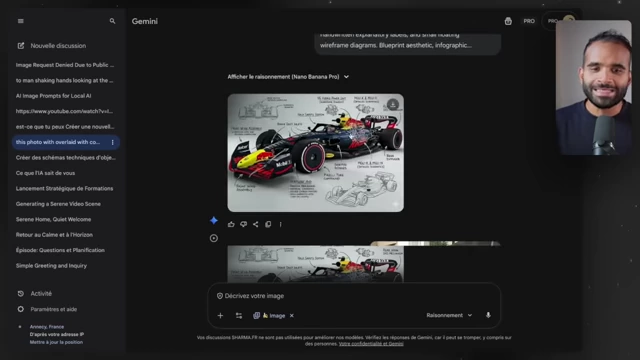
- Inspiration: The presenter was inspired by physics diagrams overlaying handwritten elements on photographs for concept explanation [00:01:38].

Initial inspiration: a physics diagram of an F1 car with superimposed handwritten elements [ 00:01:43 ] - Initial Manual Process:
- Automated Workflow with n8n and Airtable: [00:02:29]
- The automation starts by retrieving a list of images from Airtable that need annotations [00:02:36].

Airtable database showing source images for annotation [ 00:02:39 ] - Each image is sent to Nano Banana Pro via n8n for processing [00:02:42].
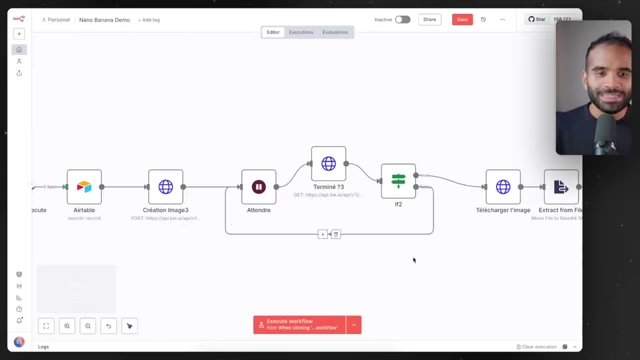
n8n workflow for automating image annotations [ 00:02:45 ]
- The automation starts by retrieving a list of images from Airtable that need annotations [00:02:36].
- Demonstrated Results of Generated Images: [00:04:22]
- A skateboard image was annotated with detailed component explanations, demonstrating precise labeling [00:05:18].

Original image of a skateboard before annotation [ 00:05:18 ] 
AI-generated technical breakdown of an electric skateboard [ 00:05:20 ] - A splitboard image was annotated with its features, showcasing the ability to detail complex items [00:05:26].

Original image of a splitboard before annotation [ 00:05:27 ] 
AI-generated diagram of a splitboard with detailed features [ 00:05:30 ] - A smartwatch image had its components detailed through annotations, even removing the original watch in one instance and adding new annotations [00:05:34].

Original image of a smartwatch on a wrist [ 00:05:35 ] 
AI-generated exploded view diagram of a smartwatch with components [ 00:05:40 ] - A charger image was annotated with its parts, proving versatility across different object types [00:05:44].
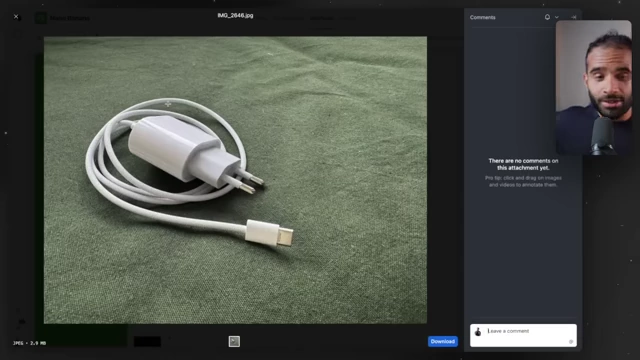
Original image of a USB-C charger [ 00:05:44 ] 
AI-generated technical diagram of a USB-C charger [ 00:05:47 ] - A camera image was annotated with its parts [00:05:51].

Original image of a camera [ 00:05:51 ] 
AI-generated diagram of a camera with labeled parts [ 00:05:54 ] - The complex Interactive Broker and n8n interfaces were automatically documented with explanations, showing AI's understanding of intricate software layouts [00:05:56].

Original screenshot of the Interactive Brokers trading interface [ 00:05:57 ] 
AI-generated annotated diagram of the Interactive Brokers interface [ 00:06:03 ] 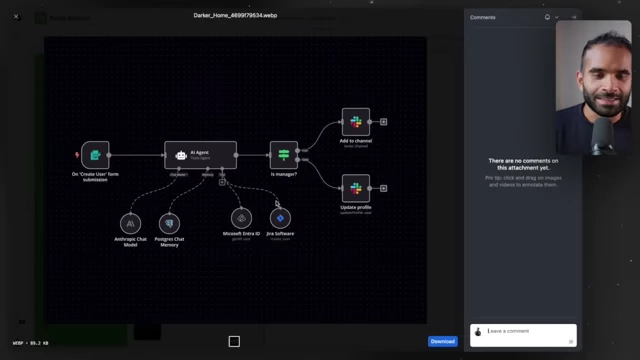
Original n8n workflow screenshot [ 00:06:09 ] 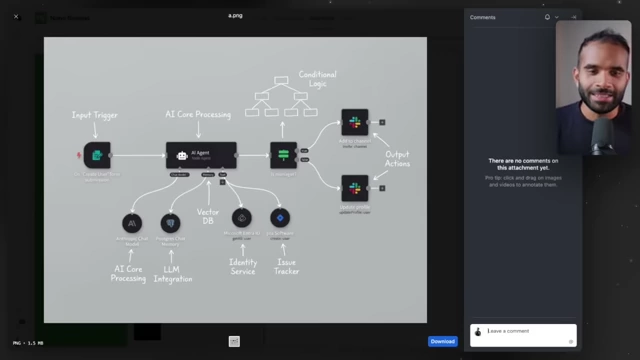
AI-generated annotated diagram of an n8n workflow [ 00:06:13 ] - The system successfully identified and annotated elements without explicit instructions, demonstrating its contextual understanding and ability to produce clean, professional diagrams.

Airtable gallery view displaying all annotated images [ 00:06:24 ]
- A skateboard image was annotated with detailed component explanations, demonstrating precise labeling [00:05:18].
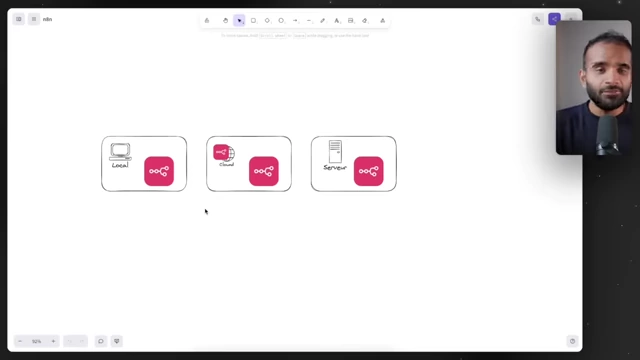
Hosting n8n: Options [00:03:08]
The video discusses the different methods for hosting n8n to ensure continuous automation.
- Local Installation: Installing n8n directly on a local computer [00:03:03].
- Pros: Free as it's an open-source tool.
- Cons: Automations stop as soon as the computer is turned off, making it unsuitable for always-on workflows [00:03:07].
- n8n Cloud Service: Using n8n's official hosted service [00:03:14].
- Virtual Private Server (VPS) Hosting: Hosting n8n on a self-managed VPS [00:03:31].

Case 2: YouTube Visual Cheat Sheets [00:06:32]
This case focuses on automating the creation of visual cheat sheets (summaries) from YouTube video transcripts.
- Concept: Automatically create a visual "cheat sheet" for each new YouTube video that centralizes key content and makes it visually actionable for learning [00:06:46].
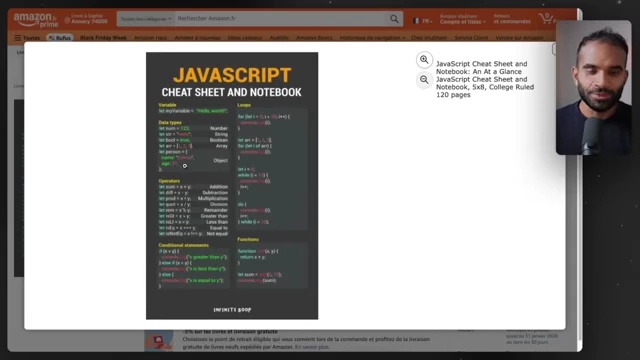
Example of a JavaScript cheat sheet for quick reference [ 00:06:35 ] 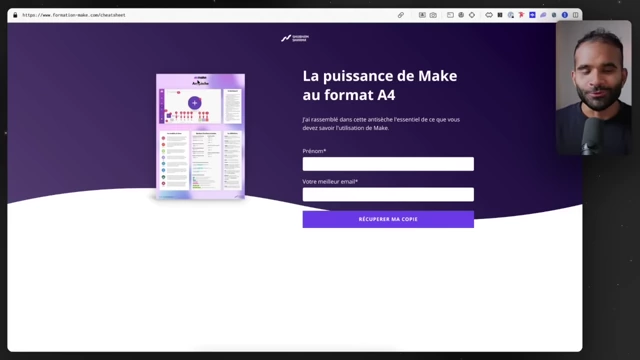
Example of a "Make" automation cheat sheet [ 00:06:41 ] 
A guide to prompting for ChatGPT 5.1 vs Gemini 3 [ 00:08:34 ] - Workflow Overview: [00:07:01]
- The workflow begins with a form that takes a YouTube video URL as input [00:07:15].
- n8n retrieves the transcript of the specified video [00:07:20].

n8n workflow for generating visual cheat sheets from YouTube video transcripts [ 00:07:25 ] - The raw transcript data (initially in a less readable format) is processed by a code node to make it more suitable for Nano Banana Pro [00:07:47].

n8n JavaScript code node processing raw video transcript data [ 00:07:54 ] - Nano Banana Pro is then prompted to generate an image, rendering the transcript as a cheat sheet in French, highlighting important information [00:08:03].
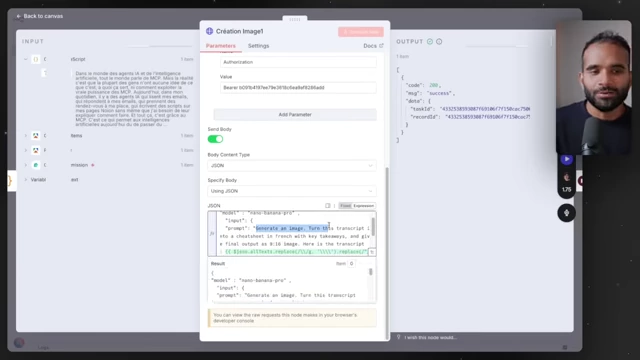
The prompt used in n8n to instruct Nano Banana Pro to create a cheat sheet [ 00:08:05 ]
- Demonstrated Result: A cheat sheet was successfully generated for a video on MCPs, visually outlining client-server architecture, concrete examples, and future concepts, demonstrating its effectiveness for visual learning [00:08:15].

AI-generated visual cheat sheet summarizing a YouTube video on MCPs [ 00:08:20 ] 
Another example of an AI video automation cheat sheet [ 00:08:27 ]
Case 3: Real Estate Home Staging [00:08:28]
This example addresses the needs of real estate agents for automatic floor plan generation and virtual home staging.
- Problem: Real estate agents often rely on basic photos and manually generated descriptions. There's a demand for automated 2D floor plans and AI-reworked, home-staged photos to enhance property listings [00:08:44].
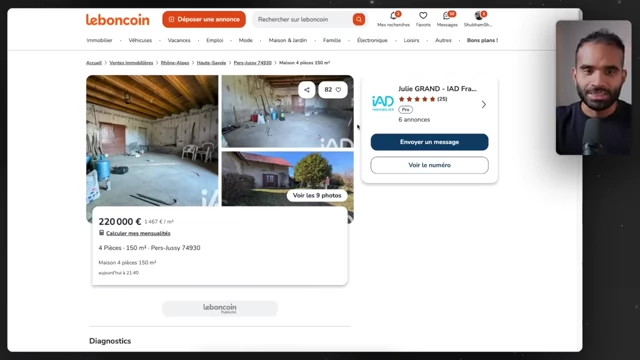
Example of raw, un-staged property photos from a real estate listing [ 00:08:45 ] 
One of the raw property photos before virtual staging [ 00:08:59 ] - Workflow Setup: [00:09:10]
- Property advertisement information (e.g., "4-room house, 150 m²") and raw, un-staged photos are uploaded to Airtable [00:09:16].
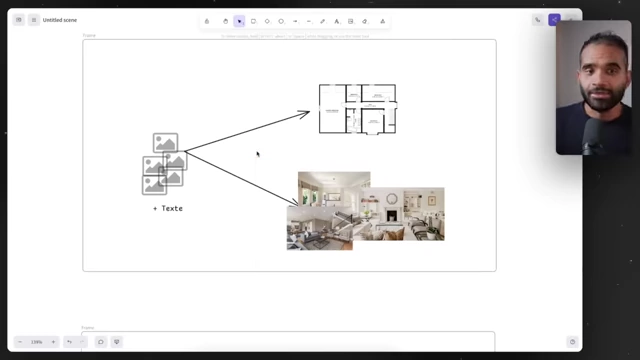
Conceptual diagram of inputting raw images and text to generate floor plans and staged photos [ 00:09:08 ] - The n8n automation retrieves this information and the photos [00:09:37].
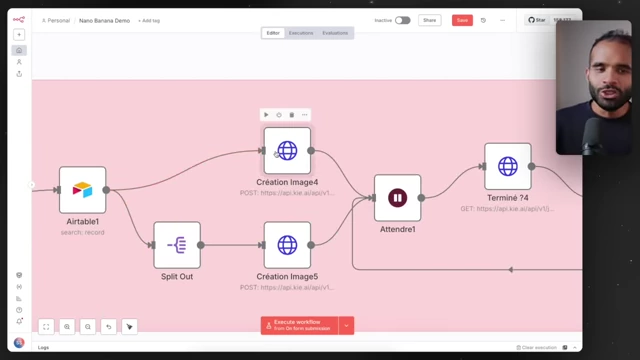
n8n workflow for real estate home staging and floor plan generation [ 00:09:43 ] - Image Creation 1 (Floor Plan): Nano Banana Pro is prompted to create a 2D floor plan based on the provided photos and textual description. The more precise the description, the more accurate the floor plan will be [00:09:47].
- Image Creation 2 (Virtual Home Staging): Each original photo is sent to Nano Banana Pro with a prompt instructing it to act as a "3D architectural designer" and perform "virtual home staging" in a specified style [00:10:04].

The prompt used in n8n for virtual home staging, specifying style and role [ 00:10:14 ]
- Property advertisement information (e.g., "4-room house, 150 m²") and raw, un-staged photos are uploaded to Airtable [00:09:16].
- Demonstrated Results: [00:10:37]
- A fairly basic floor plan was generated from the initial raw photos, with potential for greater precision given more input data [00:10:48].

AI-generated 2D floor plan for a property [ 00:10:49 ] - An original, unkempt room photo was transformed into a beautifully staged living space, demonstrating AI's ability to interpret and enhance existing structural elements like windows [00:10:58].

AI-generated virtually staged living room from a raw image [ 00:11:00 ] 
Another example of an AI-generated virtually staged living room [ 00:11:07 ] - This process highlights the potential for real estate agents to quickly generate professional marketing visuals directly from property viewings by simply uploading photos and dictating details [00:11:10].
- A fairly basic floor plan was generated from the initial raw photos, with potential for greater precision given more input data [00:10:48].
Case 4: E-commerce Visual Report [00:11:36]
This use case shows how to automate the creation of daily visual e-commerce sales reports.
- Goal: Automatically generate a daily infographic summarizing sales, popular items, daily turnover, and other key statistics in a visually appealing and readable format [00:00:41].

Conceptual diagram showing data flow from Shopify/Google Sheets to a visual dashboard [ 00:11:36 ] - Workflow: [00:11:51]
- The automation can be triggered daily (e.g., every day at 8 AM) [00:00:46].
- Sales data is retrieved from a Google Sheet [00:11:56].
- The data is then converted into a format suitable for Nano Banana Pro (e.g., CSV) [00:12:03].
- Nano Banana Pro is prompted to act as a "data analyst" and create a "daily sales recap" infographic [00:12:08].

The prompt used in n8n to generate a daily sales recap infographic [ 00:12:17 ] 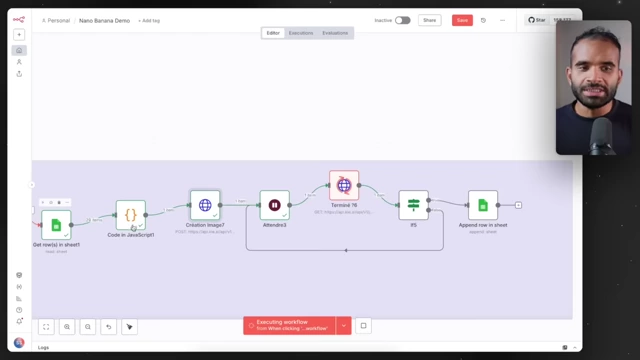
n8n workflow for automating daily e-commerce sales reports [ 00:12:36 ] - The generated image is then inserted into a specific cell (e.g., "stat") in the Google Sheet, or could be sent via email or direct message platforms like Slack [00:12:34].
- Demonstrated Result: An infographic was generated showing "Daily Sales Recap - Oct 25, 2025" with total revenue, most active region, active category, and acquisition sources [00:12:54].
AI-generated daily sales recap infographic displayed in Google Sheets [ 00:13:00 ]
Case 5: Personalized Podcast Thumbnails [00:13:42]
This final example illustrates creating hyper-personalized podcast thumbnails to improve outreach for guest invitations.
- Challenge: Inviting high-demand podcast guests requires a unique and compelling approach to capture their attention and ensure they read the invitation message [00:13:45].

Examples of podcast thumbnails, illustrating the desired "split-screen" style [ 00:13:53 ] - Solution: Create a "wow effect" by sending a message that includes a custom thumbnail featuring the potential guest alongside the host, as if they've already been on the podcast [00:13:47].
- Workflow: [00:14:01]
- A Google Sheet lists the LinkedIn URLs of desired podcast guests [00:14:10].

Google Sheet listing LinkedIn URLs of potential podcast guests [ 00:14:06 ] - The Apify "LinkedIn profile scraper" is used to automatically retrieve the guest's name and profile picture from their LinkedIn profile [00:14:13].

Apify LinkedIn Profile Scraper tool for retrieving guest data [ 00:14:25 ] - Nano Banana Pro receives two images: a generic podcast template image (showing the host and an empty guest seat) and the guest's retrieved profile picture [00:14:48].

The base podcast template image with the host, used for guest integration [ 00:14:50 ] - The prompt instructs Nano Banana Pro to combine these, creating a realistic screen split, placing the guest's face in the empty seat, and refining details like lighting and microphones for a natural look [00:14:56].

The prompt used in n8n to combine guest profile pictures with the podcast template [ 00:14:43 ] 
n8n workflow for creating personalized podcast invitation thumbnails [ 00:13:38 ]
- A Google Sheet lists the LinkedIn URLs of desired podcast guests [00:14:10].
- Demonstrated Results: Shows impressive, realistic thumbnails of the presenter with several high-profile individuals, effectively simulating a podcast interview [00:15:49].
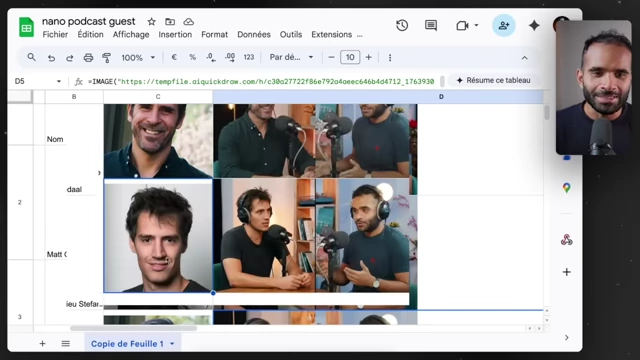
Personalized podcast invitation thumbnail featuring a potential guest [ 00:16:02 ] 
Another personalized podcast invitation thumbnail [ 00:16:10 ]
Technical Integration Details with n8n [00:16:57]
The presenter dives into the technical reasons behind using specific tools and methods for n8n integration, particularly regarding Nano Banana Pro.
- Why Kai Instead of Gemini Directly for Image Creation: [00:17:05]
- The n8n "Generate Image" node currently uses an older version of Nano Banana, not the latest "Pro" version that offers superior results.
- Kai acts as a token reseller and API aggregator, providing access to the latest version of Nano Banana (and other AI models) through a single, consolidated API [00:17:25].

Kai API platform homepage for accessing various AI models [ 00:17:26 ]
- Integrating Kai's API with n8n via HTTP Request Node: [00:17:57]
- Kai provides
curlexamples for its API calls, which can be easily imported into n8n's HTTP Request node [00:18:09].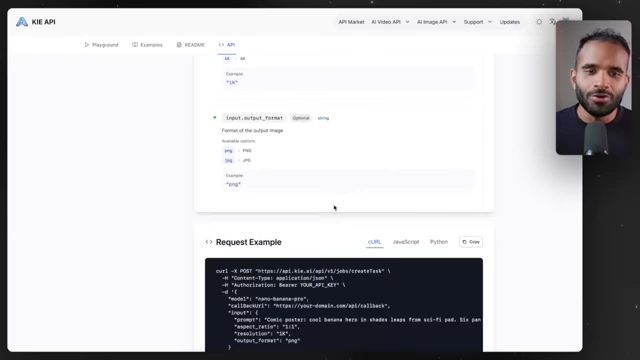
Kai API documentation demonstrating a cURL request example [ 00:18:04 ] - Users then only need to dynamically replace specific parameters, primarily the "prompt," with data from preceding nodes in the n8n workflow [00:18:34].

n8n HTTP Request node configured with an API call to Kai for image generation [ 00:18:36 ]
- Kai provides
- Asynchronous Task Management (Polling): [00:18:53]
- Image generation by Nano Banana Pro is an asynchronous process, meaning it's not instantaneous.
- n8n implements a polling mechanism: after initiating an image generation task, a loop node (e.g., "Attendre") periodically checks the status of the task (e.g., every 5 seconds) until it's reported as complete [00:18:56].

n8n workflow illustrating the polling mechanism with a "Wait" node [ 00:18:40 ] 
n8n "Wait" node parameters set for a 5-second interval polling [ 00:19:15 ]
Conclusion [00:20:10]
The presenter reiterates the immense potential of automating Nano Banana Pro, encouraging viewers to explore and implement similar solutions in their own businesses or activities. The significantly improved quality of output from Nano Banana Pro, particularly its realistic generation of human faces, is highlighted as "insane" and production-ready, marking a significant advancement over previous AI image generators. Viewers are invited to share their own automation ideas in the comments and are directed to another video on Sora automation for further learning.