Blackmagic Pyxis 12K First Impressions: A Comprehensive Review of Its Sensor, Performance, and Workflow Integration
The Blackmagic Pyxis 12K is presented as one of the best affordable cinema cameras, offering a compact body with a sophisticated 12K sensor. Key takeaways from the initial weeks of use include:
- Versatile Resolution: While named 12K, it excels at down-sampling to 8K, 4K, and 9K Super 35, offering excellent image quality across resolutions.
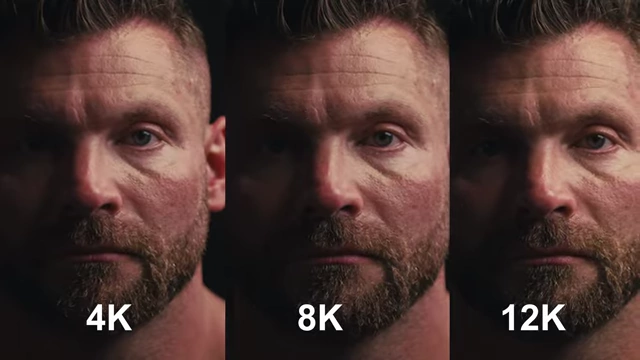
Pyxis 12K footage comparison at 4K, 8K, and 12K resolutions, highlighting the detail retention across different settings. [ 00:02:19 ] - Superior Dynamic Range: 12K and 9K modes offer slightly better dynamic range than 8K and 4K, crucial for challenging lighting.
- Practical Features: Includes a useful vertical menu for dedicated vertical content and full anamorphic support.
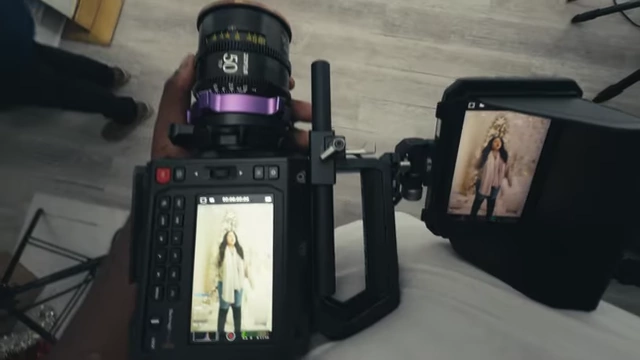
The Blackmagic Pyxis 12K camera displaying a vertical menu on its screen while being used on a set. [ 00:05:20 ] - Image Stabilization: Lacks IBIS but leverages built-in gyro data for effective stabilization in DaVinci Resolve.
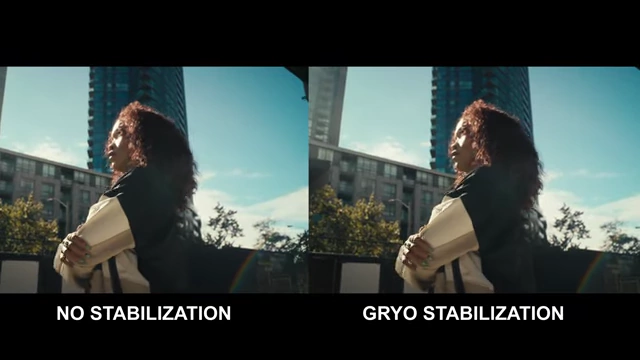
A side-by-side comparison of footage, demonstrating the difference between no stabilization and gyro stabilization, showing improved smoothness with the latter. [ 00:07:09 ] - Exceptional Image Quality: Known for pleasing skin tones and excellent highlight rolloff across various complexions.
- Low Light & Banding Fix: Features a single base ISO of 800, with noise reduction in Resolve for higher ISOs. A fix for potential banding in post is offered by switching LUT interpolation to tetrahedral.

A sequence of images showing the same scene shot at ISO 400, 800, 1600, and 3200, demonstrating the progression of noise as ISO increases. [ 00:10:29 ] 
A screenshot of DaVinci Resolve showing the color management settings with 'tetrahedral' interpolation selected, demonstrating that the banding issue in the sky has been resolved. [ 00:11:29 ] - Workflow Considerations: High power consumption necessitates multiple BPU 100 batteries or V-mounts, and large file sizes require ample, fast memory cards.
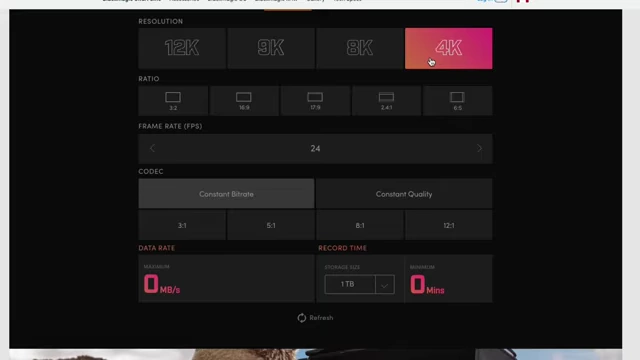
A screenshot of the Blackmagic Design website showing a tool to calculate required memory card speeds for various resolutions and compressions. [ 00:14:48 ] - Missing Feature: No ProRes codec, which can be an issue for client deliverables requiring that format.
- Integration: Serves as an excellent B-camera for the Ursa Cine 12K, ideal for handheld, gimbal, or slider shots due to its compact size.

A cinematographer adjusting the Blackmagic Pyxis 12K camera on a slider or tripod during a shoot, demonstrating its use in a professional setting. [ 00:15:58 ]
Initial Impressions and Sensor Capabilities [0:00]
The Blackmagic Pyxis 12K is hailed as one of the best modern-day affordable cinema cameras, combining a sophisticated sensor with a compact body, making it a significant upgrade from the Pixis 6K.
- The Pyxis 12K features the same sensor as the Ursa Cine 12K but in a more compact form factor.
- The camera's 12K capability, while seemingly overkill, allows for excellent down-sampling to 8K, 4K, and even Super 35 9K, retaining color and detail.
- Even when viewing in 4K, it's difficult to distinguish between footage shot at 4K, 8K, or 12K.
Resolution and Dynamic Range [0:41]
The Pyxis 12K offers impressive dynamic range across its various resolution modes.
- Dynamic Range Differences:
- Shooting in 12K and 9K modes provides slightly more dynamic range compared to 8K and 4K modes.
- This is noticeable in challenging lighting conditions, such as retaining detail in bright windows.
Pyxis 12K footage comparison at 4K, 8K, and 12K resolutions, highlighting the detail retention across different settings. [ 00:02:19 ]
- Preferred Shooting Mode:
- The reviewer frequently uses 8K 3x2 at 8:1 compression.
- This mode offers manageable file sizes for memory cards.
- It down-samples from 12K to 8K efficiently.
- Shooting in 3x2 (OpenGate) is beneficial for clients requiring multiple deliverables (e.g., 9x16, 16x9, 1x1, 4x5).
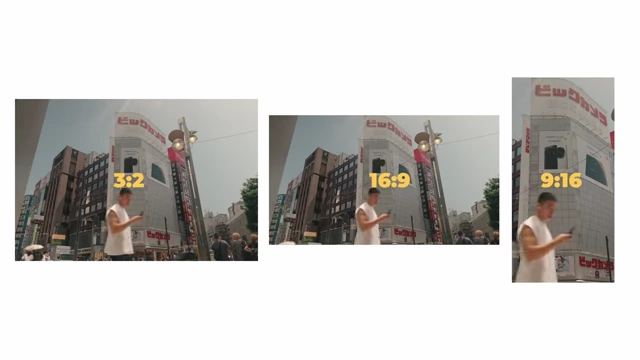
Example of using 3:2 footage to create different aspect ratios. [ 00:03:45 ]
- The reviewer frequently uses 8K 3x2 at 8:1 compression.
Body Design and Performance Differences from Ursa Cine 12K [3:47]
The Pyxis 12K shares a similar body design with the Pyxis 6K, but it does have some compromises compared to the higher-end Ursa Cine 12K.
- Readout Speed and Frame Rates:
- The Pyxis 12K has about half the readout speed and half the frame rates of the Ursa Cine 12K.
- Max frame rates:
- 12K: 40 frames per second
- 8K (3x2): 72 frames per second
- Higher frame rates are achievable by windowing down the aspect ratio:
- 8K (16:9): 84 frames per second
- 4K (16:9): 120 frames per second
- 2K (16:9): 240 frames per second
- Rolling Shutter:
- The rolling shutter is generally twice as slow as the Ursa Cine 12K.
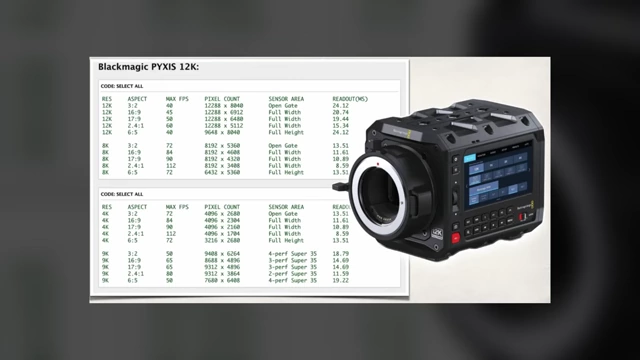
Chart of the Blackmagic Pyxis 12K readout speed and framerates. [ 00:04:34 ] - In the reviewer's preferred 8K 3x2 mode, the rolling shutter is less than 12 milliseconds, which is excellent for this type of camera.
- Shooting in 12K results in rolling shutter values in the 20s, which is comparable to many other cameras (e.g., Lumix S1R2, Sony FX2) but none of those shoot at 12K.
- The rolling shutter is generally twice as slow as the Ursa Cine 12K.
Practical Features [5:12]
The Pyxis 12K includes features that enhance its usability in various production scenarios.
- Vertical Menu:
- The camera offers a vertical menu when turned on its side, making it easier to shoot dedicated vertical content for platforms like social media.
The Blackmagic Pyxis 12K camera displaying a vertical menu on its screen while being used on a set. [ 00:05:20 ]
- The camera offers a vertical menu when turned on its side, making it easier to shoot dedicated vertical content for platforms like social media.
- Anamorphic Support:
- Provides full anamorphic support, allowing for cinematic wide aspect ratio footage.
- Gyro Stabilization (Post-Production):
- While lacking in-body image stabilization (IBIS), the camera stores gyro data.
- This data can be used in DaVinci Resolve (free with the camera) for effective gyro stabilization, smoothing out handheld footage.
- This is particularly useful for handheld shooters to eliminate micro-jitters.
A side-by-side comparison of footage, demonstrating the difference between no stabilization and gyro stabilization, showing improved smoothness with the latter. [ 00:07:09 ]
Image Quality and Skin Tones [7:32]
Blackmagic cameras, including the Pyxis 12K, are praised for their image quality, especially concerning skin tones.
- The camera consistently produces nice and pleasing skin tones for people of all complexions, without blotchy patches or unnatural colors.
- Proper lighting is still essential to achieve optimal results.
- The camera also offers incredibly nice highlight rolloff, preventing subjects from appearing "plastic-like."
Low Light Performance and ISO [8:38]
The Pyxis 12K features a single base ISO setting.
- Single Base ISO: It has one base ISO at 800.
- Noise at Higher ISOs: When increasing ISO to 1600 or 3200, a slight increase in noise ("noise kakra" - a little noise) is observed.
- Noise Reduction in DaVinci Resolve: The included DaVinci Resolve software offers a denoiser tool that effectively cleans up noise at higher ISOs (e.g., 3200), but it's not a substitute for extreme low light performance like cameras with dual base ISOs.
A sequence of images showing the same scene shot at ISO 400, 800, 1600, and 3200, demonstrating the progression of noise as ISO increases. [ 00:10:29 ] 
A side-by-side comparison of an image at ISO 800 (clean) and ISO 3200 (with noise), illustrating the impact of higher ISO on image grain. [ 00:10:39 ]
Addressing the Banding Issue [10:51]
A banding issue, particularly in skies, has been reported on various forums.
- Observation: Banding (slightly off-colored lines) can appear during post-production in DaVinci Resolve.
- Proposed Fix: Changing the "3D lookup table interpolation" setting in DaVinci Resolve's color management from "trilinear" to "tetrahedral" often resolves the banding issue in the preview.

A screenshot of DaVinci Resolve showing the color management settings with 'trilinear' interpolation selected, where banding is visible in the sky. [ 00:10:59 ]
A screenshot of DaVinci Resolve showing the color management settings with 'tetrahedral' interpolation selected, demonstrating that the banding issue in the sky has been resolved. [ 00:11:29 ] - Impact of Compression and Resolution: Higher compression and lower resolutions might slightly increase the likelihood of banding, but the tetrahedral interpolation setting generally mitigates this.

A series of images showing a cityscape at various resolutions and compression ratios (12K, 8K, 4K, 2K with different compression), demonstrating how banding might appear and disappear with different settings. [ 00:11:39 ] 
A cityscape view shot with the Pyxis 12K at S2K resolution and 3:2 compression ratio, showing the visual quality at the lowest resolution discussed. [ 00:12:39 ]
Workflow Considerations: Batteries and Storage [12:57]
The Pyxis 12K is a power-hungry camera and produces large file sizes.
- Battery Life:
- Sony FX6 BPU 35 battery lasted only 35 minutes.
- BPU 100 batteries lasted about an hour each.
- Multiple BPU batteries or V-mount batteries are recommended for extended shoots.
- Memory Cards:
- Requires fast, high-capacity CF Express Type B cards (e.g., 2TB Angelbird or ProGrade cards with 1785 MB/s sustained read/write speeds).
- Blackmagic's website provides a tool to calculate required card speeds based on resolution and compression.
A screenshot of the Blackmagic Design website showing a tool to calculate required memory card speeds for various resolutions and compressions. [ 00:14:48 ]
- File Transfer Speeds:
- Transferring half of a 1TB card (around 500GB) to a Samsung T9 4TB SSD took approximately 10-12 minutes.
- A full 1TB card transfer would take around 25-30 minutes.
Camera Body and Lens Mount Versatility [15:22]
The Pyxis 12K body is largely similar to the Pyxis 6K.
- L-mount Version: The reviewer opted for the L-mount version due to its versatility, allowing adaptation to EF lenses and use of PL adapters with built-in ND filters.

A close-up shot of the Blackmagic Pyxis 12K camera rigged with an L-mount lens and what appears to be a PL adapter with an ND filter, showcasing its versatility. [ 00:15:48 ] - Accessories: The camera can be rigged with a DJI Focus Pro motor for remote focus pulling, proving useful on sliders where larger cameras wouldn't fit.
A cinematographer adjusting the Blackmagic Pyxis 12K camera on a slider or tripod during a shoot, demonstrating its use in a professional setting. [ 00:15:58 ]
Fan Noise [16:09]
The fan on the Pyxis 12K is noted to be audibly loud.
- Increased Noise: The fan is louder than on the Pyxis 6K, likely due to the increased processing demands of 12K resolution.
- Post-Production Solution: The noise can be mitigated in post-production using DaVinci Resolve's audio tools.
Missing Features [16:37]
One significant feature is notably absent from the Pyxis 12K.
- No ProRes Codec: The camera does not support ProRes codecs (e.g., ProRes 422, ProRes 422 HQ).
- This can be a challenge for quick deliverables or when collaborating with editors who prefer or require ProRes over Blackmagic RAW.
- The processing power required to transcode 12K RAW to H.265 in-camera might be a reason for its absence.
Personal Workflow Integration [17:40]
The reviewer uses the Pyxis 12K to complement their existing camera setup.
- The Pyxis 12K serves as an excellent B-camera for the Ursa Cine 12K.
- Ursa Cine 12K (A-Cam): Used for larger rigs, sticks, easy rigs, dollies, sliders, and corporate clients requiring XLR ports. It can also be consigned to rental shops for passive income.
- Pyxis 12K (B-Cam): Ideal for handheld shooting, gimbals, and smaller sliders due to its compact size and compatibility with existing grip gear. It's suitable for "run-and-gun" gigs.
Channel Future & Pyxis 12K's Role [18:50]
The channel aims to provide access to camera technology for its audience and also covers cameras of personal interest to the reviewer.
- The Pyxis 12K falls into the category of cameras that align with the reviewer's personal workflow and interests, serving as an improved successor to the Pyxis 6K and a compact alternative to the Ursa Cine 12K.