Bash Scripting Crash Course for Beginners: Learn Basic Commands, Control Structures, Variables, Functions, and Text Manipulation (AWK, SED)
This crash course offers a comprehensive introduction to Bash shell scripting for beginners, covering its definition, advantages (most used, cross-platform), and limitations (lacks OOP, complex syntax). It's suitable for Windows (WSL), Linux, and macOS users with basic Linux knowledge. The course guides learners through basic commands like echo and cat, writing and executing their first Bash script, managing file permissions (chmod), and utilizing variables (including interactive input). It also explains positional arguments, output redirection (>, >>), input redirection (<, <<, <<<), and test operators with exit codes. Control structures such as if/elif/else and case statements, including parameter expansion, are detailed. Advanced topics include arrays, for loops, functions (emphasizing local variables and arguments), and powerful text manipulation tools like AWK for filtering and SED for substitution with backup creation.
Introduction [00:00:00]
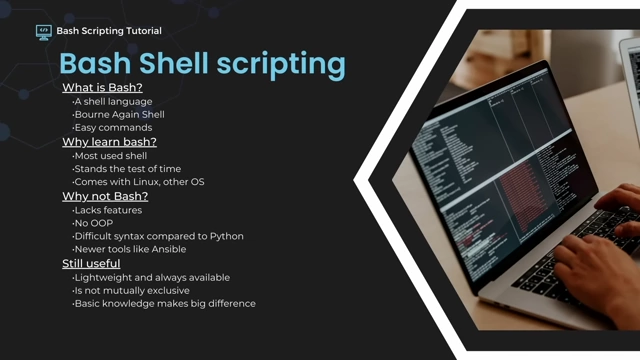
This crash course introduces Bash shell scripting, targeting beginners, those wishing to expand their knowledge, or those looking for a refresher.
What is Bash? [00:01:13]
- Bash stands for "Bourne Again Shell," replacing the original Bourne shell in the GNU/Linux project.
- A shell serves as a user interface, simplifying operating system management without requiring deep knowledge of its internal complexities.
Why Learn Bash? [00:01:36]
- Most Popular Shell: It is the most popular shell scripting language for Linux.
- Longevity: Bash has been used since the early days of Linux and has proven its reliability over time.
- Cross-Platform Availability: It is included in macOS and available on Windows via the Windows Subsystem for Linux (WSL).
- Still Useful: Even with newer tools, basic Bash knowledge is lightweight, always available, and can significantly enhance productivity.
Why Not Bash? [00:01:59]
- Lacks Features: It does not support Object-Oriented Programming (OOP), unlike languages such as Python.
- Complex Syntax: Bash syntax can be more difficult to read and write compared to Python.
- Modern Tools: Newer automation tools like Ansible offer easier multi-system management, which is harder with Bash.
- Complementary, Not Exclusive: Bash is often used alongside tools like Ansible or integrated into Python scripts, demonstrating that knowing Bash is still highly valuable.
Course Prerequisites [00:03:02]
- Windows Subsystem for Linux (WSL): The course is built around WSL on Windows (specifically Ubuntu) for command-line tool usage.
- Real Linux Distro: Running a native Linux distribution is also suitable.
- macOS: Users can follow along using the Mac terminal, ensuring Bash is set as the preferred shell.
- Basic Linux Knowledge: Fundamental understanding of Linux is required. A Linux for beginners tutorial is recommended for newcomers.
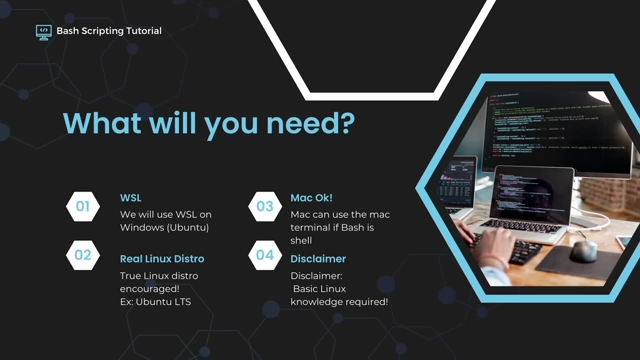
Prerequisites for the Bash scripting course, including WSL, native Linux, and macOS [ 00:03:28 ]
Basic Commands [00:03:24]
Before scripting, it's essential to understand fundamental terminal commands.
Echo Command [00:04:05]
- Displays text passed as an argument to the command line (e.g.,
echo Hello). - The text "Hello" in
echo Hellois a positional argument.
Vim Text Editor [00:04:44]
- A powerful text editor available on most Linux distributions.
- Modes:
- Insert Mode (I): For writing text.
- Command Mode (Escape, then :): For commands like saving and quitting.
- Saving and Quitting:
:wto write (save).:qto quit.:wqto write and quit.:q!to quit without saving changes.
- Append Mode (A): Writes text after the cursor, unlike insert mode which writes before.
Cat Command [00:06:21]
- Displays the contents of a file (e.g.,
cat textfile.txt). - Used to verify that
echoorvimoperations successfully wrote content to a file.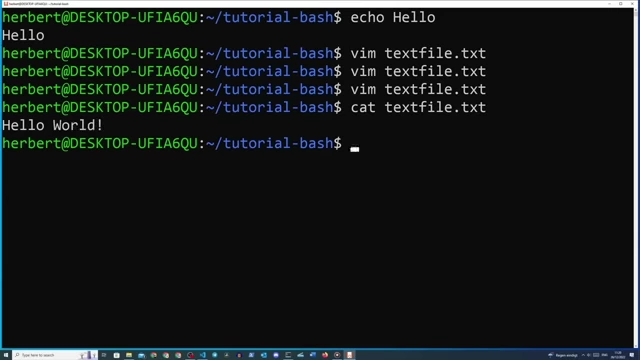
Demonstrating basic terminal commands: `echo` to print text and `cat` to display file contents. [ 00:06:40 ]
Writing Your First Bash Script [00:06:49]
Scripts automate tasks by combining commands into a single executable file.
Creating the Script [00:07:00]
- Create a new file (e.g.,
shelltest.sh) usingvim. - Add commands inside the file (e.g.,
echo "Hello World!"). - Verify the file's presence and location using
ls(list files) andpwd(print working directory).
Shebang Line [00:09:14]
- The first line in a script,
#!/bin/bash, is called the "shebang." - It tells the shell which interpreter (in this case, Bash) should execute the script.
- Using
echo $SHELLcan reveal the path to the current shell interpreter.
Executable Permissions (chmod) [00:10:35]
- In Linux, files need explicit executable permissions to be run directly.
- Use
ls -lto view file permissions (the long format ofls). - Grant executable permission to the owner with
chmod u+x shelltest.sh. - Run the script using
./shelltest.sh(where.refers to the current directory).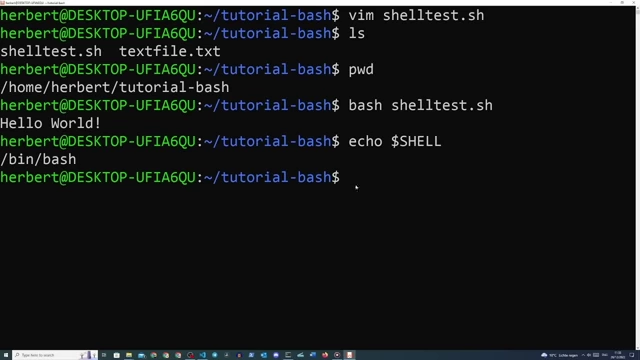
Steps to create and execute a Bash script, including adding a shebang, checking shell type, and granting executable permissions with `chmod`. [ 00:09:41 ]
Variables [00:11:29]
Variables store data that can be reused throughout a script.
Defining and Using Variables [00:13:01]
- Assign a value using
VARIABLE_NAME=value(no spaces around=). - Access the variable's value using
$VARIABLE_NAME. - Example:
FIRST_NAME=Herbertthenecho "Hello $FIRST_NAME"outputs "Hello Herbert".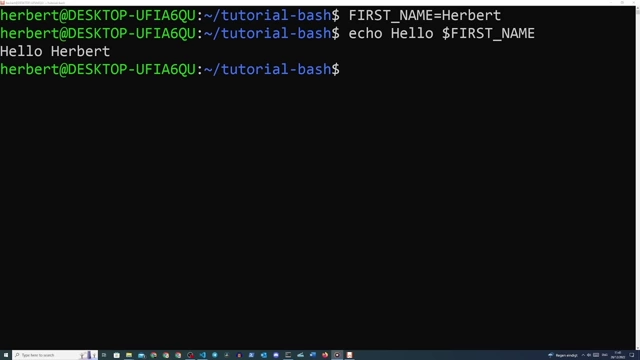
Defining and echoing a variable in the Bash terminal [ 00:13:20 ]
Interactive User Input (read) [00:14:20]
- The
readcommand prompts the user for input and stores it in a variable. - Example:
echo "What is your first name?"thenread FIRST_NAME.
Positional Arguments [00:15:31]
Arguments passed to a script at specific positions.
Understanding Positional Arguments [00:15:36]
- Arguments are placed directly after the script name, separated by spaces.
$1refers to the first argument,$2to the second, and so on.$0is reserved for the shell itself (the script name).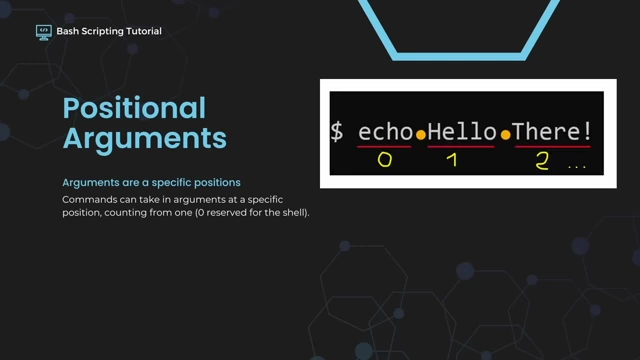
Visual explanation of positional arguments in Bash commands, where arguments are numbered starting from 1. [ 00:15:49 ]
Using Positional Arguments in Scripts [00:16:06]
- Allows scripts to take dynamic input without explicit
readcommands. - Example: A script
posargu.shcontainingecho "Hello $1 $2"can be run as./posargu.sh Herbert Lindemansto output "Hello Herbert Lindemans".
Output/Input Redirection [00:16:23]
Controlling where command output goes and where input comes from.
Piping (|) [00:16:54]
- The pipe symbol
|sends the standard output of one command as the standard input to another command. - Useful for filtering:
ls -l /usr/bin | grep bashwill list files in/usr/binand then filter for lines containing "bash".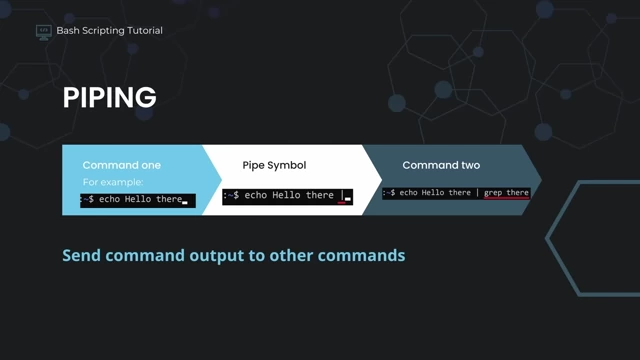
Diagram illustrating how the pipe symbol sends output from one command as input to another. [ 00:16:59 ] 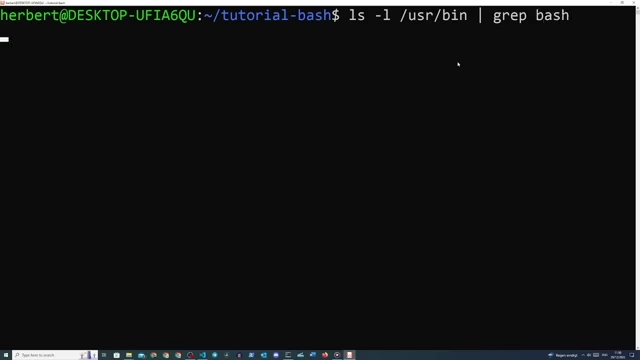
Example of using `ls -l` piped to `grep` for filtering specific files in the `/usr/bin` directory. [ 00:17:46 ]
Output Redirection (>, >>) [00:18:18]
>redirects command output to a file, overwriting its contents if it exists.>>appends command output to a file, adding to its existing contents.- Example Use Cases: Logging script output to a log file, dynamically creating configuration files.

Summary of output redirection symbols (`>` for overwrite, `>>` for append) and their common use cases like logging and dynamic configuration. [ 00:18:39 ]
Input Redirection (<, <<, <<<) [00:20:37]
<redirects input from a file to a command. Example:wc -w < hello.txtcounts words inhello.txtwithout printing the filename.<< EOF(here-document) allows multi-line input to a command until "EOF" (or any chosen delimiter) is encountered.<<< "string"(here-string) provides a single string as input to a command. Example:wc -w <<< "Hello there wordcount!".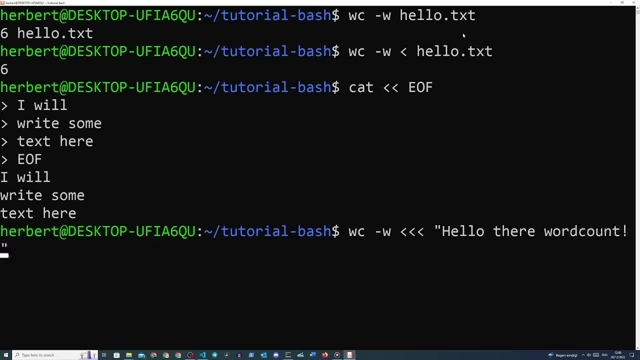
Demonstrations of various input redirection methods (`<`, `<<`, `<<<`) with the `wc -w` command. [ 00:23:42 ]
Test Operators [00:23:23]
Used within conditional statements to evaluate expressions.
String Comparison (=) [00:24:00]
- Checks if two strings are equal within square brackets (e.g.,
[ "hello" = "hello" ]). - Spaces are crucial around the square brackets and operators.
Numerical Comparison (-eq) [00:25:18]
- Checks if two numbers are numerically equal (e.g.,
[ 1 -eq 1 ]). - Other numerical operators include
-ne(not equal),-gt(greater than),-lt(less than), etc.
Exit Codes ($?) [00:24:39]
$?stores the exit code of the last executed command.- An exit code of
0typically indicates successful execution. - Any non-zero exit code (e.g.,
1) indicates an error or a false condition.
Verifying string equality using test operators (`=`) and checking the exit code (`$?`), where `0` indicates success. [ 00:24:39 ]
If/Elif/Else Statements [00:25:19]
Control flow statements that execute code blocks based on conditions.
Basic If Statement [00:26:17]
- Syntax:
if [ condition ]; then commands fi - Executes
commandsifconditionis true.
Elif for Multiple Conditions [00:28:05]
- Syntax:
elif [ condition ]; then commands - Checks an additional condition if the preceding
iforelifconditions were false.
Else for Default Action [00:28:39]
- Syntax:
else commands - Executes
commandsif none of the precedingiforelifconditions were true. - Statements are closed with
fi(if spelled backward).
Parameter Expansion (Case-Insensitive Comparison) [00:27:35]
- Used within conditional statements to modify variable values.
- Example:
"${1,,}"converts the first positional argument to lowercase for a case-insensitive comparison.
Case Statements [00:28:37]
An alternative to if/elif/else for checking multiple values, offering better readability for many conditions.
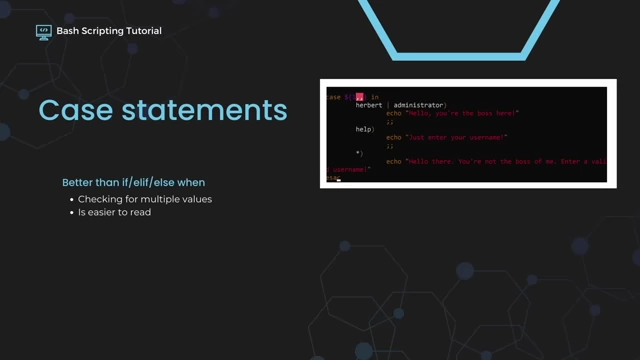
Syntax and Usage [00:29:21]
- Syntax:
case $variable in pattern1) commands ;; pattern2) commands ;; esac ;;marks the end of a pattern's commands.
Multiple Options and Catch-All (*) [00:30:11]
- Multiple patterns can be specified for a single action using the pipe symbol
|(e.g.,pattern1 | pattern2)). - The asterisk
*)acts as a catch-all or default option, similar to anelsestatement, executed if no other patterns match.
Arrays [00:32:16]
Variables that can hold multiple values, indexed numerically.
Creating Arrays [00:33:03]
- Define an array using
MY_LIST=(item1 item2 item3). - Items are separated by spaces within parentheses.
Accessing Array Elements [00:33:46]
- To access a specific element:
${MY_LIST[index]}(e.g.,${MY_LIST[<a href="https://youtube.com/watch?v=tK9Oc6AEnR4&t=0">0</a>]}for the first element). - To access all elements:
${MY_LIST[@]}.
Terminal output demonstrating how to define an array and print its entire contents or individual elements using various syntax. [ 00:33:58 ]
For Loops [00:34:12]
Iterate over a list of items or a range of numbers.
Looping Over Arrays [00:34:44]
- Syntax:
for item in "${MY_LIST[@]}"; do commands; done - The
itemvariable takes on each value from the array during iteration. - Example: Counting the character length of each word in an array. The
-nflag withechoprevents newline characters from being counted bywc -c.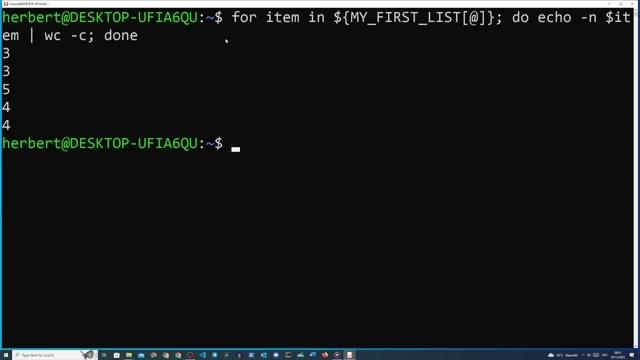
Terminal output demonstrating a for loop iterating over an array to count the character length of each item using `echo -n` and `wc -c`. [ 00:35:38 ]
Functions [00:36:03]
Reusable blocks of code within a script.
Defining Functions [00:37:16]
- Syntax:
function_name() { commands; }orfunction function_name { commands; } - Functions encapsulate repeated code, making scripts more modular and readable.
- To call a function, simply type its name in the script. The function must be defined before it is called.
Using Local Variables [00:39:25]
- By default, variables defined inside a function are global.
- Use the
localkeyword (local VAR_NAME=value) to restrict a variable's scope to within the function. - This prevents accidental overwriting of global variables.

Terminal output demonstrating a function displaying system uptime, highlighting the use of `local` variables within the function's scope. [ 00:39:18 ]
Functions with Positional Arguments [00:41:08]
- Functions can also accept positional arguments, referenced as
$1,$2, etc., within the function's scope. - These are separate from the script's global positional arguments.
Exit Codes [00:41:31]
Control the exit status of functions and scripts.
Understanding return values [00:42:17]
- The
returncommand explicitly sets the exit code for a function. return 0indicates success,return 1indicates failure (or any non-zero for specific error types).- The function's return value can be checked with
$?after its execution.
AWK [00:42:30]
A powerful text processing tool for filtering and manipulating structured data.
Filtering File Contents [00:43:26]
awk '{print $1}' filename.txtprints the first field (word) of each line, using space as the default separator.$0refers to the entire line,$1to the first field,$2to the second, and so on.
Changing Separators (-F) [00:44:22]
- The
-Fflag allows specifying a custom field separator (e.g.,awk -F ',' '{print $1}' csvfile.csvuses a comma).
Piping to AWK [00:44:51]
- AWK can process the output of other commands via piping (e.g.,
echo "Hello:World" | awk -F ':' '{print $2}').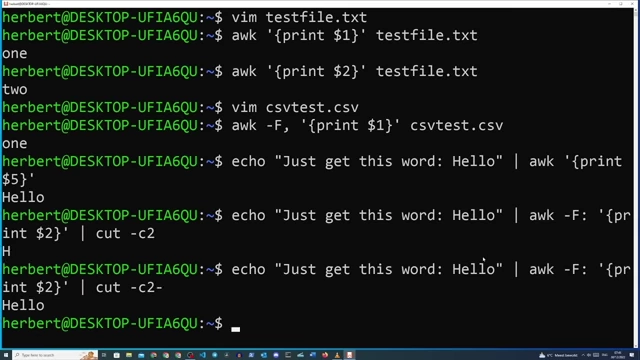
Terminal output demonstrating how AWK filters and reformats text, including changing field separators and piping command output. [ 00:45:28 ]
SED [00:45:11]
A stream editor used for transforming text, primarily for substitution.
Substituting Text (s/old/new/g) [00:46:14]
- Basic syntax:
sed 's/pattern/replacement/flags' filename.txt s: Substitute command.pattern: The text to find (can be a regular expression).replacement: The text to replace it with.g: Global flag, replaces all occurrences on a line (otherwise, only the first).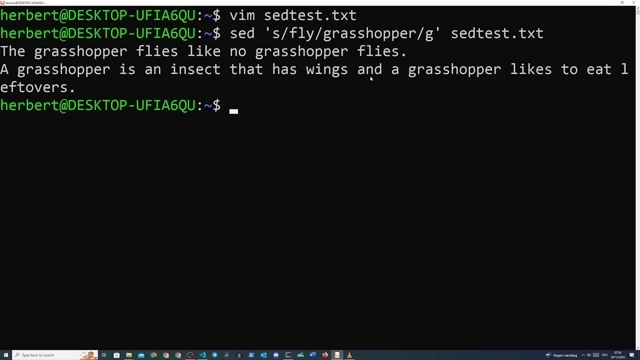
Terminal output demonstrating a SED command for global substitution of words in a text file. [ 00:46:28 ]
Creating Backup Files (-i.ORIGINAL) [00:47:13]
- The
-iflag allows in-place editing of a file. - Adding a suffix (e.g.,
-i.ORIGINAL) creates a backup of the original file before making changes. - Example:
sed -i.ORIGINAL 's/fly/grasshopper/g' sedtest.txt