Optimizing iPadOS: Essential Settings for Enhanced Productivity, Battery Life, and User Experience
Summary:
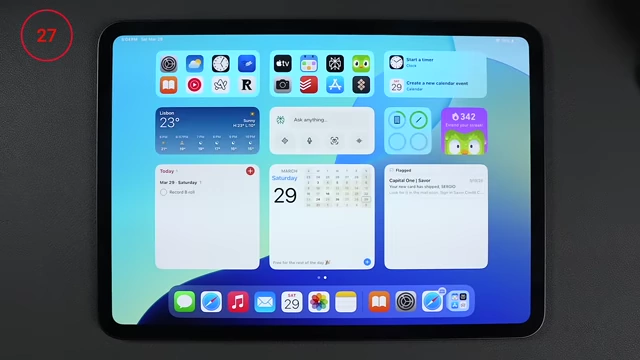
iPad Home Screen with various custom widgets
[
00:00:25
]
This video details numerous iPadOS settings adjustments that significantly improve the device's functionality and user experience.
- Customizing the Home Screen & Dock: Removing apps from the main screen, utilizing intelligent Siri Suggestion widgets, and decluttering the dock by disabling recent apps.
- Display & Eye Comfort: Enabling Night Shift with maximum warmth and creating an even warmer "super night mode" via color filters, adding it to the Control Center.
- Multitasking & Gestures: Disabling the "Shake to Undo" gesture and enabling finger swipes from corners for screenshots and quick notes.
- Apple Pencil Enhancement: Configuring the Apple Pencil to only draw with the pencil and mapping the "squeeze" gesture to custom shortcuts for increased versatility.
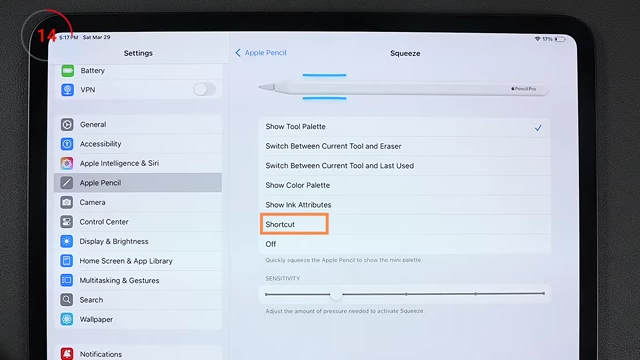
Apple Pencil settings with the 'Squeeze' gesture mapped to a custom Shortcut [ 00:04:20 ] - Battery & Performance Optimization: Reducing background app refreshes and enabling optimized battery charging to prolong iPad lifespan.
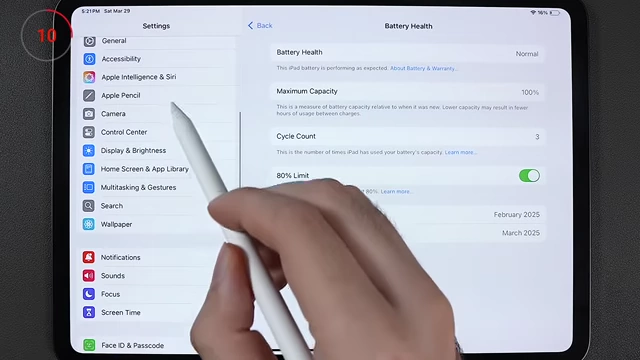
Battery Health settings showing '80% Limit' optimized charging enabled [ 00:06:27 ] - Privacy & Notifications: Preventing apps from requesting tracking permission and stopping in-app review prompts.
- App & Browser Specific Tweaks: Creating home screen shortcuts for websites without native apps, speeding up Haptic Touch, combining multilingual keyboards, offloading unused apps, customizing Mail swipe gestures, and optimizing Safari tabs.
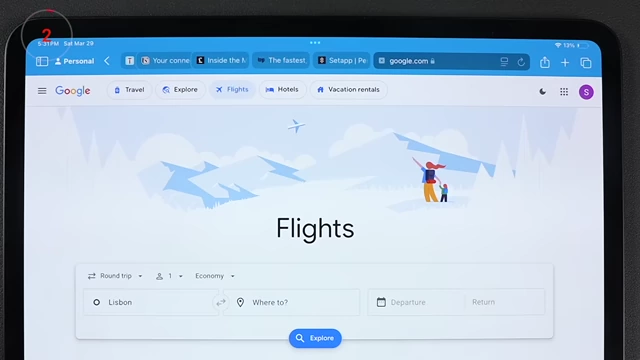
Safari browser interface with the 'Compact Tab Bar' enabled [ 00:09:30 ]
Enhancing Your Home Screen and Dock [00:00]
- A Homepage Worth Seeing [00:00]
- Delete unwanted apps and install preferred ones.
- Remove apps from the main home screen to use them via Spotlight search, the dock, or convert them into widgets.
- Utilize Siri suggestions widgets for recommended apps and shortcuts based on location, activity, and time of day. These become more accurate with device usage.
iPad Home Screen with various custom widgets [ 00:00:25 ] 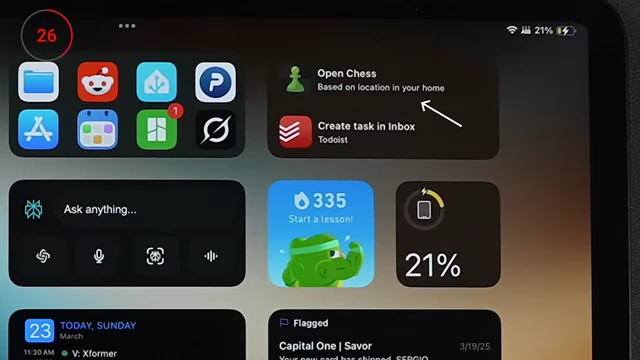
Siri Suggestions widget showing app recommendations based on location [ 00:00:47 ] - Add other useful widgets such as weather, Perplexity (AI assistant with voice mode), battery for Bluetooth devices, Duolingo, task manager (Todoist), calendar (BusyCal), and a Mail widget showing flagged emails.
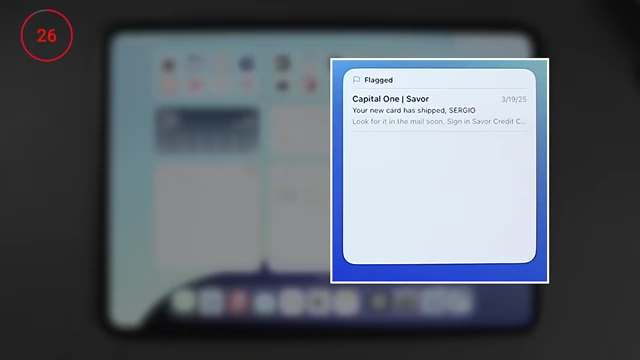
Mail widget on the Home Screen displaying flagged emails [ 00:01:15 ]
- Fixing the Dock [01:20]
- Remove recent apps and the app library from the right side of the dock for a cleaner look.
- Go to Settings > Home Screen & App Library.
- Toggle off "Show App Library in Dock" and "Show Suggested and Recent Apps in Dock".
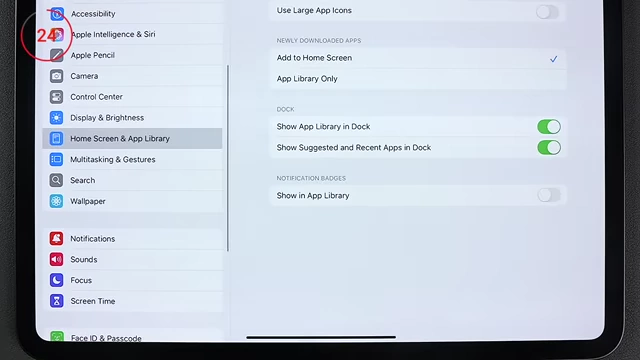
Home Screen & App Library settings to declutter the dock [ 00:01:41 ]
- Set new app downloads to bypass the home screen and go directly to the App Library.
- In Settings > Home Screen & App Library, toggle on "Add new Apps to App Library Only".
- Remove recent apps and the app library from the right side of the dock for a cleaner look.
Optimizing Display and Eye Comfort [01:53]
- Save Your Eyes! [01:53]
- Enable Night Shift for warmer display colors as the day progresses.
- Go to Settings > Display & Brightness > Night Shift.
- Schedule it and drag the color temperature slider all the way to "More Warm".
- Set Auto-Lock to 15 minutes to keep the screen active longer without constant taps.
- Disable Auto-Brightness for manual control over screen brightness.
- Go to Settings > Accessibility > Display & Text Size.
- Scroll to the bottom and toggle off "Auto-Brightness".
- Enable Night Shift for warmer display colors as the day progresses.
- Super Warm Light [02:22]
- Create an even warmer "super night mode" using Color Filters.
- Go to Settings > Accessibility > Display & Text Size > Color Filters.
- Turn on Color Filters, select "Color Tint", and move the "Hue" slider all the way to the right for maximum warmth.
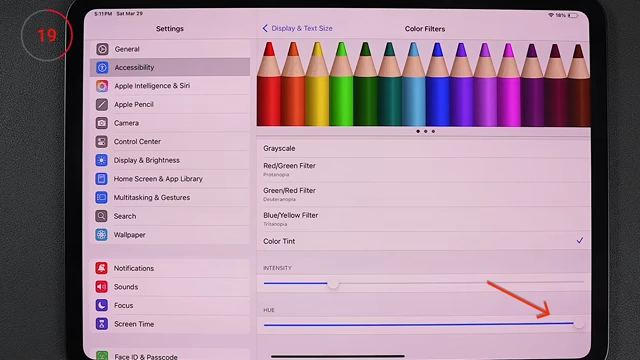
Color Filters settings with Hue slider adjusted for warmer display tint [ 00:02:30 ]
- Add this custom color filter toggle to the Control Center for easy access.
- Swipe down from the top right corner to open Control Center.
- Long-press anywhere to edit, then tap "Add Control".
- Search for "Color Controls" and add it.
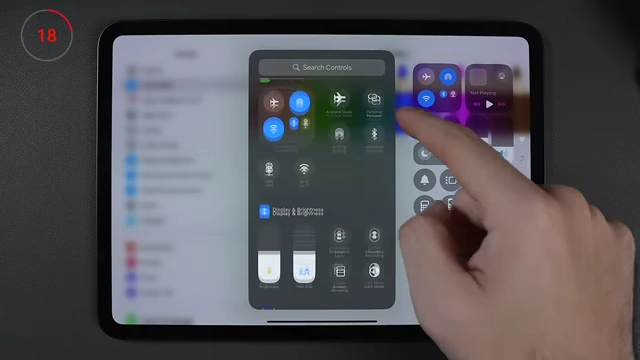
Control Center customization showing add controls option [ 00:02:51 ]
- Create an even warmer "super night mode" using Color Filters.
Customizing Multitasking and Gestures [03:19]
- Multitasking and Gestures (Who would want this?) [03:19]
- Disable the "Shake to Undo" feature, as it is impractical for an iPad.
- Go to Settings > Multitasking & Gestures.
- Toggle off "Shake to Undo".
- Enable finger gestures from screen corners for quick actions (by default, these are Apple Pencil exclusive).
- In Settings > Multitasking & Gestures, toggle on "Swipe Finger from Corner".
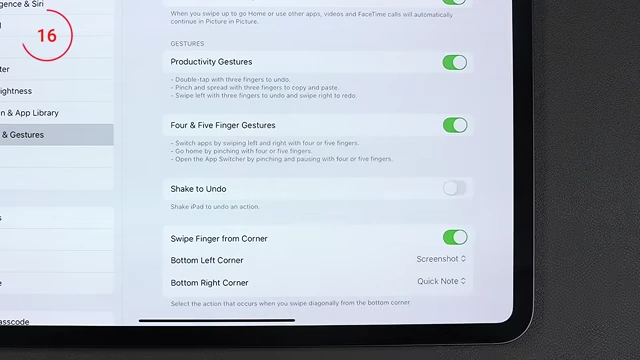
Multitasking & Gestures settings showing 'Swipe Finger from Corner' enabled [ 00:03:46 ] - The bottom-left corner gesture takes a screenshot.
- The bottom-right corner gesture opens a quick note.
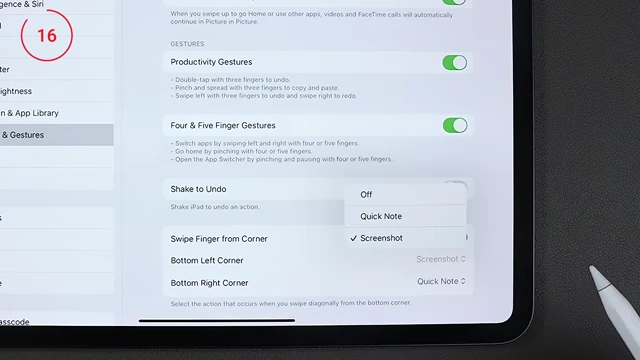
Multitasking & Gestures settings showing options for corner swipe actions [ 00:03:50 ]
- In Settings > Multitasking & Gestures, toggle on "Swipe Finger from Corner".
- Disable the "Shake to Undo" feature, as it is impractical for an iPad.
Enhancing Apple Pencil Usage [03:53]
- Apple Pencil's Secret New Feature [03:53]
- Enable "Only Draw with Apple Pencil" to prevent accidental touches from registering when handwriting.
- Go to Settings > Apple Pencil.
- Toggle on "Only Draw with Apple Pencil".
- Map the new "Squeeze" feature (on Apple Pencil Pro) to custom shortcuts for versatile functionality, similar to the iPhone's Action Button.
- In Apple Pencil settings, under "Squeeze", select "Shortcuts".
- Create a simple shortcut (e.g., "Go to Home Screen") and assign it. This allows for complex, context-aware shortcuts.
Apple Pencil settings with the 'Squeeze' gesture mapped to a custom Shortcut [ 00:04:20 ]
- Enable "Only Draw with Apple Pencil" to prevent accidental touches from registering when handwriting.
Extending iPad Lifespan [05:32]
- Make it Last 5+ Years [05:32]
- Reduce background app refreshes to save battery and potentially improve performance.
- Go to Settings > General > Background App Refresh.
- Disable background refresh for most apps, leaving only essential ones active.
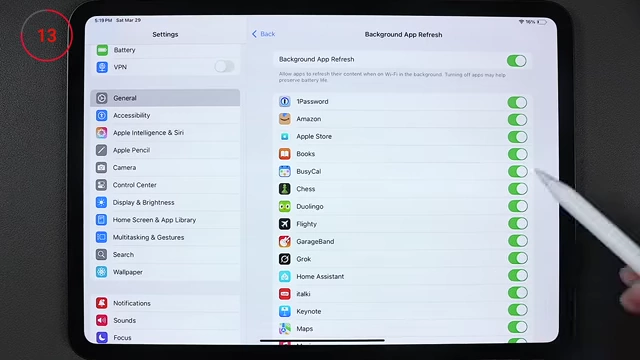
Background App Refresh settings with most apps toggled off to save battery [ 00:05:55 ]
- Turn off "Hey Siri" listening to conserve battery.
- Go to Settings > Siri & Search.
- Toggle off "Listen for 'Hey Siri'".
- Enable Optimized Battery Charging to prolong battery health by limiting charging to 80% until closer to when you need it. (Available on newer models)
- Go to Settings > Battery > Battery Health.
- Toggle on "Optimized Battery Charging".
Battery Health settings showing '80% Limit' optimized charging enabled [ 00:06:27 ]
- Reduce background app refreshes to save battery and potentially improve performance.
Streamlining Notifications and Privacy [06:24]
- Fix The Notifications [06:24]
- Turn off most notifications on the iPad, especially if you receive them on other devices like an iPhone or Apple Watch.
- Go to Settings > Notifications and customize app notifications individually.
- Turn off most notifications on the iPad, especially if you receive them on other devices like an iPhone or Apple Watch.
- No More "Ask app not to track" [06:36]
- Prevent apps from even asking to track your activity across other apps and websites.
- Go to Settings > Privacy & Security > Tracking.
- Toggle off "Allow Apps to Request to Track".
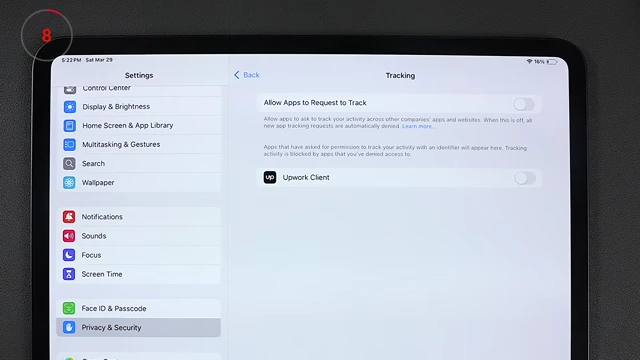
Privacy & Security settings with 'Allow Apps to Request to Track' disabled [ 00:06:55 ]
- Prevent apps from even asking to track your activity across other apps and websites.
- No More "Enjoying XYZ? Leave a review!" [06:53]
- Disable annoying in-app rating and review prompts.
- Go to Settings > App Store.
- Toggle off "In-App Ratings & Reviews".
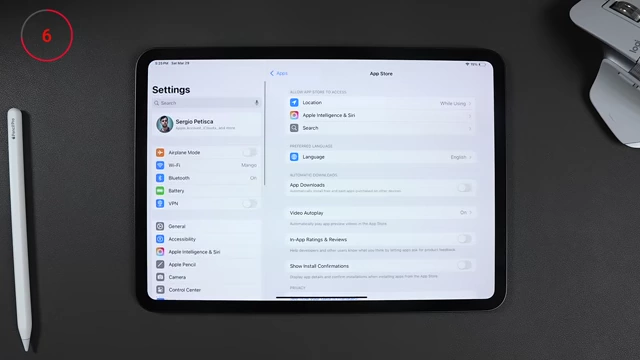
App Store settings showing 'In-App Ratings & Reviews' toggle [ 00:07:57 ]
- Disable annoying in-app rating and review prompts.
Customizing Apps and System Behavior [07:07]
- Turn Anything Into An App [07:07]
- Create home screen shortcuts for websites that lack a native iPad app, making them behave more like an app.
- Open the website in Safari.
- Tap the Share button (square with an arrow pointing up).
- Select "Add to Home Screen". This creates a shortcut that launches the website directly from the home screen and allows it to be found via Spotlight search.
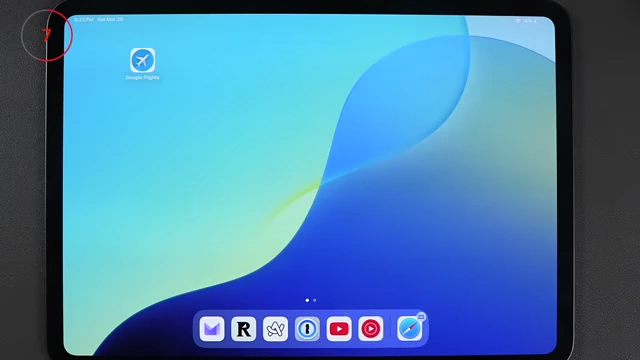
Google Flights website shortcut added to the iPad Home Screen [ 00:07:25 ] 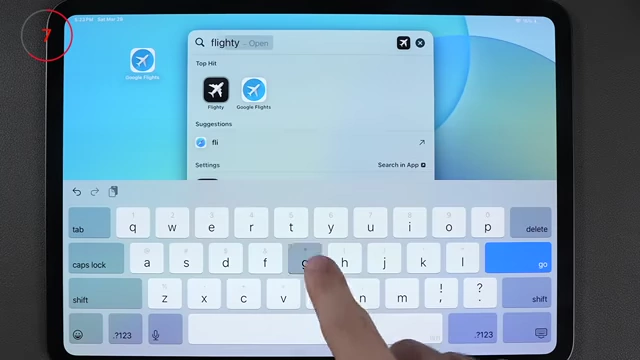
Spotlight search results showing a website shortcut [ 00:07:27 ] 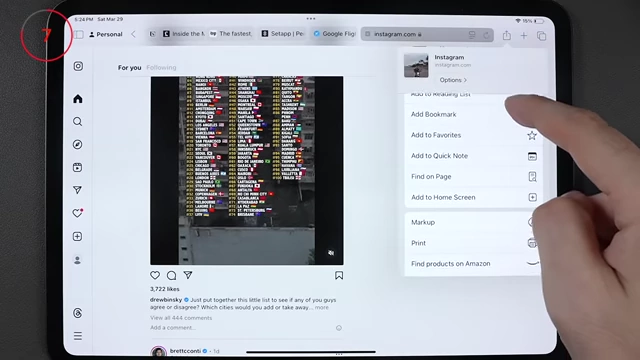
Instagram website open in Safari with the 'Add to Home Screen' option visible [ 00:07:32 ] 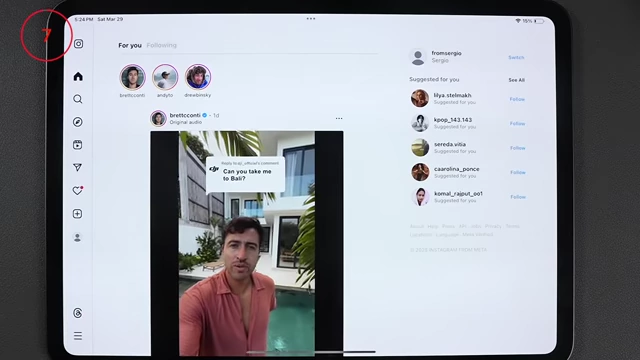
Instagram website launched as a home screen shortcut, behaving like an app [ 00:07:38 ]
- Create home screen shortcuts for websites that lack a native iPad app, making them behave more like an app.
- Switch This, You'll Never Go Back. [07:40]
- Speed up the Haptic Touch duration for quicker contextual menus on long-press.
- Go to Settings > Accessibility > Touch > Haptic Touch.
- Change the duration to "Fast".
- Speed up the Haptic Touch duration for quicker contextual menus on long-press.
- No More Switching Keyboards [08:04]
- Combine multiple languages into a single keyboard in iPadOS 18 (and iOS 18) for seamless multilingual typing.
- Go to Settings > General > Keyboard > Keyboards > Add New Keyboard.
- Choose your additional language, then select the option to combine it with your existing keyboard.
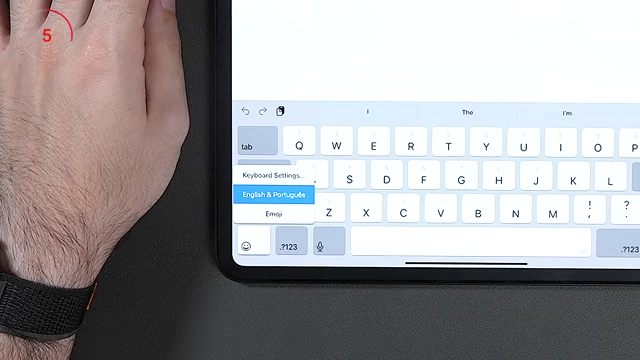
Keyboard showing combined English and Portuguese languages [ 00:08:12 ] 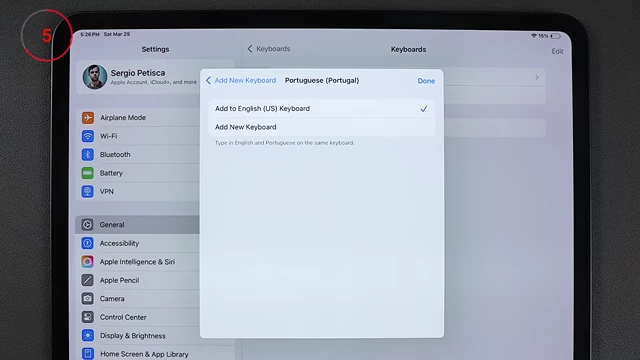
Keyboard settings allowing combination of multiple languages into one keyboard [ 00:08:25 ]
- Combine multiple languages into a single keyboard in iPadOS 18 (and iOS 18) for seamless multilingual typing.
- Regain Space [08:27]
- Enable "Offload Unused Apps" to automatically remove app data when low on storage, keeping documents and data while freeing up space.
- Go to Settings > General > iPad Storage.
- Toggle on "Offload Unused Apps".
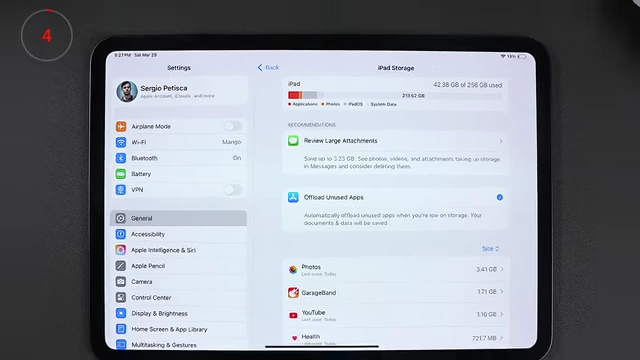
iPad Storage settings showing 'Offload Unused Apps' option [ 00:08:36 ]
- Enable "Offload Unused Apps" to automatically remove app data when low on storage, keeping documents and data while freeing up space.
Refining Mail and Safari [08:35]
- Fix The Mail App [08:35]
- Change the left swipe gesture in the Mail app to "Flag" emails instead of marking them read/unread. This helps in managing important emails.
- Go to Settings > Mail > Swipe Options > Swipe Left.
- Select "Flag". This ensures flagged emails appear in the home screen Mail widget.
- Remove the default "Sent from my iPad" signature.
- In Mail settings, tap "Signature" and delete the default text.
- (Optional) Change your default mail app from the stock Mail app if desired.
- In Mail settings, tap "Default Mail App" and choose your preferred client.
- Change the left swipe gesture in the Mail app to "Flag" emails instead of marking them read/unread. This helps in managing important emails.
- Fix Safari [09:09]
- (Optional) Change your default browser to an alternative like Arc.
- Go to Settings > Safari > Default Browser App.
- Use the "Compact Tab Bar" for Safari to reclaim screen space, especially on smaller iPad models.
- Set Safari to automatically close tabs after a specified period (e.g., one week) to prevent clutter.
- In Safari settings, scroll down to "Close Tabs".
- Choose an option other than "Manually".
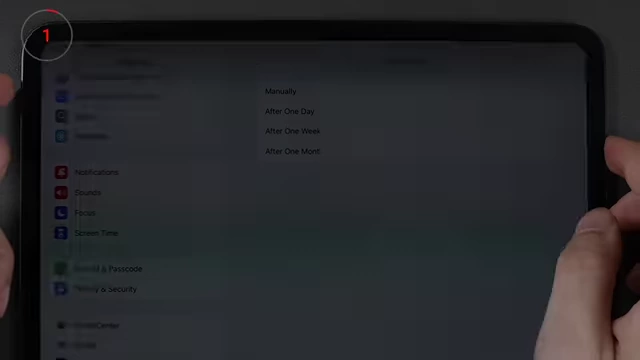
Safari settings showing options for automatically closing tabs [ 00:09:44 ]
- (Optional) Change your default browser to an alternative like Arc.
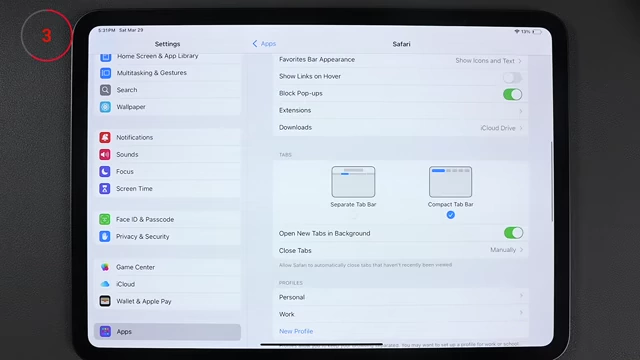
Managing Notes and General Cleanup [09:43]
- No More Starting An Accidental Note [09:43]
- Disable the feature that opens a new note when tapping the locked screen with an Apple Pencil, preventing accidental notes.
- Go to Settings > Notes.
- Scroll to the bottom and toggle off "Access Notes from Lock Screen".
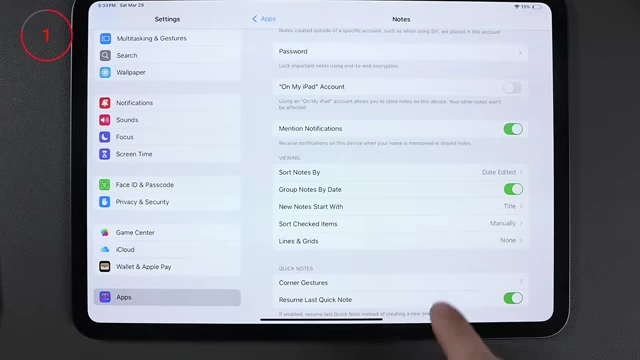
Notes settings showing 'Access Notes from Lock Screen' toggle disabled [ 00:09:55 ]
- Disable the feature that opens a new note when tapping the locked screen with an Apple Pencil, preventing accidental notes.
- Why Bother With All of This [09:58]
- Starting fresh with a new iPad and manually adjusting settings is beneficial because old iPads accumulate cached files and forgotten apps, leading to clutter and potential performance degradation. A fresh setup ensures optimal performance and a clean slate.