Primary Surfacing: Patch Layout Fundamentals for Boat Hulls
This video, the fourth in a series on primary surfacing, delves into the foundational principles of patch layout for boat hulls. It critiques an example of a numerically generated boat hull with 385 surfaces, highlighting its uneditability and potential issues for production. The presenter then demonstrates how to rebuild such a shape using far fewer, cleaner, and more editable surfaces.
The key principle is to use single-span, untrimmed, four-sided surfaces, maintaining low control point counts for ease of editing. Basic boat hull shapes can be modeled with just two surfaces, with additional surfaces introduced only when there are hard breaks or changes in guide curves, such as a chine or a wider stern, leading to three or four surfaces respectively. The "Surface from Edge Curves" command in Rhino is recommended for generating clean surfaces. Understanding and implementing proper patch layout ensures robust, smooth, and editable models, making subsequent blending operations easier and allowing advanced tools to function correctly.


Critique of an Existing Boat Hull Model [0:00]
The video begins by examining a boat hull model that inspired this module, sourced from a Rhino forum user.
- Origin and Generation [0:08]
- The model was created by a user aiming to demonstrate conceptual boat modeling to a client.
- It appears to be generated numerically, potentially using a function in CATIA, based on a dense network of cross-sections.
- Issues with the Model's Construction [1:00]
- Dense Curves and Control Points: The input curves are extremely dense with many control points, making them virtually impossible to edit directly.

Control points on a segment of the dense boat hull curves, highlighting their uneditability. [ 00:01:00 ] - Numerous Surfaces: The resulting hull is composed of 385 individual surfaces.

The original generated boat hull showing its numerous surface edges. [ 00:02:26 ] - Unusual Surface Flow: The output surfaces exhibit a "weird flow" in their edges, with a backward bend.
- Problematic Bow Geometry: The bow area, often a challenging part, is treated as a three-sided surface by collapsing two edges, a common practice described as "dirty laundry" that should be avoided in clean modeling.

A zoomed-in view of the bow section, illustrating how two edges are collapsed to form a pseudo-three-sided surface. [ 00:03:00 ] - Lack of Editability: The sheer density of surfaces and control points prevents direct editing, limiting modifications to only general scaling or using tools like "cage edit" which are still difficult to manage with such complexity.
- Difficulty with Blending: The numerous surface edges make it challenging to create smooth blends (e.g., adding a keel), as the blend would break across many individual patches.
- Dense Curves and Control Points: The input curves are extremely dense with many control points, making them virtually impossible to edit directly.
Rebuilding with Best Practices [5:52]
The core purpose of the video is not to perfectly replicate the problematic hull, but to demonstrate how to build a boat-like shape as a "Class A" surface model for production, addressing the identified issues.
- Goal of Rebuilding [5:13]
- To create a more editable model with fewer patches.
- To make it friendlier for blending operations, avoiding trims with excessive edges.
- Characteristics of Rebuilt Geometry [6:05]
- New Curves: The presenter rebuilt the geometry from scratch using clean curves.
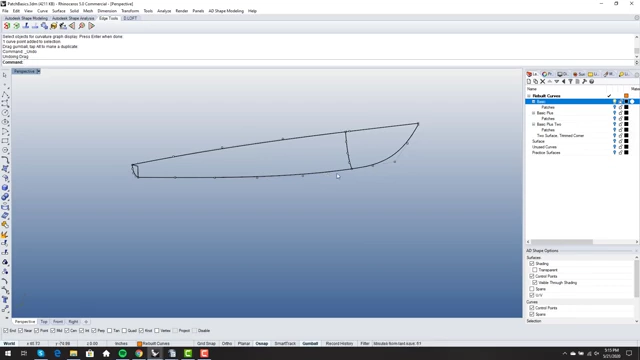
Clean, rebuilt curves for a boat shape, demonstrating fewer control points and clarity. [ 00:07:45 ] - Single-Span: All curves are single-span, meaning they have a continuous polynomial definition without internal knots.
- Degree 5 or Less: Curves are kept at degree 5 or lower, ensuring optimal control.
- Smooth Curvature: The curves exhibit very smooth and controlled curvature, vital for high-quality surfacing.

A rebuilt curve with its curvature graph displayed, showing a smooth and controlled curvature profile, allowing for easy editing. [ 00:06:50 ] - Editability: The new curves are easily editable, allowing for smooth adjustments like creating a reflex.
- New Curves: The presenter rebuilt the geometry from scratch using clean curves.
- Recommended Surface Generation Tool [10:39]
- The "Surface from Edge Curves" command in Rhino is highlighted as one of the few commands that reliably creates clean, well-laid-out surfaces, especially with clean input geometry.
- It avoids generating overly complex surfaces, which many other Rhino commands tend to do.
Basic Patch Layout: Two Surfaces [7:12]
For a fundamental boat hull shape, the presenter demonstrates that only two surfaces are needed, assuming no complex features.
- Reason for Two Surfaces [7:39]
- The need for two surfaces arises from a natural "break" along the bottom of the hull.
- Surface Properties [8:41]
- Both surfaces are single-span.
- They have matching point counts along their shared edges, allowing for exact matching.
- They are untrimmed, simplifying the initial layout.
- Their degrees (e.g., degree 5 on the top edge, degree 4 on the bottom for an example curve) are set to match the input geometry, ensuring high-quality surface continuity.
- The low point count makes them easily editable.
A simple boat hull shape constructed from two primary surfaces, illustrating the basic patch layout. [ 00:08:40 ]
Adding Complexity: Chine (Three Surfaces) [11:23]
When a hard edge, like a chine, is introduced, the patch layout needs to be adjusted.
- Introduction of a Chine [11:25]
- A chine at the back of the boat signifies a hard break in the surface.
- Necessity of a Third Surface [11:45]
- Because of this hard edge, the surfaces should not be combined. Instead, a separate, third single-span surface is required.
- While the final design might include a blend for a softer edge, the modeling should start with distinct, sharp edges for precision.

A boat hull with a distinct chine, requiring three separate surfaces for proper patch layout. [ 00:12:00 ]
Adding More Complexity: Wider Stern (Four Surfaces) [13:14]
Further complexity, such as a wider stern with a tangent, straight-back profile, demands an additional surface.
- Wider Stern with a New Guide Curve [13:25]
- This design modification requires a separate guide curve for the stern section, indicating a change in the geometry.

The guide curves for a boat hull design with a wider stern, showing the additional curve required. [ 00:13:48 ]
- This design modification requires a separate guide curve for the stern section, indicating a change in the geometry.
- Necessity of a Fourth Surface [13:44]
- The new guide curve and the resulting change in shape necessitate an additional, separate patch for the stern, bringing the total to four surfaces for this layout.

A boat hull with a wider stern, illustrating a four-surface patch layout. [ 00:14:10 ]
- The new guide curve and the resulting change in shape necessitate an additional, separate patch for the stern, bringing the total to four surfaces for this layout.
Why Proper Patch Layout Matters [14:46]
Understanding these basic principles of patch layout is crucial for efficient and high-quality surface modeling.
- Foundational for Quality Modeling [14:40]
- These basics ensure that even when utilizing advanced "fancy tools" (e.g., multi-blend tools, XNURBS plugins) for complex scenarios, those tools will perform as expected and not fail due to underlying "dirty" surfaces.
- Efficiency and Editability [16:08]
- It makes the modeling process faster and the resulting models far more editable.
- Preparation for Future Challenges [16:27]
- These fundamentals lay the groundwork for tackling more complex problems, such as solving three-sided problems and implementing intricate trims, which will be covered in subsequent episodes.
- The goal is to create a very smooth, editable, and nice hull with a minimal number of surfaces (e.g., starting with two for a basic shape).